YouTube isn’t just a video platform. It’s one of the biggest search engines in the world. Tapping into the data that people are searching for is pure gold. But manually tracking YouTube search results is a nightmare. The rankings change constantly, the trends shift hourly, and scrolling through endless videos to find patterns feels like drowning in tabs. That’s where YouTube scraping helps.
Let’s break down the easiest ways to scrape YouTube search results using the right tools, simple scripts, and best practices anyone can follow.
What Data You Can Extract from a YouTube SERP
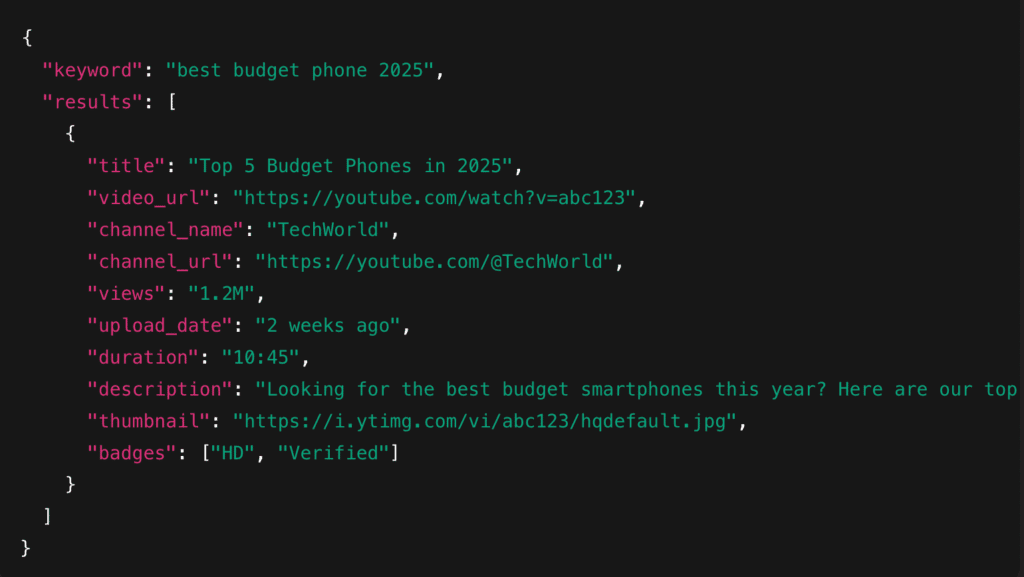
When you scrape a YouTube Search Results Page (SERP), you’re basically pulling all the essential information that decides what content ranks and why. This data is extremely useful for keyword research, competitor tracking, content planning, and understanding what type of videos perform best in your niche.
Here’s the kind of data you can extract from a YouTube SERP and why it matters:
- Video Title & URL: Helps you analyze keyword usage and ranking patterns.
- Channel Name & URL: Useful for checking competitors or category leaders.
- View Count: Indicates popularity and engagement potential.
- Upload Date: Helps you spot fresh trends vs. evergreen content.
- Duration: Shows the preferred video length for ranking.
- Description Snippet: Useful for secondary keywords and content hooks.
- Thumbnail URL: Helps identify thumbnail trends and click-through strategies.
- Additional Metadata: Gives deeper context about authority and ranking factors.
Example JSON Output:
Recommended Tools for Scraping YouTube
Before we jump into methods, here are the most commonly used tools for YouTube SERP scraping, ranked by reliability and ease of use:
1. Decodo Web Scraping API
Handles CAPTCHAs, proxies, rendering, and gives clean JSON for YouTube SERPs.
2. YouTube Data API
Official and stable, ideal for structured outputs.
3. yt-dlp
Great for quick metadata pulls and CLI workflows.
4. Playwright/Puppeteer
For pixel-perfect browser automation.
5. Custom Internal API Replay Scripts
Most flexible but requires expertise.
Three Quick Approaches: Pick Your Vibe
There are three common ways to pull YouTube SERPs. Each solves the same problem but trades off cost, reliability, and control. Here’s a compact comparison so you can choose fast.
| Approach | Pros | Cons | Best Fit |
| YouTube Data API (Official) | Structured JSON, stable, documented | Rate-limited, quota rules, limited fields | Researcher/Analyst |
| Direct Scraping (Internal API, yt-dlp, Browser-Based) | Extremely flexible, full control, can grab everything | Fragile (layout changes), needs infra and proxy handling | Developer/Technical Team |
| Managed Scraping API (Decodo-Style) | Handles proxies, CAPTCHA, rendering, and is reliable at scale | Paid service, recurring cost | Business/Growth Teams |
Quick Notes:
- The API is perfect when you want clean, supported data and don’t need every single field.
- Direct scraping is the go-to when you need custom fields or full-page context, but it needs engineering and maintenance.
- A managed scraping API buys you reliability and time savings. It is ideal when uptime and scale matter more than DIY control.
Recommended Buyer Persons:
- Researcher: Use the YouTube Data API for reproducible academic or market analysis where quotas aren’t a blocker.
- Developer: Roll your own with direct scraping if you need custom parsing, experiment quickly, or want data not exposed by the API.
- Business / Growth: Pay for a managed scraping API when you need frequent, reliable results without hiring a scraping ops team.
Method 1: Official YouTube Data API
The YouTube Data API is Google’s official, fully supported way to fetch YouTube search results without touching the actual webpage. Instead of scraping HTML, you can get clean, structured JSON straight from the source. If your project needs long-term stability, accuracy, and total compliance, this is the safest route.
Pros:
- It’s stable. Google maintains it, so you won’t have to deal with the broken scripts.
- The output is structured and easy to parse.
- It’s fully legal and compliant, which matters for enterprise or academic use.
Cons:
- Strict quotas mean you can’t spam high-volume searches.
- Not all fields you see on a SERP are exposed.
- You’ll need to set up API keys and project credentials.
Best For:
Low-volume keyword research, dashboards, prototypes, educational projects, and anything that must stay 100% within Google’s policies.
Learn More:
See YouTube Data API docs reference
Method 2: DIY Scraping
If you need fields the official API doesn’t expose, want exact output formats, or must replay real-world user behavior (scrolling, filtering, infinite-load), DIY scraping gives you that control. Below are 3 practical ways to do it:
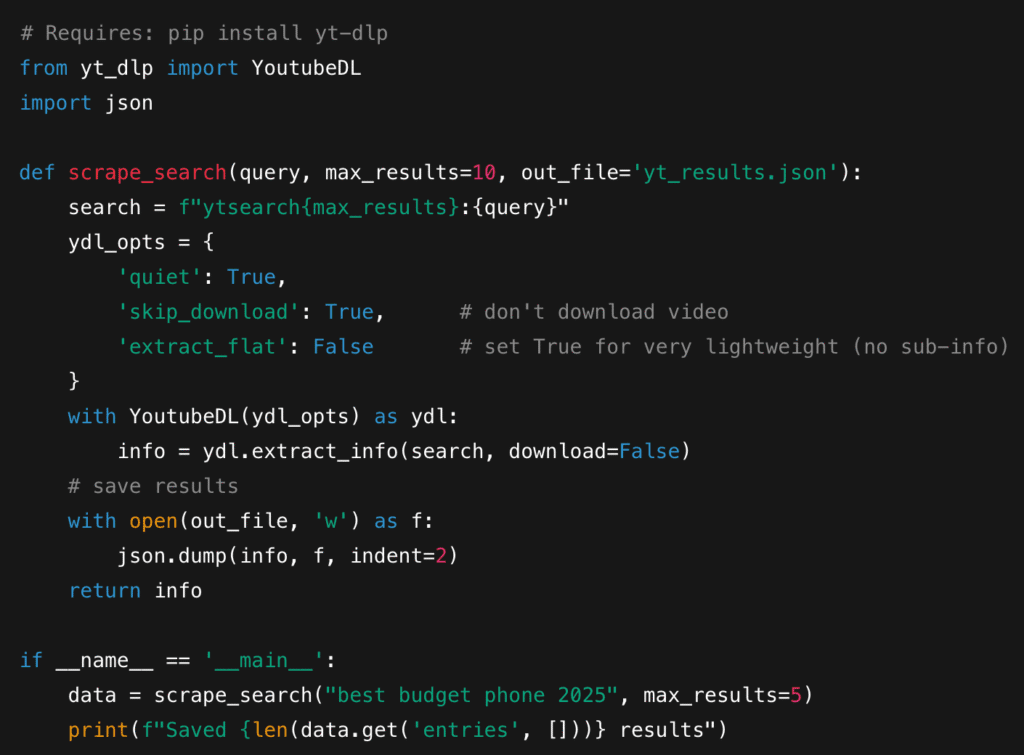
2.1 yt-dlp
yt-dlp is a CLI/library that can run quick searches (ytsearch:), extract video metadata, and dump structured JSON.
Pros:
- Very quick to set up.
- Returns structured metadata (title, id, uploader, duration, view count when available).
- It’s lightweight and can also run on a laptop.
Cons:
- You won’t get rendered DOM-only fields like some dynamic badges or certain snippets.
- Limited by what yt-dlp parses from the page/embedded data.
- Needs updates when YouTube changes response payloads.
Python Snippet:
When It Breaks:
You’ll usually know because yt-dlp fails to extract info after YouTube internal changes. Update yt-dlp or switch strategies.
2.2 Internal API Replay
Inspect the browser Network tab while performing a YouTube search and locate the internal YouTube (or similar) JSON POST request that YouTube sends. Capture the request payload and headers, then replay that request from your code, parsing the rich JSON response.
Pros:
- Returns very rich, nested JSON (renderers, micro-formats, badges, continuity data).
- Fast responses compared to full browser scraping.
- Great for extracting the same structured fields the YouTube client uses.
Cons:
- YouTube can change endpoint names, payload shape, or require new auth tokens.
- You must handle API keys/client version fields.
- Legal/Terms risk treads into reverse-engineering, so you need to evaluate compliance.
When to Use:
You want the most complete SERP payload available without spinning a browser, and you can maintain replay logic when YouTube updates.
2.3 Browser Automation
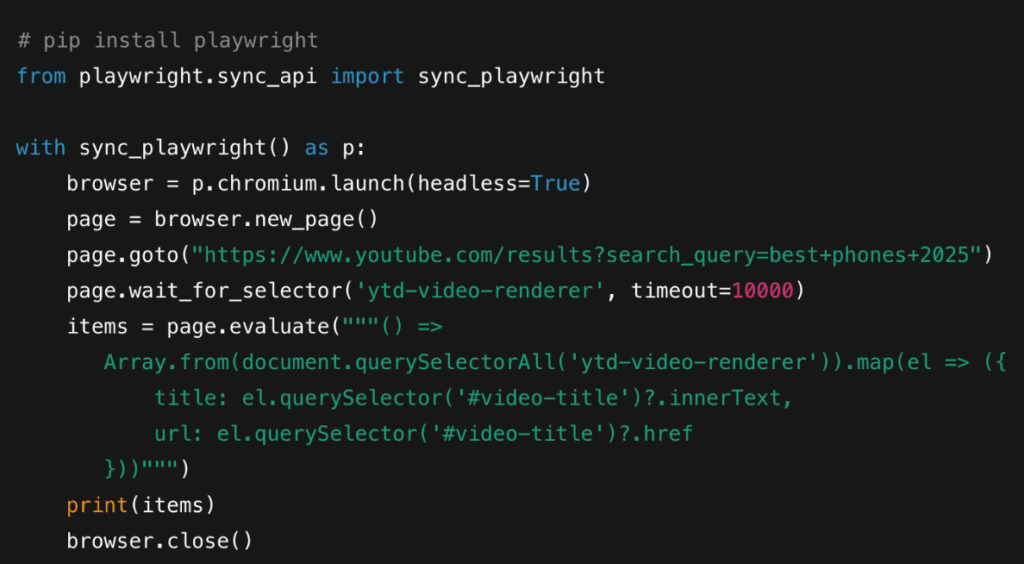
Use Playwright to run a browser that behaves like a real user: load the search page, wait for JavaScript to render, click “Load more,” scroll to the bottom, and then scrape the DOM or run page scripts to extract structured items.
Pros:
- Most robust for JS-heavy pages and UI-driven content (badges, carousels, dynamic snippets).
- You can replicate exact user flows: search, filter by upload date, open dropdowns, etc.
- Harder for simple bot-detection to catch you if you simulate normal interaction patterns.
Cons:
- Resource-heavy and slower.
- Requires proxies and stealth techniques at scale to avoid rate limits/CAPTCHA.
- More complex orchestration for scale (browser pools, retries, session management).
Quick Outline (Playwright Python):
When to Use:
Use Playwright when you need pixel-perfect renders, dynamic badges, or to interact with the page as a user. It’s the go-to when the reliability of visible content matters more than cost.
3. Managed Web Scraping API (Decodo-style)
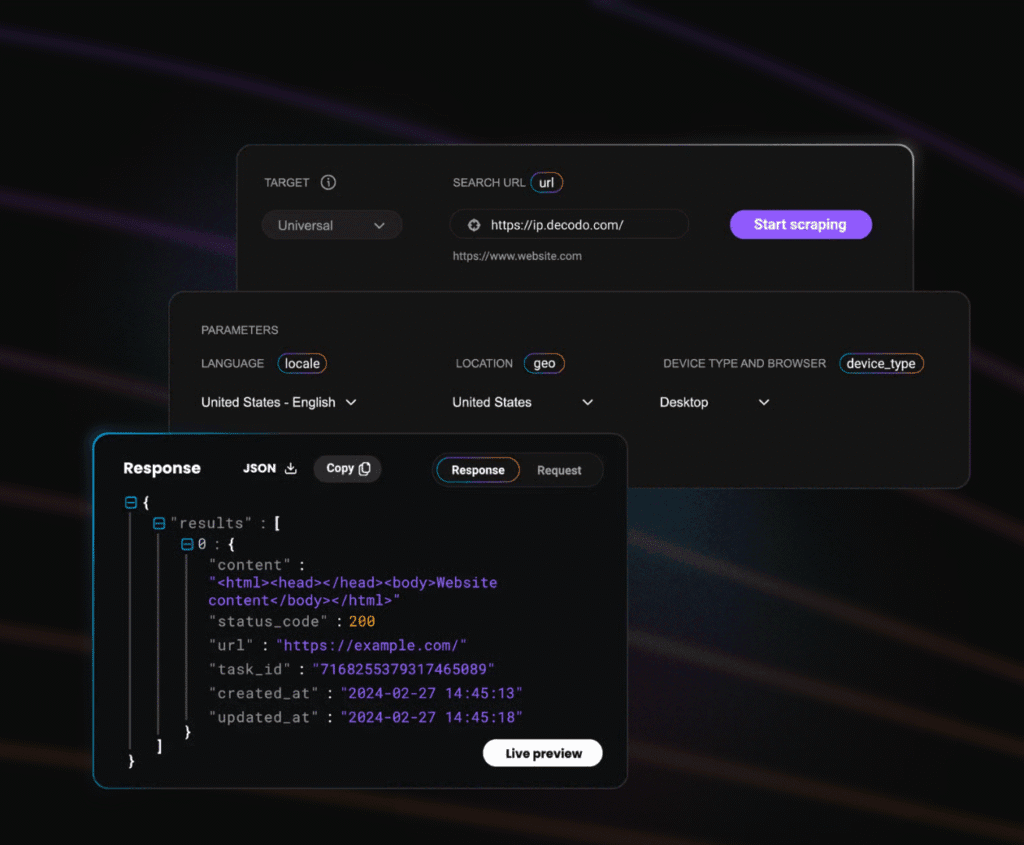
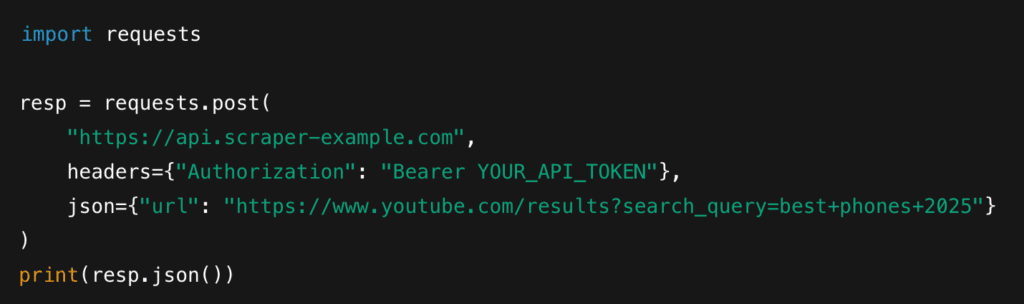
If you’re scraping YouTube SERPs at scale or need rock-solid reliability, a managed web scraping API is often the easiest and safest choice. Instead of juggling proxies, solving CAPTCHAs, spoofing fingerprints, or running fleets of browsers, these services let you request a YouTube URL and instantly receive clean HTML or structured JSON. Everything, including proxy rotation, device emulation, JavaScript rendering, retries, and user-agent management, is handled for you behind the scenes.
This is why teams building dashboards, analytics, products, or large-volume SEO pipelines usually choose a managed API. Many providers like Decodo’s Web Scraping API even include dedicated YouTube endpoints, giving you bonus features like transcript extraction, metadata parsing, and auto-pagination via continuations. You get predictable output without babysitting infrastructure.
Pros:
- No need to maintain proxy pools or avoid bot detection manually.
- JavaScript rendering is handled automatically.
- CAPTCHA challenges are solved at the platform level.
- Uniform output: JSON, HTML, or pre-parsed fields.
- Scales from hobby projects to production workloads.
When to Use:
You need guaranteed uptime, large volumes, or a hands-off scraping pipeline your business can rely on.
Example:
Decodo
cURL

Python
Anti-Bot & Scale: Proxies, Fingerprinting, CAPTCHAs, and Best Practices
Scraping YouTube at scale is less about code and more about avoiding detection. YouTube uses multiple layers of bot defenses like rate limits, fingerprinting, network checks, and behavior heuristics, so building a stable pipeline requires smart rotation, realistic browser behavior, and strong monitoring. Here’s the best way:
1. Proxies
- Residential: Safest for YouTube; mimic real users; lowest block rate.
- Mobile: Strongest trust profile but most expensive.
- Datacenter: Cheap but easier to block.
For scale, use per-request rotation, but switch to sticky sessions when scraping multiple pages in a flow (search —> detail —-> channel). Apply geo-targeting if you want region-specific results.
Note: Decodo offers a range of reliable proxies across different types. It helps you with an efficient way to test, launch, and scale your web data projects.
2. Headers & User-Agent Rotation
Rotate User-Agent, accept-language, referrer, and basic request headers to mimic real browsers. Keep them consistent within a session as YouTube flags mismatched signatures. Use real browser fingerprints captured from Chrome/Firefox for accuracy.
3. Human-Like Browser Behavior
If using Playwright:
- Randomize sleep intervals.
- Apply small scroll events and page interactions.
- Enable cursor movement emulation on scroll-heavy pages.
These micro-interactions help bypass UI-level bot checks.
4. Fingerprinting Defenses
Use full browser context rather than minimal headless modes:
- Avoid obvious flags like –headless=new without stealth plugins.
- Ensure realfonts, plugins, viewport sizes, and timezone consistency.
- Rotate device profiles (desktop/mobile) when needed.
5. CAPTCHA Strategy
YouTube occasionally throws hCaptcha/recaptcha. Options:
- Solver API: Cheapest but slower.
- Human-in-Loop Services: Highest solve rate but costly.
Ethical Note: Only solve CAPTCHAs for legitimate, compliant scraping use cases.
6. Rate Limits & Backoff
Implement:
- Exponential backoff on 429/5xx errors.
- Jitter to avoid synchronized spikes.
- Spike patterns are easily detected, so spread requests through time.
7. Monitoring & Metrics
Track:
- Success rate per proxy group.
- CAPTCHA frequency over time.
- Ban rate or “soft-block” HTML pages.
- Latency and abnormal load times.
- Error classifications (4xx, 5xx, connection resets).
Quick Checklist
| Rotate Headers | User-AgentAccept-LanguageRefererViewport + Device ProfileCookies (Session-Consistent) |
| Monitor | Success RateCAPTCHA/Bypass RateProxy BansResponse TimeContinuation Failures |
| Minimum-Safety Limits | 1-3s delay between burstsProxy rotation every request (unless session-needed)Max 30-60 requests/min per IP cluster |
Data Quality & Normalization
Once you start scraping YouTube search results, the next challenge is keeping your data clean, consistent, and analysis-ready. YouTube’s fields can vary by region, language, device type, and sometimes even experiment buckets, so normalization is essential.
Start with the basics: deduplicate by video ID. A single keyword search may surface the same video in multiple sections, so using canonical videoID prevents double-counting. Normalize view counts (e.g., convert “1.2M views: into integers) and durations (10:45 → seconds) so they can be compared across datasets.
Missing fields are normal. Some videos hide statistics, some channels block metadata, and some snippets vary by user location. Always set sane defaults (nulla) and avoid guesswork.
For timestamps, convert everything into a canonical UTC format. This makes trend analysis and multi-region comparisons much easier. And finally, keep a copy of raq response payloads. They’re invaluable for debugging breaks, validating parsers after a YouTube update, and reprocessing historical data without re-scraping.
Legal, Ethical & Platform Considerations
Here are the high-level realities:
1. Scraping Sits in a Legal Grey Area
Scraping publicly accessible pages is not outright illegal in many regions, but it can still violate YouTube’s Terms of Service. This can lead to IP bans, account actions, or platform-level blocks.
2. Respect YouTube’s ToS Wherever Possible
Use the official YouTube Data API when the use case allows it, especially for commercial or compliance-sensitive projects.
3. Avoid Collecting Personal Data
Do not include email IDs, addresses, personal identifiers, or anything tied to a specific individual. Stick to content metadata only.
4. Act Like an Authentic User on the Platform
Implement crawl delays, distribute requests over time, and avoid aggressive parallel scraping that looks like DDoS activity. Use backoff, rate limits, and request spreading to reduce load on YouTube.
5. Understand Privacy & Ethical Boundaries
Don’t attempt to bypass private or restricted content. Scrape only what is publicly visible and non-sensitive.
6. Consult Legal Counsel for Serious Projects
If you’re building a high-volume crawler, a commercial product, or a large-scale analytics pipeline, talk to a professional. They can help interpret ToS risk, licensing obligations, and compliance requirements for your specific content.
Quick Troubleshooting Guide
| Issue | Likely Cause | Quick Fix |
| 403 Forbidden | IP or proxy flagged/blocked | Rotate to a new proxy pool (prefer residential/mobile), slow down request frequency |
| 429 Too Many Requests | Hitting rate limits | Add exponential backoff + jitter; spread requests across time and IPs |
| CAPTCHA or hCaptcha Page | Bot detection triggered | Use CAPTCHA solver API, switch to residential proxies, add human-like browser behavior |
| Blank or Partial Results | JavaScript not rendered/page loaded too fast | Use Playwright with proper wait conditions, ensure scrolling triggers auto-load |
| Missing Fields/None Values | YouTube changed layout ot metadata structure | Update selectors/parsers; consider switching to internal API replay |
| Continuation Token Errors | Token expired or mismatches, proxy region variance | Refresh clientVersion from DevTools; re-capture the initial request payload |
| Inconsistent SERP Results | Geo/language mismatches, proxy region variance | Set hl/gl parameters, use geographically consistent proxies |
| Timeouts | Slow proxy or network congestion | Increase timeouts, retry with backoff, replace lagging proxy endpoints |
Pro Tip: Managed scraping APIs like Decodo automatically handle most of these issues, especially CAPTCHA loops, 403 bursts, and continuation token errors, making them ideal for large-scale or time-sensitive workflows.
Suggested Monitoring & KPI Dashboard
To keep a YouTube scraping pipeline healthy, track these KPIs regularly:
1. Success Rate
Percentage of requests that return valid, parseable SERP results. Drops usually indicate bans or selector changes.
2. CAPTCHA Rate (Per 1,000 Requests)
Measures how often YouTube triggers hCAPTCHA/reCAPTCHA. A spike means proxy degradation or overly predictable behavior.
3. IP Ban Frequency (Per Day)
Track soft-blocks (blank pages, redirect loops) and hard-blocks (403/429 clusters) per proxy group.
4. Average Latency (ms/sec)
Higher latency often signals proxy congestion, rendering overhead, or stealth mode degradation.
5. Cost Per 1,000 Successful Scrapes
Includes proxies, solver APIs, infra, and scraper API credits.
At the end of the day, scraping YouTube SERPs is about more than grabbing data. It’s about finding patterns, spotting opportunities, and making smarter decisions. With the tools, techniques, and best practices in this guide, you can collect high-quality data safely, scale your workflows, and build truly powerful search intelligence systems.
If you wanna know more about web scraping, check out our other expert guides:
- Large-Scale Web Scraping – A Comprehensive Guide
- Best No-Code Web Scrapers in 2025
- 10 Best AI Web Scraping Tools in 2025
FAQs
It depends on your scale and how you plan to use the data:
– JSON is great for small projects or debugging
– NDJSON is better for large SERP datasets
– A database schema is ideal for dashboards, analytics, and long-term storage
To detect issues early:
– Track parse error rates, missing fields, and sudden drops to zero results.
– Use alerts when patterns deviate from normal.
To recover:
– Always log raw responses so you can diff new vs old layouts.
– Maintain a modular parser where individual selectors can be updated without rewriting the whole scraper.
– Consider a fallback method (e.g., internal API replay if DOM parsing fails).
For YouTube, residential and mobile proxies work best because they mimic real user behavior and have higher trust scores. While we’re keeping this vendor-neutral, look for providers that offer:
– Per-request rotation
– Sticky sessions
– Region targeting
– High-quality residential/mobile IP pools
Calculate the cost per 1,000 successful scrapes, including:
– Proxies
– CAPTCHA solvers
– Server/infra costs
– Engineering time
Then compare that to the cost per 1,000 results for a managed API.
Disclosure – This post contains some sponsored links and some affiliate links, and we may earn a commission when you click on the links at no additional cost to you.