Scraping Google Reviews lets you automatically collect all the insights you need, like ratings, comments, timestamps, keywords, customer sentiment, etc. Instead of spending hours clicking through pages, you get the full picture in minutes.
In this article, we’ll break down everything you need to know about scraping Google Reviews. You’ll have a clear roadmap to collecting review data the smart way, not the hard way.
Why Scrape Google Reviews?
Here’s why scraping Google reviews is such a game-changer:
- Business Intelligence Made Easy: Scraping helps you gather feedback across locations, products, and time periods, without scrolling through reviews manually.
- Real Sentiment Analysis: With scraped data, you can quickly analyze overall sentiment, spot keywords, and understand emotional tone.
- Competitor Monitoring: Scraping lets you track competitor ratings, recurring complaints, and recent customer experiences, helping you stay one step ahead and refine your own strategy.
- UX & Product Feedback: Scraped reviews help product and UX teams identify what’s working and what needs fixing, backed by actual user voices.
- Training Data for Models: If you’re building machine learning models, Google reviews are a reliable source of rich, natural language data.
Real-World Use Cases
Here are a few everyday scenarios where scraped Google reviews become practically invaluable:
- Local SEO Optimization: Identify what customers praise or complain about to improve your location pages and boost search rankings.
- Aggregator Dashboards: Travel, food, and service comparison platforms often pull real-time review data to keep listings updated.
- Hospitality Analytics: Hotels and restaurants use scraped reviews to track guest satisfaction, monitor seasonal patterns, and benchmark against competitors.
- Brand Reputation Tracking: Companies monitor spikes in negative reviews to respond quickly before issues escalate.
- Customer Experience Mapping: Understanding recurring pain points helps teams redesign journeys with fewer friction points.
Legal & Ethical Notes
Here’s what you need to keep in mind:
- Respect Google’s Terms of Service: Whenever possible, choose official APIs or approved data sources instead of scraping raw HTML. It’s safer, more stable, and fully compliant.
- Handle Personal Data with Care: Don’t store unnecessary personal data, avoid redistributing identifiable user information, and use anonymized or aggregated data whenever possible.
- Be Courteous with Technical Limits: Throttle your requests, avoid overloading servers with parallel hits, and check robots.txt for guidance.
- For Commercial or Large-Scale Projects, Get Legal Advice: Every use case is different, and professional advice ensures you’re fully protected.
Google Reviews Scraping Methods at a Glance
| Method | Scale | Cost | Difficulty | Data Depth | Best Use Case |
| Google Places API (Official) | High (Stable) | Pay-as-you-go | Easy-Medium | Medium | Commercial use, dashboards, compliant workflows |
| Manual/One-Off Extraction | Very Low | Free | Very Easy | Low-Medium | Small checks, single business, one-time insights |
| DIY Scraping (Playwright/Selenium) | Medium | Low | Hard | High | Technical teams, custom pipelines, experiments |
| Managed Scraping API (Decodo) | Very High | Subscription-Based | Very Easy | Very High | Scale scraping, automation, non-technical users |
Method A: Google Places API
It’s the official method, backed by Google’s infrastructure, and perfect for anyone who needs structured, predictable data without worrying about scraping capabilities.
What It Gives You
- place_id
- Ratings & review snippets
- Upto ~5 reviews per request
- Timestamps, reviewer names, profile photos
- Business details like location, hours, and categories
When to Use It
- Compliance-first data collection
- Small-scale dashboards or internal tools
- Prototypes, POCs, or analytical experiments
- Low-to-medium review depth
How the Request Flow Looks Like
- Get an API key from Google Cloud
- Hit the Place Details endpoint using a place_id
- Parse the JSON response
- Store review data for analysis
Limitations
- You only get a few full review set
- You cannot paginate through all historical reviews
- Sorting is aggregated by Google
- Missing deeper sentiment and long-term patterns
Method B: Manual/Ad-Hoc Scraping
It’s the simplest way to pull data when you’re testing ideas, comparing a couple of businesses, or doing one-off checks.
When to Use It
- Quick audits of a single business
- Testing hypotheses or prepping datasets before automation
- Validating fields you want to collect later with a proper tool
- Small school projects, prototypes, or academic assignments
How to Get It Done
- Use ChromeDev Tools: Inspect elements to understand how review blocks are structured.
- Copy Selectors or XPaths: Helpful if you want to semi-automate with small scripts or browser extensions.
- Export to CSV: Use a simple copy-paste —> Excel/Sheets —> Save as CSV workflow
Limitations
- Anything beyond a few pages becomes painful
- Easy to miss reviews or duplicate data
- Copying reviews one by one adds up quickly
- Manual pasting often breaks structure
Method C: DIY Automated Scraping Using Playwright + Parsing
DIY is ideal for engineering teams or power users who need raw, deep data and are comfortable maintaining a pipeline.
Architecture
Playwright handles dynamic content, clicks and JavaScript. Parsers clean up HTML into structured fields. Deduplication prevents repeats. Storage gives you repeatable exports and queryability.
Key Engineering Concerns
- Proxies & IP Rotation: Avoid blocks when scraping at scale
- Fingerprinting: Use realistic browser contexts (user agents, viewport, timezone)
- Scroll/Lazy-Loading: Reviews often load as you scroll; emulate user scrolling
- Selector Stability: Google’s DOM changes; prefer robust selectors and fallback paths
- Retries & Backoff: Transient failures happen; retry with exponential backoff
- Rate Limiting: Throttle requests and respect legal/ethical notes
- Monitoring & Alerting: Detect large drops in success rate or structural changes
Deduplication
- Preferred: Use a native review_id if present
- Fallback: Hash of author + text + timestamp to create a stable key
- Tip: Store a unique index in your DB so re-runs don’t create duplicates
Export & Storage Tips
- CSV/JSON: Quick, portable, good for small-to-medium datasets or handoffs
- SQLite: Lightweight, easy to query for POCs
- Postgres/BigQuery: Use for production scale and analytics
- Schema Idea: review_id | place_id | author | rating | text | timestamp | scrape_time | source_url
- Always store raw HTML or raw JSON snapshot separately
Pros
- You can extract any field you need, having full control
- It has high data depth, including historical, hidden metadata, or long comments
- It is customizable with enrichment, language detection, and has NLP pipelines that plug in easily
Limitations
- Selectors, render behavior, and anti-bot measures change, leading to maintenance overhead
- It has infra needs like proxies, orchestration, storage, monitoring
- More exposure to legal and ethical risk if not handled carefully
Method D: Managed Web Scraping API with Decodo
Decodo’s Web Scraping API method is useful when infra overhead becomes the bottleneck, and you need reliable, repeatable review data quickly.
What It Provides
- Rendered pages (handle JS-heavy content)
- Proxy rotation and IP management to reduce blocks
- Anti-bot/CAPTCHA handling so scrapes succeed more reliably
- Pre-built Google Maps/Reviews scrapers
- Structured outputs ready for analysis or ingestion
- Monitoring and retries are included in the service
Practical Workflow
- Sign in to the provider dashboard
- Choose the Google Maps/Reviews scraper template
- Provide the place identifier or search query
- Preview a sample result, tweak fields or selectors if needed
- Export or pull the data via API or webhooks
Pseudo API Call
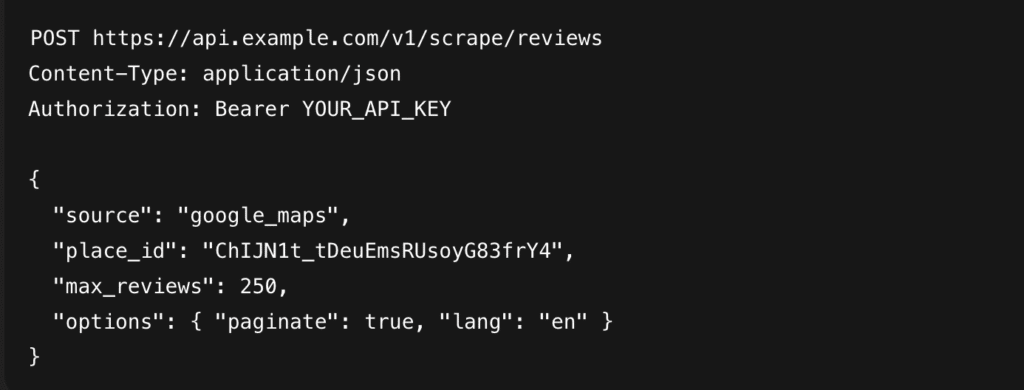
Example Response
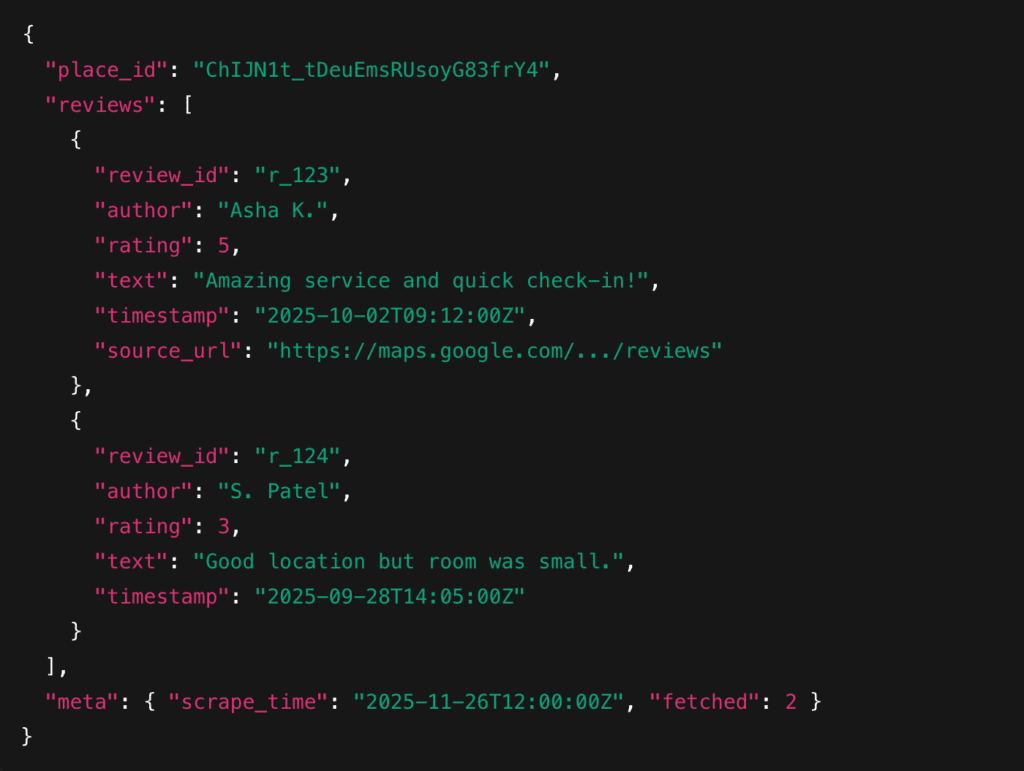
Pros
- Fast setup
- Minimal maintenance
- High throughput
- Consistent structured data
Limitations
- Recurring cost
- Less granular control than DIY
- Dependency on provider SLAs
Proxies, Fingerprinting & Anti-Bot
Scraping Google Reviews isn’t just about grabbing HTML. It’s about staying undetected, avoiding blocks, and keeping your pipelines healthy. Here’s how to keep your operations stable:
1. Proxies: Why They Matter
Google aggressively rate-limits repeated requests from the same IP. To avoid constant blocks:
- Rotate proxies for every few page loads
- Prefer residential or ISP proxies for large-scale projects
- Use clean, low-noise IP pools to reduce CAPTCHAs
- Maintain a pool large enough for your concurrency needs
2. Proxy Placement & Locale
Where your proxy is located affects:
- Search results
- Review ordering
- Language and review variants
- Place matching (some listings change based on locals)
Use geo-aligned proxies if you need:
- Country-specific results (e.g., India vs. US)
- Language consistency
- Local ranking insights for SEO use cases
3. Fingerprinting: Keeping the Browser “Human”
Google checks more than your IP. Browser fingerprinting is a major vector for detection. Mitigate by using:
- Realistic user-agent strings (rotate modern Chrome/Edge profiles)
- Consistent viewport sizes (desktop/mobile, depending on goal)
- Standard fonts and language settings
- Timezone + locale matching the proxy
- Human-like delays (randomized waits, scrolling speed, cursor movement)
4. CAPTCHA Handling
You will encounter CAPTCHAs at some point. Your options:
- Detect and retry
- Route through residential proxies to reduce triggers
- Use API-based solving if you need full automation
- Rely on managed providers that handle CAPTCHAs upstream
5. Monitoring & Alerts
To keep scrapers healthy, track:
- Success rate per attempt
- CAPTCHA frequency
- IP blocks or 429 responses
- Code changes in DOM selectors
- Average load/render time per page
Set up alerts so you know the moment:
- A proxy pool degrades
- Google updates the layout
- CAPTCHAs jump unexpectedly
- Scrape volumes drop vs. expected throughput
Robust Extraction Pattern: Best Practice
1. Core Extraction Pattern
- Perform a search or open a known place_id/place URL
- Click the exact place result
- Trigger the “All Reviews” modal or the reviews section
- Emulate human scrolls to load more reviews
- Click “Read More”/expand buttons so you capture full text
- Parse each review block into structured fields
- Write extracted batch to storage immediately
- Repeat scrolling/pagination until target reached or limits hit
- Run dedupe/upsert, mark place as completed, and store raw snapshot for debugging
2. Fields to Capture
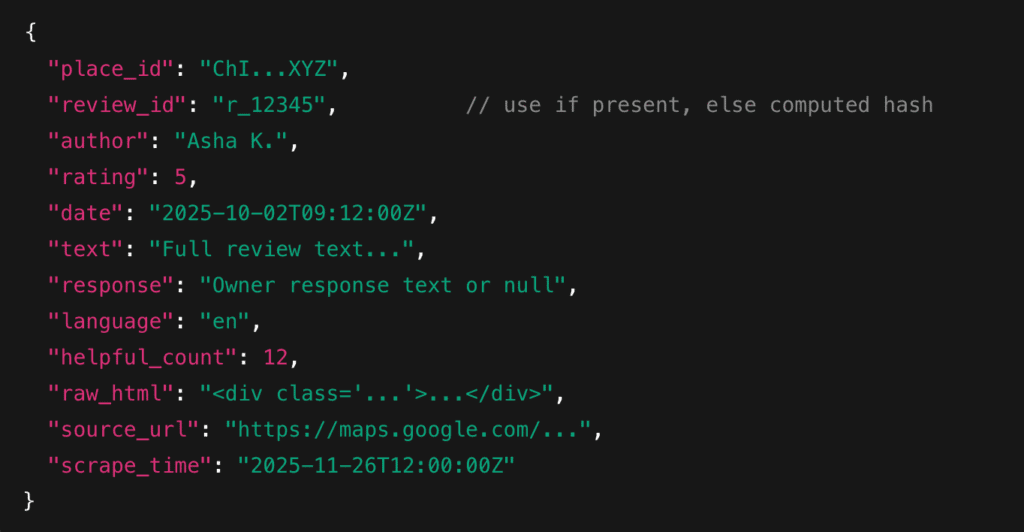
3. Selector Strategy & Expansion
- Prefer stable, semantic selectors (data attributes) when available
- Use multiple selector fallbacks
- To expand long reviews: detect aria-expanded or the “Read more” button and click it before reading innerText
- Capture both innerText and innerHTML for tricky formatting (line breaks, emojis)
4. Rate-Limiting & Backoff Pattern
- Use per-place pacing and global concurrency limits
- 2-5 parallel places for a residential proxy pool; lower for datacenter proxies
- Between requests to the same origin, insert randomized delays (human-like)
Exponential backoff + jitter (pseudo)
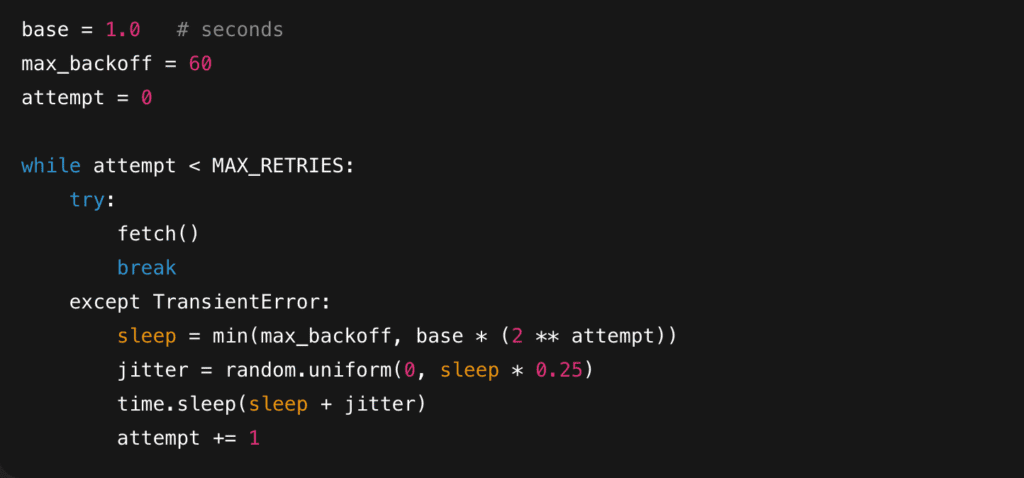
5. Error Handling & Resumability
- Write each batch (e.g., every 20-50 reviews) to DB or file as you go. This prevents total rework or crash.
- For each place job, persist a cursor such as last_cursor_offset or last_review_id_extracted. On restart, scroll until you reach that token and continue.
- Always upsert by review_id. This makes reruns safe.
- Transaction Pattern: Fetch batch —> Parse —> Save raw snapshot —> Upsert parsed rows —> Update place cursor —> Commit.
- On repeated parser failure, trigger an alert and save a falling HTML snapshot for debugging.
6. Quick Pseudocode
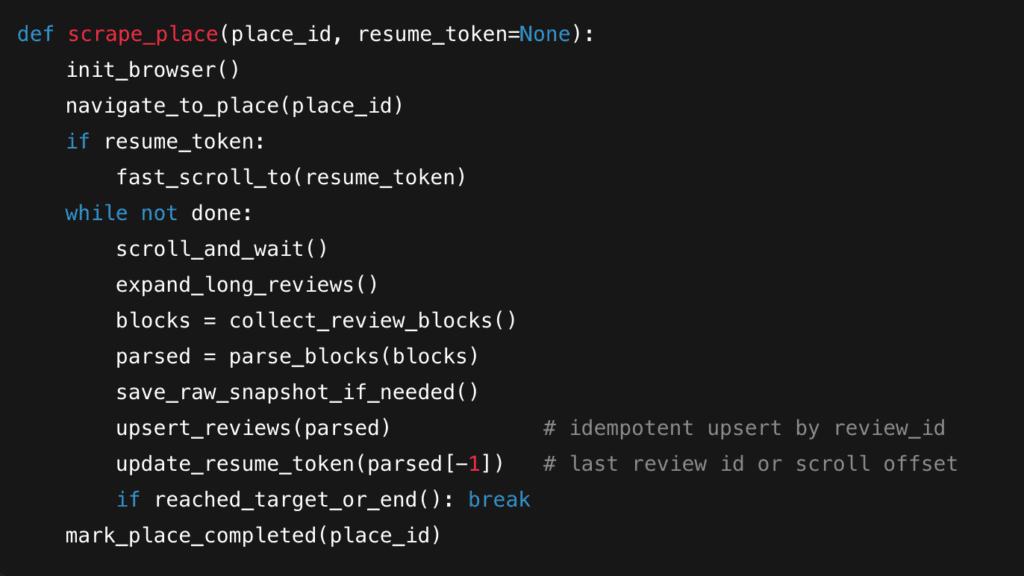
Data Cleaning & Storage
Once you’ve scraped the reviews, the real work begins.
1. Core Steps
Keep it simple and consistent across all places and runs.
- Normalize Dates: Convert any scraped date into a standard ISO format:
YYYY-MM-DD or YYYY-MM-DDTHH:MM:SSZ - Cast Ratings to Numeric: Ratings often come as “5.0” or “Rated 4 stars”. Extract the numeric value —> float or int.
- Strip Whitespace: Trim spaces, line breaks, and off spacing:
– .strip ()
– Replace multiple spaces with a single space
– Normalize newline behavior
- Handle Emoji & Non-UTF Characters: Google Reviews frequently include emojis, accented letters, and multilingual text.
– Read/write files using encoding=”utf-8”
– Normalize Unicode with unicodedata.normalize (“NFKC”, text)
– Retain emojis for sentiment tasks; they’re often signal-rich
2. Storage Suggestions
Different formats serve different scales and workflows:
- CSV: Great for small-to-medium datasets, Excel/Sheets analysis, and sharing.
- JSONL: Perfect for:
– Streaming pipelines
– Incremental scrapes
– NLP workflows (each line = one review)
- SQL/NoSQL: If you plan to scale, query, or run dashboards:
– SQLite for local prototyping
– Postgres for production
– MangoDB for flexible documents
- Object Storage: For raw HTML snapshots + JSONL dumps. It is often the cleanest long-form architecture:
Scraper —> S3 —> ETL job —> Database/analytics layer
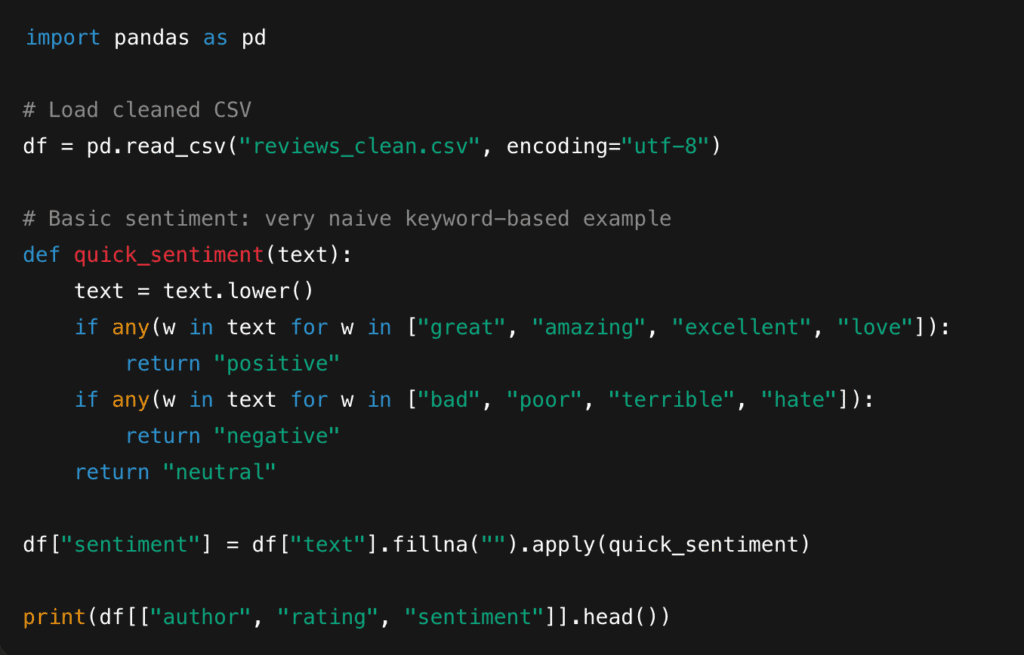
3. Quick Example
4. Use Case
- Spot trends
- Filter unhappy reviewers
- Combine sentiment with rating for deeper insights
5. Practical Tips
- Store raw and cleaned versions, as it saves you when parsers break.
- Keep a versioned schema so that adding new fields doesn’t break old pipelines.
- Add a scrape_time column to track freshness.
- Deduplication early, but re-check after cleaning.
Analysis Ideas & Downstream Uses
Once your Google Reviews data is cleaned and structured, you can start turning it into insights. Here are practical, high-leverage ways to use them.
1. Sentiment Analysis
Start with simple polarity scoring, then move to more nuanced models. Uses:
- Track brand health over time
- Compare sentiment between locations
- Identify “silent churn” signals
- Highlight mismatches between ratings
2. Topic Modelling
Top Modelling helps answer: What are people actually talking about? Common outputs:
- Staff behavior
- Product defects
- Wait times
- Pricing complaints
- Feature requests
- Cleanliness or ambience (hospitality)
3. Time-Series of Ratings & Sentiment
Plot ratings or sentiment month-by-month or week-by-week. Useful for:
- Tracking improvements after fixes or launches
- Identifying seasonality (hotels, clinics, retail)
- Spotting slow declines in customer experience
- Connecting external events to customer mood
4. Competitor Benchmarking & Ranking
If you scrape your competitors too, you can:
- Rank them by average ranking
- Track their sentiment over time
- Identify the features customers praise them for
- Spot recurring complaints you can exploit
- See which competitor locations outperform others
5. Alerts & Early Warning Systems
Set up lightweight alerts using your stored data. Examples:
- Sudden rating drops
- Spike in negative keywords
- Unusual number of 1* reviews in a 24-48 hour window
- Owner response backlog
6. LLM-Based Summaries
Use LLMs to generate structured insights from hundreds of reviews. Examples:
- “What were the top 5 complaints this week?”
- “Summarize the most common compliments for location A”
- “Extract recurring issues that need escalation”
7. Enrichment & Cross-Linking
You can join review insights with:
- Transactional data
- Customer support logs
- SEO metrics
- Sales performance
- Geography
Scraping Google Reviews doesn’t have to be complicated. With the right approach, you can turn scattered customer opinions into structured, actionable insights. Once cleaned and stored properly, review data becomes a powerful engine for sentiment tracking, competitive analysis, product feedback, and automated reporting. Start small, stay compliant, and build up as your needs grow.
Read our expert AI guides here:
- AI for Customer Experience: What Marketers Should Know
- Best AI Tools for UX Design
- Best AI Voice Agents in 2025
FAQs
Start by reviewing Google’s Terms of Service and API policies, then map your use case against them. If you’re building anything commercial, custom-facing, or large-scale, it’s best to consult legal counsel.
Public data includes things like ratings, timestamps, and review text. PII (Personally Identifiable Information) covers any information intentionally displayed to everyone. If the data points to a single individual, treat it as PII and handle it with extra care.
Most teams check their pipelines weekly, keep a small set of “test places” for early warnings, and update selectors whenever success rates drop or HTML structure shifts. This way, you’ll usually catch breakages early and fix them quickly.
Use a job-based workflow: one place = one job with its own proxy, delays, and retry logic. Run multiple jobs in parallel but keep concurrency low enough to avoid CAPTCHAs and IP blocks. Store progress with resume tokens so failed jobs can restart without losing data. For very large volumes, switch to rotating residential proxies or a managed scraping API to keep throughput stable.
Disclosure – This post contains some sponsored links and some affiliate links, and we may earn a commission when you click on the links at no additional cost to you.