Android phones run half of our lives today. From shopping and streaming to managing entire businesses on the go, it’s everywhere. But with all that activity comes one big challenge of staying private and accessing the content you need without restrictions. This is why proxies are important.
Whether you’re trying to scrape data, manage multiple accounts, or simply browse safely, the right proxy can make your Android experience faster, smoother, and way more secure.
In this guide, we break down the best proxies for Android, why they matter, and how they can completely upgrade the way you use your device. Let’s get started!
What Is an Android Proxy?
An Android proxy is a middle layer between your device and the internet that reroutes your traffic through a different IP address or location. Think of it as a digital mask that lets you browse, access apps, or run tasks without revealing your real identity or IP. On Android, you can set proxies at two levels: device-level, which covers everything connected through your WiFi, and app-level, where only specific apps use the proxy.
Why Use a Proxy on Android?
- Privacy & Anonymity: Proxies hide your real IP, making your browsing and app activity far more private, especially on public Wi-Fi or shared networks.
- Geo-Unblocking: A proxy lets your Android device appear as if it’s in another country.
- App Testing: Developers and QA teams use proxies to see how apps behave in different regions, networks, and carrier environments.
- Avoid IP Bans: Tasks like scraping, social media management, or running multiple accounts become smoother when each session routes through a fresh IP.
- Network Monitoring: Businesses managing dozens of Android devices use proxies to inspect traffic, enforce policies, and keep usage secure and consistent.
Types of Proxies for Android
| Type | What It Is | Best For | Pros | Cons |
| Mobile Proxies | Real 3G/4G/5G carrier IPs routed through mobile networks | Social media, app testing, automation, scraping | Hardest to detect, excellent trust scores, highly rotating | Most expensive option |
| Residential Proxies | Real home-user IPs from ISPs in different cities/countries | Sneaker bots, e-commerce, localized browsing | High stealth, great for geo-targeting reliable | Slower than mobile; pricier than datacenter |
| ISP/Static ISP Proxies | Datacenter hardware, but IPs are issued by ISPs (not hosting providers) | Long sessions, account creation, stable automation | Fast and harder to detect than datacenter; offers sticky/static IPs | Not as anonymous as residential/mobile |
| Datacenter Proxies | Server-based IPs from hosting providers | Large-scale scraping, speed-heavy tasks | Cheapest, fastest, easy to scale | Easiest to detect; not ideal for sensitive platforms |
How to Choose the Right Proxy for Android
| Decision Factor | What to Consider | Why It Matters |
| Use Case | Testing, scraping, automation, streaming, or multi-account work | Different tasks need different IP trust levels and speeds |
| Geo Granularity | Country-level, city-level, or ZIP-level targeting | More precise targeting = better localization, ads, and testing accuracy |
| Rotation Model | Per-request rotation or long sticky sessions | Rotating IPs avoid bans; sticky IPs help with logins and app testing |
| Budget vs Throughput | Pay-per-GB or pay-per-IP pricing | Heavy data tasks need GB plans; long-term automation needs IP plans |
| Compliance & Sourcing | Ethically sourced, opt-in residential/mobile networks | Ensures legality, reduces risk, and protects your app ecosystem |
| Supports & SDKs | Android SDKs, API access, documentation, troubleshooting | Better tooling = easier integration for automation and QA workflows |
Comparison Table of Best Proxies for Android
| Provider | Mobile IP Source | Best For | Notes |
| IPRoyal | Real carrier & ISP | All-around use (testing, automation, unblocking) | Good balance of features and pricing |
| Proxy-Cheap | Real mobile | Budget mobile use | Great starter choice; pool smaller than premium |
| DataImpulse | Real mobile | Flexible small-to-mid use | Traffic stays forever, good location depth |
| Bright Data | Real mobile & residential | Enterprise/advanced workflows | Huge pool & tooling, steeper pricing |
| Proxidize | Real 4G/5G | Custom networks & Android endpoints | Proxy Builder adds device-based IPs |
| MarsProxies | Real mobile & others | All-in-one budget suite | Android app simplifies setup |
| SOAX | Large real mobile pool | Reliable performance & geo tests | Premium performance & flexibility |
Best Proxies for Android
| Table of Contents |
| 1. IPRoyal |
| 2. Proxy-Cheap |
| 3. DataImpulse |
| 4. Bright Data |
| 5. Proxidize |
| 6. MarsProxies |
| 7. SOAX |
1. IPRoyal
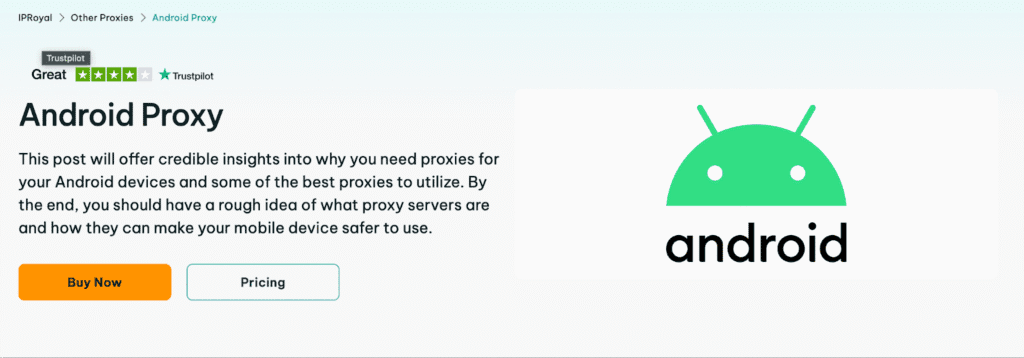
IPRoyal is a versatile proxy provider with a large global IP network covering residential, mobile, datacenter, and ISP proxies, and usable on Android devices without extra apps. Their Android-focused proxies and designed to keep your device private, unblock content, and bypass IP restrictions easily.
Key Features:
- Massive Proxy Variety: You get access to residential, mobile, ISP, and datacenter IPs straight from a single dashboard.
- Competitive Pricing: The plans offered scale to users of all sizes.
- Wide Geo Coverage: IPs span dozens of countries worldwide, letting you localize Android traffic effectively, test regional behaviors, or unlock content locked behind location restrictions.
- Protocol Support: Support for SOCKS5 and HTTP(S) proxies means easy setup with popular Android proxy apps, as well as tools and automation workflows.
- Reliable Dashboard: It has a straightforward control panel for managing proxies, rotations, and regions.
Cons:
- Smaller Proxy Pool: Compared to some top-tier competitors, IPRoyal’s IP pool isn’t the biggest.
- Dashboard Can Feel Overwhelming: The interface has many features packed in, which can be slightly confusing at first.
Review: IPRoyal is a solid choice for Android phones, especially if you want flexibility without paying top-tier enterprise prices. Just keep in mind that very large projects might benefit from providers with even broader IP pools.
2. Proxy-Cheap
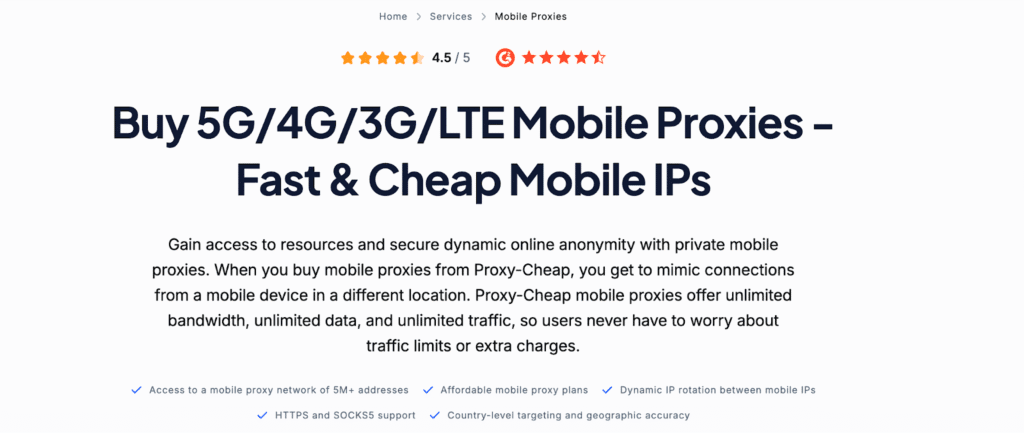
Proxy-Cheap offers budget-friendly mobile proxy plans you can use on Android to mimic real mobile connections, rotate IPs, and stay under the radar on social apps, testing tools, or geo-restricted services. Their mobile proxy options come with support for both standard proxy protocols and flexible pricing.
Key Features:
- Real Mobile IPs: Proxy-Cheap gives you access to genuine mobile proxies with unlimited bandwidth and data.
- Static & Rotating Options: You can choose static if you need consistency for long sessions or login-based workflows, or rotating for scraping and high-volume tasks.
- Wide Geo Coverage: Proxy-Cheap offers mobile IPs from 100+ countries.
- HTTP(S)/SOCKS5 Compatibility: This means easy setup with Android proxy tools and compatibility across apps and automation workflows.
- Easy Pricing: Plans start as low as a few dollars per GB, making it cost-effective.
Cons:
- Support Can Be Slow: Slow response times or delayed troubleshooting on complex issues.
- Budget Pool Limits: Proxy-Cheap’s mobile IP pool is smaller compared to premium providers.
Review: Proxy-Cheap is a great entry-level mobile proxy provider for Android users who want affordable and flexible proxy access. With dynamic and static mobile IPs spread across many countries and generous traffic policies, you get good value.
3. DataImpulse
DataImpulse is a pay-as-you-go proxy provider with a strong focus on mobile and residential proxies that work great on Android devices. Their mobile proxies route your traffic through real 5G/4G/3G/LTE IPs, offering both rotating and sticky sessions, location targeting, and flexible pricing based on traffic used.

Key Features:
- IPs with Rotation & Sticky Sessions: It lets you choose between rotating IPs (for scraping) or sticky sessions (for logins/app testing).
- Pay-Per-Traffic: You can pay only for the gigabytes you actually use, and traffic never expires.
- Wide Location Targeting: Mobile proxies are available from 190+ global locations.
- 24/7 Support: Support for both HTTP(S) and SOCKS5 protocols makes setup flexible across apps.
- Simple Integration: Proxies are easy to set up via the dashboard, and tutorials are available too.
Cons:
- Pricing Expensive at Scale: If you need huge volumes regularly, it can add up compared to some tier-1 competitors.
- Limited Independent Benchmarks: There are fewer independent performance benchmarks available compared with bigger names in the proxy space.
Review: DataImpulse’ real mobile IPs, rotating/sticky session options, and deep location targeting make it excellent for testers, scrapers, and marketers alike. Just be aware of pool size and larger volume pricing if you’re running very high-scale projects.
4. Bright Data
Bright Data is one of the biggest and most established proxy platforms on the market, offering Android proxy integration backed by a massive global network of IPs, powerful location targeting, and flexible session options. Bright Data covers virtually every need, from mobile and residential to ISP and datacenter proxies.
Key Features:
- Deep Geo Targeting: Bright Data gives you highly granular location control, which is ideal for localized experiences and unlocking region-blocked apps.
- Real Proxies: The catalog includes authentic IPs, all accessible from one dashboard.
- Sticky & Rotating Support: Bright Data gives you flexibility depending on your workflow.
- Free Trial: You can start with a free trial before investing into it.
- Enterprise-Grade Tools: Offers comprehensive features like Proxy Manager, APIs, and advanced integration options.
Cons:
- Premium Pricing: It is known for being on the higher end of the price spectrum, which can feel steep.
- Complex for Beginners: The platform can feel overwhelming if you’re just getting started with proxy use on Android.
Review: Bright Data is a top-tier choice if you want powerful, highly customizable, and enterprise-grade proxy support for Android, especially when your work demands advanced geo-targeting, large-scale automation, or deep data collection. It’s best suited for serious users, professionals, and businesses rather than casual or budget-only users.
5. Proxidize
Proxidize is a mobile-proxy-first platform that lets you buy and use proxies built from real 4G/5G networks, with options for high rotation and broad location access. You can even turn Android phones or USB modems into proxy endpoints using their Proxy Builder tools, giving you flexibility most traditional providers don’t offer.
Key Features:
- Unlimited Data: Proxidize delivers proxies sourced from authentic mobile networks with unlimited traffic.
- Fast Setup: Proxies are ready almost instantly after purchase with easy setup.
- City-Level Targeting: You can choose locations at a granular level straight from the dashboard.
- Private Proxy Builder Option: Proxidize also lets you create your own pool from Android devices or USB modems using proprietary software.
- Responsive Support: They offer fast and knowledgeable support, stable connection, and overall smooth performance.
Cons:
- Occasional Targeting Inconsistencies: City-level selection isn’t always 100% exact in practise.
- Pricing Can Be Steep at Scale: Plans can feel high compared with some competitors, especially if you’re using proxies daily in high volumes.
Review: Proxidize is a mix of instant proxy delivery, easy setup, and its unique Proxy Builder tool makes it a capable solution for automation, testing, and geo-targeted browsing, especially if you’re focused on U.S. networks and don’t mind premium pricing for quality.
6. MarsProxies
MarsProxies is a budget-friendly, full-suite proxy provider that puts a big focus on simplicity, global IP coverage, and flexible plans. With over a million IPs in more than 190 countries and easy setup tools, it’s a solid choice for both beginners and small-to-medium projects.
Key Features:
- Wide Range of Proxy Types: MarsProxies offers mobile, residential, ISP, datacenter, and sneaker proxies all from one platform.
- Unlimited Traffic: They offer unlimited bandwidth and high uptime, meaning smoother connections and fewer bans or interruptions.
- Global Coverage: With proxies available in 190+ countries, MarsProxies lets you target nearly any location.
- Android Proxy App: They even offer a free Android app that makes proxy switching and management super simple.
- Responsive Support: You get fast and professional customer support, plus a user-friendly dashboard that makes proxy deployment straightforward.
Cons:
- Performance Varies by Plan: There can be a kag or variable network performance, especially with low-tier proxies.
- Overwhelming Dashboard: Beginners may need a moment to figure out which plan best fits their needs.
Review: With multiple proxy types, a wide geographic reach, and beginner-friendly tools like a dedicated Android app, it’s a strong contender. Just keep in mind that if you need ultra-fast speeds or massive mobile IP rotation, premium providers may still edge it out.
7. SOAX
SOAX is a well-established proxy provider with a robust mobile proxy offering you can use on Android for anything from privacy and geo-unblocking to data collection, automation, and in-app testing. Its mobile proxies are all accessible via a user-friendly dashboard.
Key Features:
- Massive Mobile Proxy Pool: Lets you target by country, city, region, or even ISP.
- Rotating & Sticky Session: Choose per-request rotation, or sticky sessions. You can tailor session lengths to your needs.
- Fast & Reliable Performance: With a ~99.95% success rate and quick response times, SOAX proxies are a big win.
- Broad Protocol Support: Supports HTTP(S), SOCKS5, UDP, and QUIC protocols.
- Flexible Suites: Plans range from pay-per-GB to larger monthly bundles, which is great for wider usage flexibility.
Cons:
- Mobile Pool Speed Can Lag: Mobile proxies aren’t always the fastest compared with datacenter alternatives.
- Learning Curve: With so many settings, users might feel a bit overwhelmed at first.
Review: SOAX is a premium and highly capable mobile proxy provider, especially if you need reliable mobile IPs, granular geo-targeting, and session flexibility. Its large proxy pool, good performance, and broad tool support make it a user favorite.
Quick Android Setup Guide
Here’s a simple, practical walkthrough you can copy and use right away.
1. Device-Level Manual Proxy Setup (Wi-Fi Settings)
This method routes all Wi-Fi traffic on your Android device through a proxy.
Steps:
- Open Settings on your Android phone.
- Go to Wi-Fi and connect to your preferred network.
- Long-press the network —> tap Modify network.
- Expand Advanced options.
- Under Proxy, choose Manual.
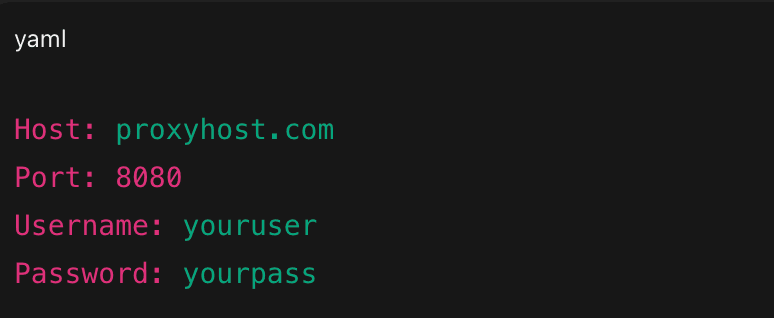
- Enter your proxy details —> tap Save.
Example Config:
Or as a single line:

Note: For SOCKS5 proxies, simply pick an app that supports SOCKS5 (Android does not support SOCKS5 natively in system settings).
2. Per-App Proxies Using VPN/Proxy Apps
Android doesn’t support app-specific proxies by default, but third-party tools fill the gap.
Popular Tools:
- ProxyDroid (rooted devices)
- SocksDroid (SOCKS5 support, no root)
- HTTP Injector/Proxy Manager apps
These apps let you:
- Route only specific apps through a proxy
- Use SOCKS5 or HTTP(S)
- Create profiles for automation, testing, or social apps
- Avoid changing system-wide settings each time
Note: Because Android limits system-level proxy granularity, these apps typically create a local VPN interface to steer per-app traffic.
3. Using Proxies in Android/Emulators (Playwright/Appium)
If you’re testing with Android emulators, Playwright, or Appium, you can route emulator traffic through a proxy with simple commands/config.
Option A: Set Emulator Proxy in Startup Flags

Option B: Using ADB (fast testing)

Option C: ADB Reverse/Tunnel (Playwright/Appium)

Tip: For Appium, set the proxy inside “desiredCapabilities” or use system-wide proxy flags before launching the emulator.
Tiny Config Setup
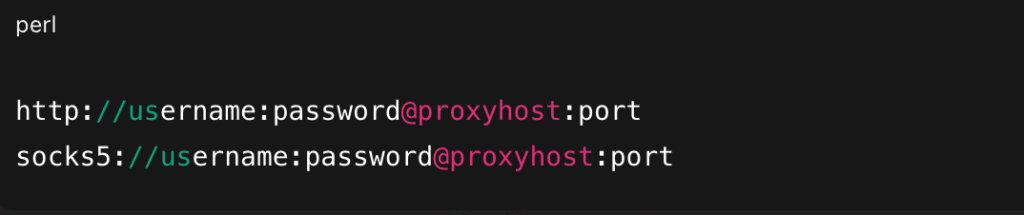
Use the first for HTTP(S) proxies; the second for SOCKS5-compatible apps for Android automation tools.
Performance & Testing Checklist
To evaluate each proxy provider fairly, we focus on four practical metrics:
- Success Rate: Ability to reach 3 target hosts reliably (e.g., Google, IG, a geo-restricted site).
- Median Latency: How long it takes for the proxy to return a response.
- Rotation vs. Sticky Session Behavior: Whether IPs rotate as expected or stay stable during long sessions.
- Authentication & Health Checks: Verifying username/password auth, connection stability, and provider health APIs.
Quick Test Snippets
1. Test Via cURL
Check whether your proxy routes traffic and reveals the expected IP:

If it’s working, you’ll see the proxy IP, not your device or server IP.
2. Test Via Python (requests)
A simple script to verify connectivity, auth, and proxy response:
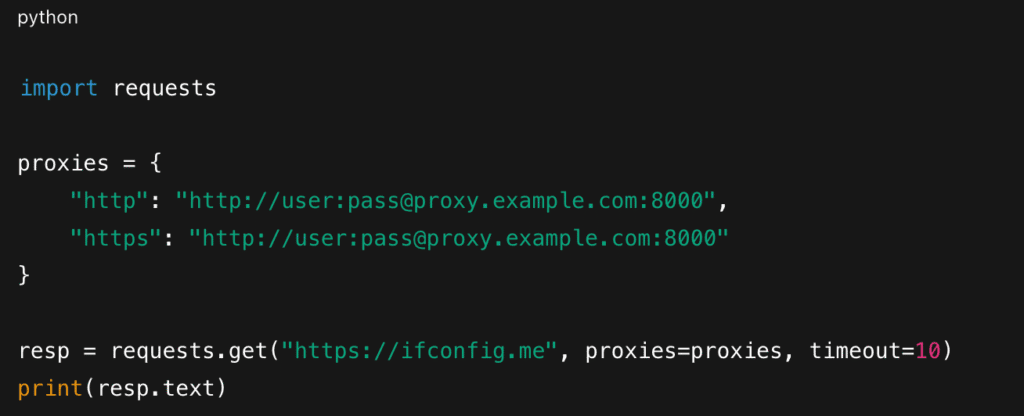
Use this to:
- Confirm the proxy is active
- Inspect rotation behavior by running multiple times
- Validate sticky sessions for long-lived Android testing flows
Android proxies open up a whole new level of flexibility while scraping data. With the right provider and setup, you get better privacy, smoother automation, and far more control over how your device connects online. The key is choosing a proxy type that fits your exact use case and testing it properly before scaling. Once you do, proxies become one of the simplest yet most powerful upgrades to your Android workflow.
Check out our other blogs on the proxy side:
FAQs
You’ll need a proxy/VPN routing app (like SocksDroid, HTTP Injector, or an app provided by your proxy service). These create a local VPN tunnel that redirects all mobile data traffic through your proxy.
Use Android proxy apps that support scheduled reconnects or rotation triggers. In automation setups (Playwright/Appium), rotation is usually managed through the proxy URL, not the device.
Google Play relies heavily on device signals like GPS, SIM card region, Google account location, and billing country, not just your IP. Clearing Play Store data, removing cached location files, or using a fresh Google account sometimes helps, but results vary.
Run quick checks:
– Verify the IP doesn’t show up on abuse or blacklist databases.
– Confirm the provider uses ethical, opt-in mobile/residential sourcing.
– Test the proxy for DNS, WebRTC, and IPv6 leaks.
– Check Trustpilot/G2 reviews for reliability issues.
Disclosure – This post contains some sponsored links and some affiliate links, and we may earn a commission when you click on the links at no additional cost to you.