Instagram doesn’t have a native export button, which is frustrating if you’ve ever needed to export followers, analyse competitor accounts, or build lead lists. That’s why building an Instagram scraper Google Sheets workflow has become the go-to solution for marketers in 2026.
The good news? In 2026, there are three viable ways to build an Instagram scraper Google Sheets workflow, ranging from the tedious manual approach to automated solutions that do the heavy lifting for you.
This guide walks through each method, complete with step-by-step instructions, screenshots, and honest assessments of what works (and what wastes your time). With 2.4 billion monthly active users as of 2025, Instagram offers invaluable audience data for marketers, but accessing it requires the right tools and workflows.
Why Scrape Instagram Data to Google Sheets?
Before we dive into the how, let’s quickly cover the why. Businesses and marketers scrape Instagram data for legitimate purposes like:
- Lead generation: Export followers of competitor accounts to find potential customers
- Influencer research: Analyse engagement rates, follower counts, and contact information
- Competitor analysis: Track posting frequency, hashtag strategies, and audience growth
- Campaign tracking: Monitor user-generated content, branded hashtags, or campaign participants
- Customer research: Understand who’s engaging with your content and build lookalike audiences
- Partnership identification: Find micro-influencers or brand advocates in your niche
- Market research: Understand demographic trends and audience interests in your industry
Instagram’s massive scale makes it a goldmine for business intelligence. Over 200 million business accounts use Instagram monthly, and 83% of users discover new products on the platform. For marketers, this means Instagram data isn’t just interesting, it’s essential for competitive advantage. The common thread? You need structured data in a format you can actually use, like Google Sheets, rather than locked inside Instagram’s walled garden.
Why Google Sheets for Instagram Scraping?
Why everyone prefers Google Sheets to Excel, CSV files, or specialist databases for their Instagram data may be a mystery to you. The following explains why Google Sheets has emerged as the industry standard:
Collaboration: Multiple team members can access and update the same spreadsheet simultaneously in real-time.
Cloud Access: Access from any device with an internet connection—no more emailing CSV files back and forth.
Integration Ecosystem: Connects seamlessly with CRMs, email platforms, and analytics tools through Zapier, Make, and native integrations.
Automatic Backups: Version history means you’ll never lose data. Roll back to any previous version with a few clicks.
Free and Familiar: No cost, no training required—most people already know how to use Google Sheets.
Formula Power: Use built-in formulas to calculate engagement rates, segment audiences, and automatically create dynamic reports.
Method 1: The Manual Approach
Let’s start with the most basic method that costs nothing except your sanity and several hours of your life.
What You’ll Need
- An Instagram account
- Google Sheets
- Patience
- A strong tolerance for repetitive tasks
Step-by-Step Instructions
Step 1: Navigate to Your Target Account. Open Instagram in your web browser and go to the profile you want to scrape. Make sure you’re logged in.
Step 2: Open the Followers List. Click on the “followers” or “following” count to open the pop-up window.
Step 3: Start Scrolling. Instagram loads followers in batches of 12-20 accounts. For large accounts, you’ll need to scroll continuously until all data loads (10-30 minutes for thousands of followers).
Step 4: Set Up Your Google Sheets. Create a new spreadsheet with these column headers:
Username | Full Name | Follower Count | Following Count | Bio | Website | Verification Status
Step 5: Copy the Data. Manually click each profile and copy their information into the corresponding Google Sheets columns. You’ll constantly switch between Instagram and Sheets.
Step 6: Repeat for Multiple Accounts. Building a list of 500 followers typically takes 4-6 hours of dedicated work. When you consider that Instagram users post 95 million photos and videos daily, manual data collection simply doesn’t scale for serious analysis.
Step 7: Clean Your Data Remove duplicates, standardize formatting, fix errors, and validate that all data is correctly formatted.
The Brutal Truth About Manual Scraping
Pros:
- Completely free
- No technical skills required
- No terms of service violations
- No dependency on third-party tools
Cons:
- Extremely time-consuming (3-5 hours per 1,000 followers)
- High error rate from manual copying
- Instagram’s scroll loading often fails on large accounts
- Zero automation—repeat manually for updates
- Instagram crashes can erase your progress
- No historical tracking—single snapshots only
- Doesn’t scale beyond small datasets
Method 2: Browser Extensions
Between manual scraping and complete automation are browser addons. They use your browser to interact with Instagram, simulating human interaction while automating the repetitive tasks.
Popular Instagram Scraper Extensions
Several Chrome extensions claim to scrape Instagram data. The most commonly used ones include:
Instant Data Scraper: Allows users to quickly extract visible Instagram profile or post data directly from the browser. Best suited for small-scale, one-time data collection rather than repeatable scraping workflows.
Step-by-Step: Using a Browser Extension
Step 1: Install the Extension
Search the Chrome Web Store for “Instagram scraper” and install a reputable extension with recent reviews. Look for extensions with:
- Recent update dates (within the last 3 months)
- Positive reviews mentioning current functionality
- Clear privacy policies
- Transparent permissions (be wary of extensions asking for excessive access)
Step 2: Log in to Instagram
Extensions work by accessing Instagram through your logged-in session, so you’ll need to be signed in to your Instagram account in Chrome.
Step 3: Navigate to Your Target Profile
Go to the Instagram profile you want to scrape data from, whether it’s a competitor’s account, an influencer’s profile, or a hashtag page.
Step 4: Activate the Extension
Click the extension icon in your browser toolbar. Most extensions will offer options like:
- Scrape followers
- Scrape following
- Scrape post comments
- Scrape post likes
- Scrape hashtag posts
Select your desired data type.
Step 5: Configure Your Scrape
Set parameters like:
- Number of accounts to scrape (e.g., “first 1,000 followers”)
- Data fields to extract (username, follower count, bio, website, email)
- Delay between requests (to avoid triggering Instagram’s rate limits)
Step 6: Run the Scrape
Hit “start” and let the extension do its work. It will automatically scroll through the followers list, extract the data, and compile it into a downloadable format.
Step 7: Export to Google Sheets
Most extensions export data as CSV files. Download the CSV, then:
- Open Google Sheets
- Click File → Import
- Upload your CSV file
- Choose “Replace spreadsheet” or “Insert new sheet.”
- Click “Import data.”
Your Instagram data now lives in Google Sheets, where you can sort, filter, and analyze it.
The Reality Check on Browser Extensions
Pros:
- Significantly faster than manual scraping (minutes vs hours)
- Exports clean, structured data
- Can handle thousands of accounts without manual copying
- Some extensions offer advanced filters and data enrichment
- One-time setup, then relatively hands-off
Cons:
- Instagram actively breaks these extensions with platform updates
- Many extensions are unreliable or contain malware. Exercise extreme caution
- Instagram’s rate limits still limit you
- Data quality varies wildly between extensions
- Most good extensions cost $10-50/month
- Requires keeping your browser open during scraping
- Doesn’t work well for scheduled/recurring scrapes
- Limited to data visible in the Instagram interface
- Privacy concerns: Extensions can access your entire browsing session
Method 3: Google Sheets Add-Ons (The Best Instagram Scraper Google Sheets Solution)
Here’s where things get interesting. Instead of exporting data from Instagram and then importing it into Google Sheets, what if the scraping happened directly inside your spreadsheet?
Google Sheets Add-Ons are powerful extensions that add functionality directly to your spreadsheet. For Instagram scraping, this means you can pull data without ever leaving your Google Sheets environment, making it the most effective Instagram scraping approach in Google Sheets.
How Google Sheets Add-Ons Work for Instagram
The Extensions option allows add-ons such as Marketing Data Extractor to be integrated directly into Google Sheets. Once deployed, they directly incorporate into your spreadsheet, adding sidebar interfaces and unique menu items.
The workflow is simple:
- Open Google Sheets
- Launch the add-on from the Extensions menu
- Enter the Instagram account or hashtag you want to scrape
- Click “Extract Data”
- Watch as rows populate automatically with Instagram data
No CSV exports. No switching between browser tabs. No manual copy-pasting. Everything happens inside the spreadsheet you’re already working in.
Step-by-Step: Using Marketing Data Extractor
Step 1: Install the Add-On
Visit the Google Workspace Marketplace and search for “Marketing Data Extractor” or go directly to https://smacient.com/products/marketing-data-extractor-google-sheets-add-on/.
Click “Install” and provide the required access. The add-on does not require access to your Instagram account credentials, but it does require access to your Google Sheets to write data.
Step 2: Open Your Google Sheet
To display your Instagram data, either open an already-existing Google Sheet or create a new one. Several scraping projects can be arranged in separate tabs inside the same spreadsheet.
Step 3: Launch Marketing Data Extractor
Navigate to Extensions → Marketing Data Extractor → Start. This opens the add-on sidebar on the right side of your Google Sheet.
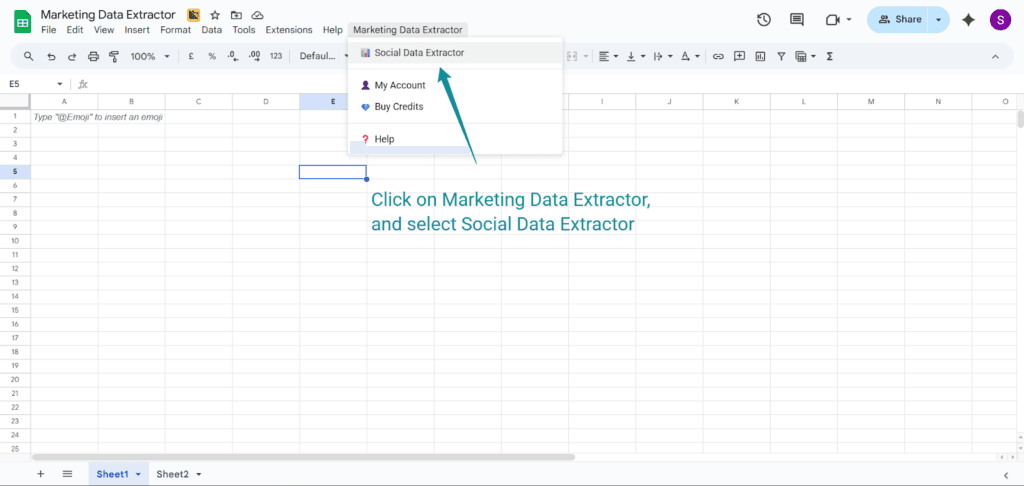
Step 4: Select Instagram as Your Data Source
In the add-on sidebar, you’ll see various social media platforms. Select Instagram from the list of available sources.
Step 5: Configure Your Extraction
Enter the details of what you want to scrape:
- Account username: The Instagram handle you wish to extract followers from (e.g., @nike, @garyvee)
- Data type: Followers, following, post comments, hashtag posts, or account details
- Number of results: How many accounts or posts to extract (e.g., 5,000 followers)
- Data fields: Choose which information to extract (username, bio, follower count, engagement rate, website,etc.)
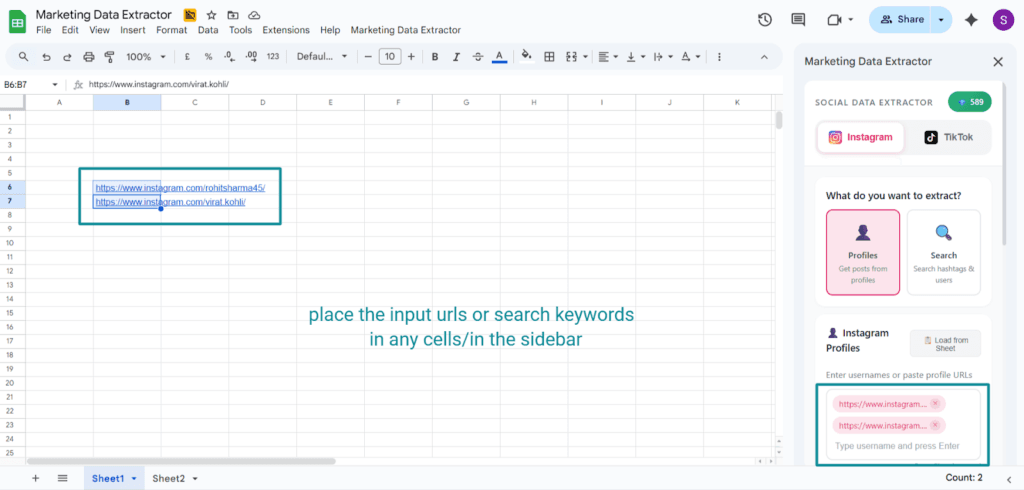
Step 6: Set Advanced Options (Optional)
Marketing Data Extractor offers advanced filters:
- Minimum follower count (e.g., only accounts with 1,000+ followers)
- Verified accounts only
- Bio keywords (e.g., must include “fitness coach” or “marketing agency”)
- Location filters
- Language preferences
These filters help you build highly targeted lead lists rather than just scraping everyone.
Step 7: Choose Your Destination
Select where in your Google Sheet the data should appear:
- Current active sheet (data appears starting at cell A1)
- New sheet (creates a fresh tab)
- Specific cell range (for adding to existing data)
Step 8: Run the Extraction
Click “Extract Data” to start the add-on. Unlike browser extensions, this happens in the cloud, where you can close Google Sheets, and the extraction continues running in the background.
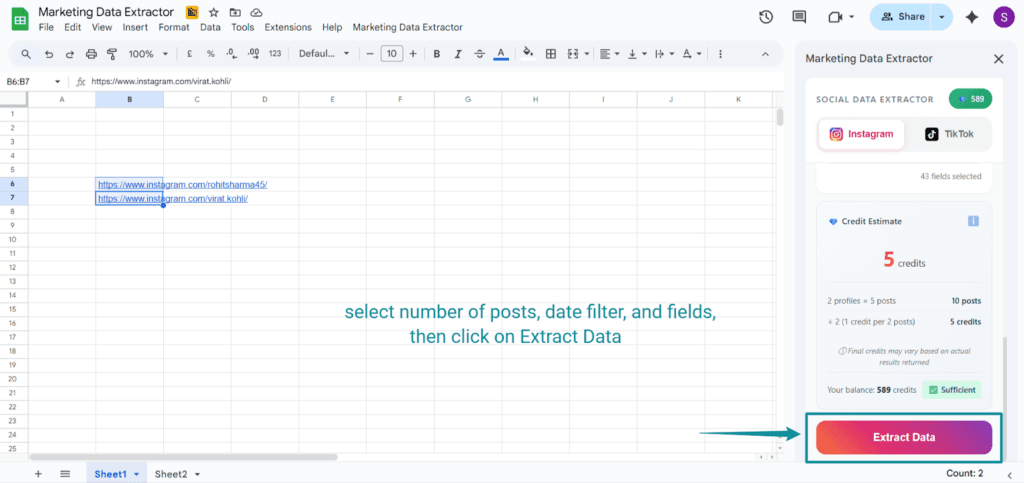
Step 9: Review Your Data
Within minutes, your Instagram data populates directly in your Google Sheet. Each row represents one account, and columns contain the data fields you selected:
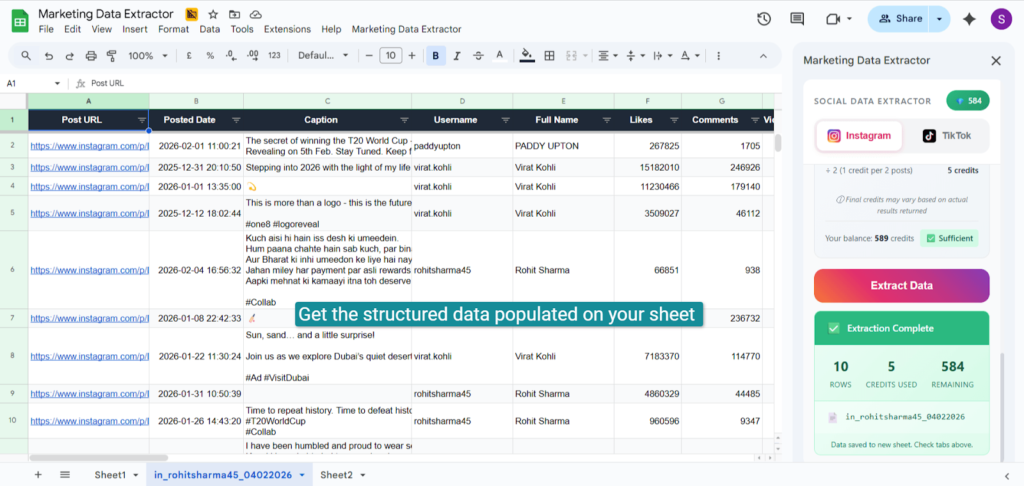
Step 10: Set Up Automatic Updates (Optional)
For ongoing competitor monitoring or campaign tracking, configure scheduled extractions:
- Daily updates (track competitor follower growth)
- Weekly refreshes (monitor hashtag performance)
- Monthly snapshots (long-term trend analysis)
Marketing Data Extractor can automatically refresh your data on a schedule, ensuring you always have current information without manual intervention. Other tools that work similarly are:
- Phantombuster
Offers no-code Instagram scraping workflows for profiles, posts, followers, and hashtags. Data can be exported into spreadsheets, making it suitable for recurring Instagram research and reporting. - Apify
Provides preconfigured Instagram scrapers that collect public data, including post metrics, captions, and engagement metrics. While flexible, it remains accessible to non-technical users through ready-made templates.
| Feature | Manual Scraping | Browser Extensions | Google Sheets Add-On (Marketing Data Extractor) |
|---|---|---|---|
| Time Required | 3–5 hours per 1,000 profiles | 10–30 minutes per 1,000 | 5–15 minutes per 1,000 |
| Cost | Free | $10–$50/month | Free tier + paid plans |
| Automation | None | Limited | Full automation + scheduling |
| Data Accuracy | Low (manual errors) | Medium | High |
| Scalability | Very limited | Moderate | High (10K+ profiles) |
| Recurring Updates | No | No | Yes |
| Best For | One-time small lists | Occasional scraping | Agencies, ecommerce, serious marketers |
| Reliability | Low | Medium (breaks often) | High (cloud-based) |
What Makes Add-Ons Different?
Native Integration: Data flows directly into your spreadsheet—no CSV exports or imports needed.
Cloud-Based Processing: Scraping happens on remote servers. Close your browser without losing progress.
Automatic Updates: Schedule recurring extractions that keep data fresh without manual work.
Team Collaboration: Your entire team accesses the same live data in Google Sheets.
Formula-Friendly Data: Written directly to cells, ready for formulas, calculations, and pivot tables.
Version Control: Track account growth over time using Google Sheets’ built-in version history.
Cost-Effective: More features than browser extensions at competitive prices, with free tiers available.
The Add-On Advantage for Different Use Cases
Agencies: Manage multiple clients with automated reporting—no billable hours for manual extraction.
E-Commerce: Monitor competitor followers and extract engaged commenters for lookalike audiences.
Influencer Marketers: Build searchable influencer databases filtered by engagement, followers, and keywords.
Researchers: Collect large datasets and track trends with scheduled historical extractions.
Sales Teams: Generate B2B leads from industry publications and trade show followers with enriched contact data.
Legal and Ethical Considerations
What’s Acceptable:
- Scraping publicly visible data (profiles, posts, hashtags)
- Using data for research, competitive analysis, or lead generation
- Respecting Instagram’s rate limits and privacy regulations (GDPR, CCPA)
What’s Problematic:
- Scraping private accounts or bypassing security measures
- Selling scraped data without adding value
- Using data for harassment, spam, or illegal purposes
- Creating fake accounts to access more data
Best Practices:
- Only scrape public data that you could collect manually
- Store data securely and delete when no longer needed
- Respect rate limits and choose compliant tools
- Be transparent about data usage and provide opt-out options
The 2022 hiQ Labs v. LinkedIn Supreme Court decision generally supported scraping public data, but platform terms of service still matter. When in doubt, consult a data privacy lawyer.
Choosing Your Method: Decision Framework
Still unclear which Instagram scraper Google Sheets approach fits your needs? Here’s a quick decision tree:
Choose Manual Scraping If:
- You need data from fewer than 50 accounts
- This is a one-time project
- You have zero budget
- You’re not on a deadline
Choose Browser Extensions If:
- You need occasional scraping (a few times per month)
- Your datasets are under 5,000 accounts
- You’re comfortable with some technical troubleshooting
- You want a low-cost option ($10-30/month)
- You don’t need scheduled, recurring updates
Choose Google Sheets Add-Ons If:
- You need ongoing, scheduled scraping
- You’re building processes that depend on Instagram data
- You’re scraping large datasets (10,000+ accounts)
- Your time is worth more than $50/hour
- You need reliable, production-grade data
- Multiple team members need access to the same data
- You want everything to happen inside Google Sheets
- You value automation over manual control
Getting Started with the Best Instagram Scraper Google Sheets Tool
If you’re ready to stop manually copying Instagram data and start working with a professional tool that lives right inside Google Sheets, Marketing Data Extractor offers the easiest path.
What makes it different:
- Native Google Sheets integration: No CSV exports, no imports, data flows directly into your spreadsheet
- Cloud-based extraction: Close your browser and let the tool work in the background
- Scheduled scraping: Set daily, weekly, or monthly updates that run automatically
- Advanced filtering: Build targeted lists with follower count minimums, bio keyword filters, and verification status requirements
- Data enrichment: Get more than just usernames, extract engagement metrics, contact information, and audience insights
- Compliant scraping: Respects rate limits and platform guidelines to protect your Instagram account
- Multi-platform support: Beyond Instagram, extract data from TikTok, Twitter, LinkedIn, YouTube, and more, all in the same spreadsheet
Get started in under 5 minutes:
- Visithttps://smacient.com/products/marketing-data-extractor-google-sheets-add-on/
- Click “Install” to add it to your Google Sheets
- Open any Google Sheet and launch the add-on
- Enter an Instagram username and click “Extract Data.”
- Watch your first 500 Instagram profiles populate automatically
Real-World Success Stories
E-Commerce Brand Grows Email List by 347%
An online fitness apparel company used Marketing Data Extractor to identify engaged followers of competitor brands. They extracted 15,000 Instagram users who commented on competitor posts, enriched the data with email addresses (when publicly available), and launched a targeted ad campaign—result: 5,200 new email subscribers in 30 days and $47,000 in revenue from the new audience.
Agency Cuts Influencer Research Time by 90%
A digital marketing agency was spending 10 hours per week manually building influencer lists for clients. After switching to Marketing Data Extractor, they automated the entire process, scheduled weekly extractions of relevant hashtags, and automatically filtered by engagement rate and follower count. They organized the data in client-specific Google Sheets—saving 40 hours per month and allowing them to take on three additional clients.
B2B Company Generates $230K Pipeline from Instagram
A SaaS company targeting marketing agencies extracted followers of industry publications and popular marketing podcasts. They built a list of 8,500 potential customers, enriched with website URLs and contact information, then ran a personalized outreach campaign. Result: 340 qualified leads and $230,000 in sales pipeline within 90 days.
Advanced Tips for Power Users
Combine Multiple Sources: Scrape 5-10 competitor accounts and use =UNIQUE() to deduplicate, creating a comprehensive niche list.
Calculate Engagement Rates: Use (Likes + Comments) / Followers* 100 to identify genuinely engaged audiences versus inflated followers.
Track Growth Over Time: Schedule weekly extractions in separate tabs to identify rapidly growing accounts (potential rising influencers).
Enrich with External Data: Use IMPORTXML or API connectors to add website traffic, email verification, or LinkedIn company data.
Build Scoring Models: Create weighted rankings based on follower count, engagement rate, bio keywords, and verification status for prioritized outreach.
Final Thoughts
For one-off projects with tiny datasets, the manual approach works (though it’s painful). For occasional needs, browser extensions offer a middle ground. But for businesses serious about Instagram data, Google Sheets add-ons like Marketing Data Extractor eliminate the headaches and deliver reliable results directly where you need them.
The Instagram landscape changes constantly, accounts grow, influencers emerge, and competitors shift strategies. Having fresh data automatically flowing into Google Sheets means you’re always working with current intelligence, not stale snapshots.
Whatever method you choose, remember: the goal isn’t just to scrape data, it’s to turn that data into actionable insights that drive real business results. A spreadsheet full of Instagram usernames is worthless unless you do something with it. Build targeted ad audiences, create personalized outreach campaigns, identify partnership opportunities, or track competitive trends.
Ready to automate your Instagram data collection? Stop scrolling and start extracting with Marketing Data Extractor’s free tier.
Install the Best Instagram Scraper Google Sheets Add-On →
Related Reads From Our Blog
- Best Proxies for Web Developers
- 10 Best AI Influencer Generators in 2026
- A Beginner’s Guide to AI Customer Segmentation (With Real-World Examples)
- Top AI Marketing Agencies in the UK
- AI Infographic Generator Tools
FAQs
Yes, scraping publicly available Instagram data is generally legal, but you must respect rate limits and comply with data privacy laws such as GDPR.
Risk is minimal with compliant tools that respect rate limits, but aggressive scraping or sketchy browser extensions can trigger account flags.
Free tiers exist (100 extractions/month), with paid plans ranging from $29 to $ 79/month for 1,000 to 10,000 extractions.
No, reputable tools can only access publicly visible data—scraping private accounts violates terms of service.