Scraping websites has always been useful, but scraping directly to Markdown? That’s where things start to get really interesting.
So what does scraping to Markdown actually mean? In simpler terms, it’s the process of taking a messy, noisy webpage and converting it into clean, readable .md content. It includes just pure text, headings, lists, images, and links in a structured manner.
In this guide, we’ll break down how to scrape websites cleanly, convert them into Markdown effortlessly, and navigate the challenges that come with modern web structures.
What Markdown Actually Preserves
Markdown is great at capturing the parts of a webpage that matter most for readability and analysis. Think of it like this: Markdown keeps the content and removes the chaos.
Here’s what gets preserved:
1. Headings
Your <h1> to <h6> tags turn into clean, readable # headers. Perfect for structure, summaries, and LLM-friendly context.
2. Lists
Bulleted lists, numbered lists; Markdown handles them like a pro.
3. Links
Clickable, clean, and easy to follow. [Text] (URL) just works.
4. Basic Tables
Simple HTML tables convert nicely into Markdown tables. This is great for product specs, comparisons, or documentation.
5. Code Blocks
Markdown preserves them in tidy blocks that look great anywhere.
When & Why You’d Want to Scrape Directly to Markdown
Here’s when scraping directly to Markdown really shines:
1. Faster Preprocessing for AI Pipelines
If you’re building AI models, fine-tuning, or setting up RAG workflows, Markdown gives you clean, structured text right out of the box.
2. Migrating Blogs & Docs into Static Generators
If you’re moving your content from an old CMS or website, scraping directly into .md files cuts your migration time drastically. You get ready-to-publish docs without messing with formatting.
3. Offline-Friendly Archiving
Modern websites rely heavily on JavaScript, which breaks the moment you go offline. Markdown solves that as it’s lightweight, portable, and readable forever.
4. Clean Datasets for NLP/RAG Systems
Markdown preserves hierarchy, meaning, and structure without visual clutter. It helps you feed text into an LLM, evaluate content, and run summarization.
Main Challenges in Scraping to Markdown
The moment you try to extract clean, structured content, a few challenges show up:
1. Dynamic/JS-Rendered Content
A lot of websites don’t show their real content in the raw HTML anymore. Instead, JavaScript loads everything after the page renders. This means traditional HTML scrapers often return half-broken pages or nothing at all.
2. Maintaining Structure (Headings, Lists, Code)
Markdown depends on a clean hierarchy. But websites are full of nested <div> s, random classes, and inline styling that make it tough to preserve proper:
- Headings
- Bullet Points
- Numbered Lists
- Code Blocks
Keeping structure intact is one of the trickiest parts of Markdown conversion.
3. Filtering Out Navbars, Ads, and Buttons
HTML pages are packed with things you absolutely don’t want in your Markdown file, like logos, menus, cookie pop-ups, social share buttons, and promo banners. Separating “content” from “everything else” requires smart filtering or readability algorithms.
4. Anti-Bot Protections & Rate Limits
Many sites actively block scrapers. CAPTCHAs, rotating tokens, IP bans, you name it. Often, this forces developers to use headless browsers or rely on managed scraping APIs like Decodo, which already handle things like proxy rotation, JavaScript rendering, and anti-bot defenses, so the content comes through cleanly.
Method 1: Simple HTML —> Markdown
If the website you’re scraping is mostly static, this is the easiest and cleanest approach. Think classic blogs, documentation pages, or sites that render content on the server without heavy JavaScript. For these pages, a simple HTML-to-Markdown pipeline works beautifully.
When to Use This Method
This approach is perfect for:
- Blogs that serve real HTML (not JS shells)
- Simple documentation sites
- News articles
- Landing pages without dynamic widgets
Basically, if the content is in the HTML source, you’re good to go.
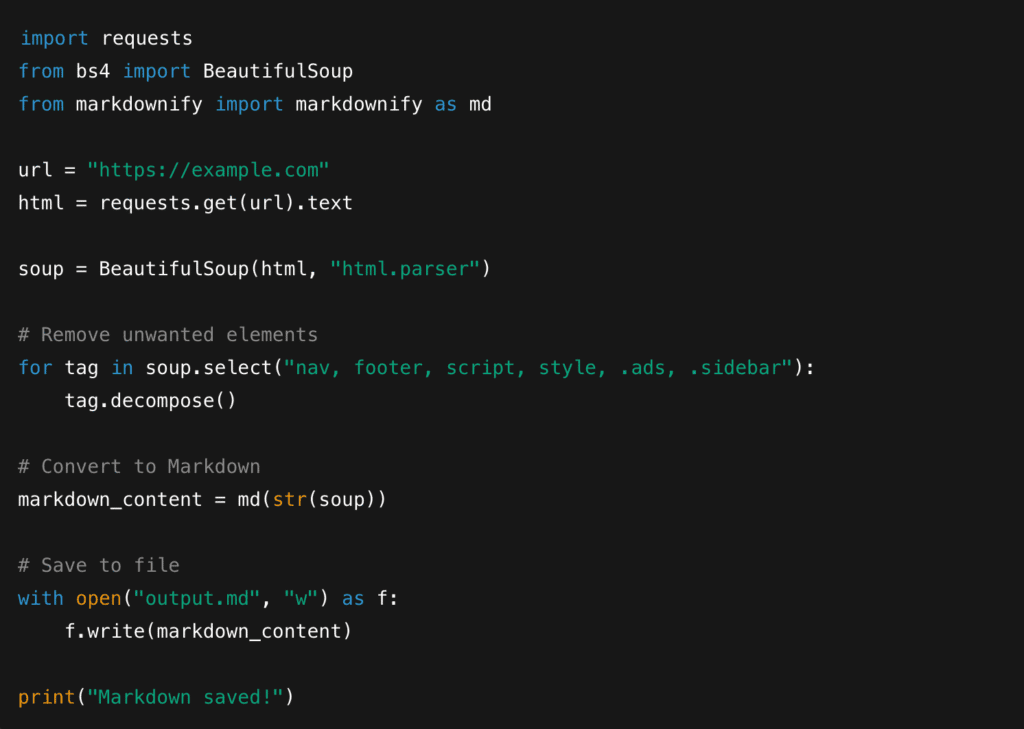
Steps
1. Fetch the HTML
You can grab the page using tools like requests, curl, or any basic HTTP client. Simple, fast, and no rendering required.
2. Remove Unwanted Elements
Most webpages come with navigation bars, footers, side widgets, ads, and other things you don’t want in your Markdown file. Online libraries make it easy to strip away the mess.
3. Convert HTML to Markdown
Once the HTML is clean, you can feed it into converters like:
- Python-markdownify (Python)
- Turndown (JavasScript)
4. Validate Markdown Output
Tools like markdownlint help check spacing, headings, formatting, and consistency so your output stays clean and readable.
Quick Python Snippet:
Method 2: Render & Extract —> Convert to Markdown
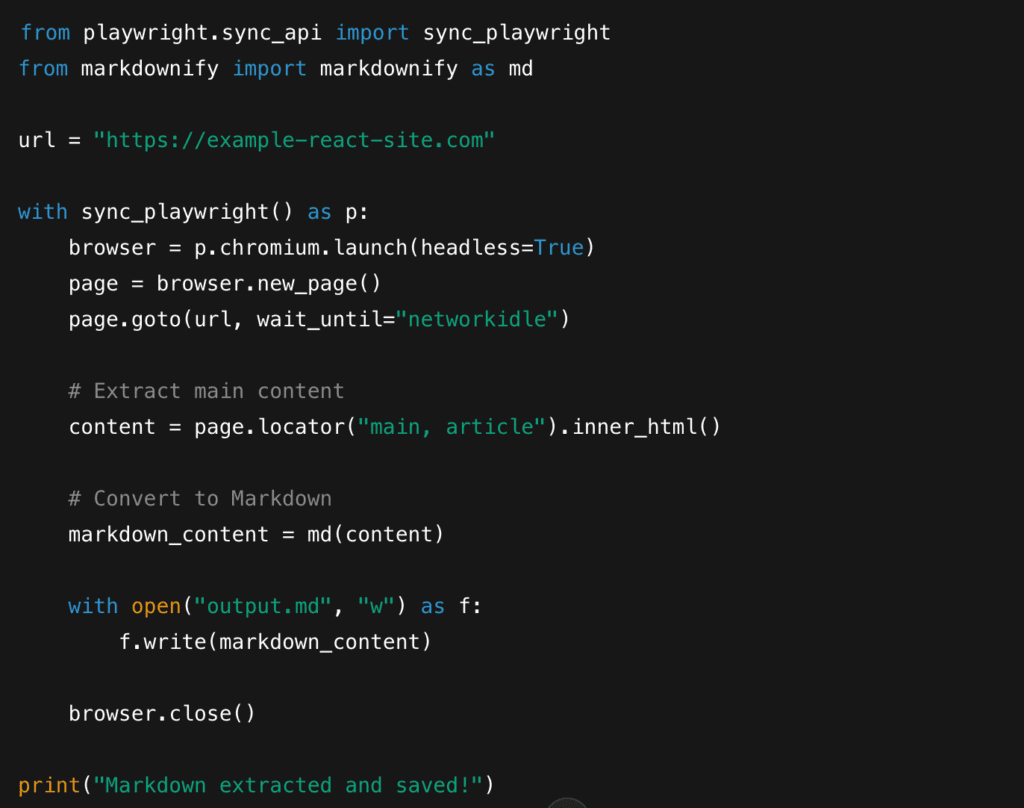
When websites rely heavily on JavaScript frameworks like React, Vue, or Next.js , the actual content doesn’t exist in the raw HTML. It appears after the page renders. That’s where Playwright comes in.
Playwright behaves like a real browser, loads the page fully, executes JavaScript, waits for content, and then lets you extract exactly what you need.
When to Use This Method
This approach works best for:
- React or Vue-based websites
- Next.js or SvelteKit pages
- Infinite scroll content
- News feeds that update dynamically
- Sites where text appears only after JS execution
Steps
1. Launch Playwright
You start a browser environment that mimics real user behavior.
2. Load the Page Fully
Wait for network calls, dynamic modules, and content-rendering scripts to finish.
3. Extract the Main Content
Most modern websites wrap their actual content in <main>, <article>, or content-specific divs.
You can target these cleanly.
4. Convert to Markdown
Once extracted, you can run the HTML through Markdown converters like:
- python-markdownify
- Turndown
- Readability —> Markdown pipeline
Minimal Playwright Example (Python)
Method 3: Using a Managed Web Scraping API (Decodo-style)
If you’re scraping occasionally, running Playwright or building your own pipeline is manageable. But the moment you move into large batches, anti-bot heavy sites, or team workflows, maintaining your own scraping stack can get overwhelming fast.
That’s where managed scraping APIs become a practical alternative.
When to Use This Method
This approach is ideal if you:
- Scrape hundreds or thousands of pages
- Deal with strict rate limits or active bot protection
- Want a low-maintenance setup
- Don’t want to manage proxies, browsers, or HTML-to-Markdown conversions
- Need consistent output for documentation, AI pipelines, or archives
What a Managed API Actually Does
A good scraping API handles the entire messy backend stack for you:
1. Automatically Renders JavaScript
You get the final, user-visible content.
2. Handles Anti-Bot Challenges
CAPTCHAs, TLS fingerprints, IP bans.
3. Rotates Proxies Globally
Different geos, clean IPs, and location-based targeting when needed.
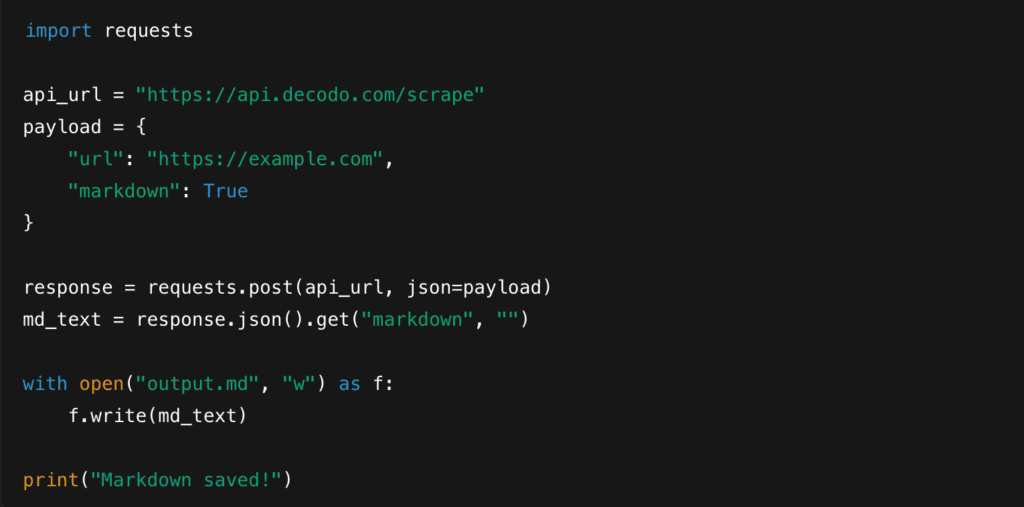
4. Outputs Markdown Directly
Some APIs can return HTML or Markdown with a single parameter, eliminating your need for conversion libraries.
5. Lets You Customize Headers, Device Profiles, Cookies
Useful for scraping websites that change content based on region or authentication.
Many developers prefer using managed APIs like Decodo’s Web Scraping because it combines rendering, proxy rotation, and Markdown conversion into a single request. This removes the need to run Playwright infrastructure or write HTML-to-MD conversion logic manually.
Example Workflow
Using a managed API is usually this simple:
- Enter a URL in the dashboard
- Choose Markdown output (no converters needed)
- Preview the rendered content
- Download/export as .md or integrate via API
Python Example (Markdown Output Enabled)
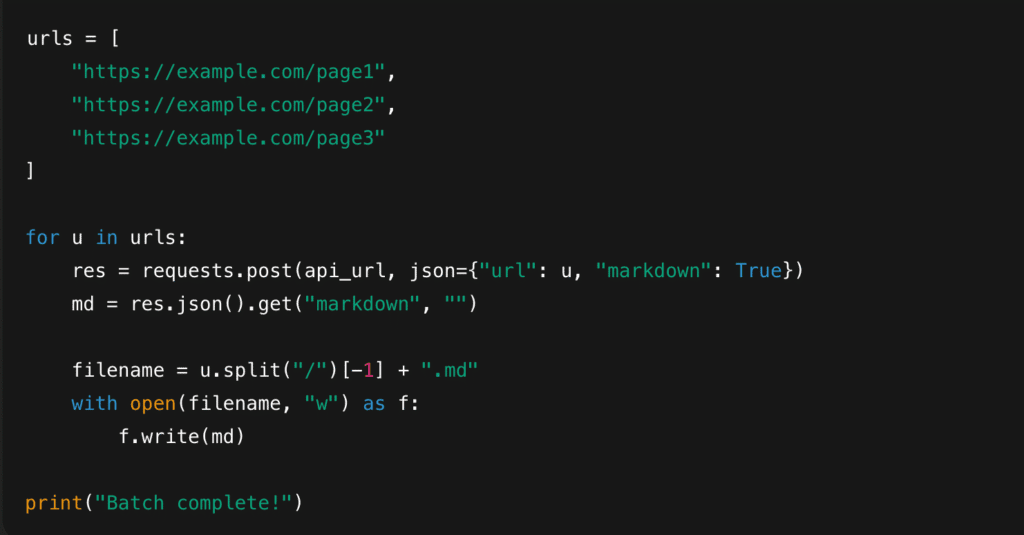
Batch Scraping Example
If you’re scraping a lot of URLs, a loop keeps things simple:
Cleaning & Validating Markdown Output
A little cleanup goes a long way in making your .md files polished, consistent, and ready for documentation, AI pipelines or static-site generators.
Here are a few simple steps to tidy things up:
1. Remove Leftover HTML Tags
Even the best converters can occasionally leave bits of <div>, <span>, or inline styling behind. A quick pass with regex or an HTML sanitizer ensures your Markdown stays clean and readable.
2. Normalize Whitespace
Extra blank lines, double spacing, awkward breaks- these things make your files look messy. Whitespace normalization keeps your text compact and well-structured, especially for LLM or RAG pipelines.
3. Convert Relative —> Absolute URLs
Markdown links and images often appear like:

These break once you move the file out of its original folder structure.
Converting them to absolute URLs ensures every link and image works no matter where your Markdown is stored.
4. Run markdownlint
Tools like markdownlint help enforce clean formatting:
- Heading Spacing
- List Alignment
- Code Fence Styles
- Line Length
- Indentation
5. Fix Code Blocks & Heading Hierarchy
Sometimes scrapers scramble heading levels (#### where it should be ##) or break fenced code blocks.
A quick manual or automated pass helps restore consistent structure, which matters a lot for readability and AI training.
Advanced Custom Extraction
Here are a few powerful ways to take control:
1. Extract Only Headings + Paragraphs
If your goal is documentation, summarization, or LLM inputs, you can selectively pull:
- H1-H6 tags
- Paragraph Text
- Maybe Lists
2. Use CSS Selectors to Isolate Main Content
Most websites wrap their real content inside predictable containers:
- <main>
- <article>
- .post-content
- .blog-body
3. AI/MCP Prompts for Targeted Extraction
This is where things get really interesting. Instead of scraping the raw HTML and then cleaning it, you can use an AI layer to extract only the parts you want, such as:
- “Return only the steps from the tutorial.”
- “Extract FAQs only.”
- “Summarize the article before converting to Markdown.”
- “Ignore tables and return just the text content.”
4. Smart Extraction with MCP
Some tools now support MCP (Model Context Protocol), which lets you pass a natural language prompt during extraction.
For example:
Decodo’s Web Scraping API includes MCP support, letting you add prompts like “extract only blog content” or “return just the steps in Markdown.” This gives you structured, focused output without writing custom parsing logic.
Anti-Bot, Scale & Reliability Guidelines
A few simple guidelines can keep your workflow smooth and interruption-free:
1. Respect robots.txt
Always check a site’s robots.txt file before scraping. It’s a small step, but it tells you what’s allowed, what’s restricted, and how to stay compliant.
2. Add Delays Between Requests
Rapid-fire scraping can trigger rate limits or temporary bans. Short delays of 1-3 seconds help you stay under the radar and reduce server load.
3. Detect CAPTCHAs Early
If you’re scraping a site with strong security, CAPTCHAs will show up eventually. Building early detection logic prevents you from accidentally saving empty Markdown files or malformed content.
4. Use Residential or Mobile Proxies
When websites block datacenter IPs or aggressively filter traffic, residential/mobile proxies mimic real user traffic and help you maintain consistent access.
5. Rely on a Managed API When Infra Becomes Heavy
Running your own proxy pool, Playwright setup, CAPTCHA detection, and retries can quickly turn info a time-consuming task. This is where managed APIs take a lot of stress off your plate.
APIs like Decodo handle rendering, proxy rotation, retries, and anti-bot defenses behind the scenes, making large-scale Markdown scraping far more reliable without extra infrastructure.
Use Cases
Here are some of the most common ways to put it to work:
1. RAG & NLP Ingestion
Markdown is one of the easiest formats for LLMs to understand.
Headings —> Context
Lists —> Structure
Links —> References
It feeds cleanly into retrieval systems, vector stores, and fine-tuning datasets without heavy preprocessing.
2. Migrating Docs to Hugo/Jekyll/Docusaurus
Static site generators love Markdown. If you’re rebuilding old documentation, moving from WordPress, or consolidating content, scraping pages into .md makes migration smooth, fast, and layout-friendly.
3. Archival
Long-term storage gets messy when everything is HTML, CSS, and JavaScript. Markdown keeps things readable for decades.
4. Content Analysis
Markdown provides a clean input for:
- Text Mining
- Clustering
- Sentiment Analysis
- Entity Extraction
5. Training Datasets
If you’re building domain-specific models, instruction datasets, or evaluation sets, Markdown gives you organized text that’s easy to tokenize, tag, or split into chunks.
Troubleshooting
Scraping to Markdown can run into a few bumps. Here’s a quick cheat sheet to help you diagnose and fix the most common issues:
| Issue | What It Means | How to Fix It |
| Blank or Partial Output | The site’s content is rendered by JavaScript, but you scraped the raw HTML. | Use Playwright or a managed API that supports JS rendering. |
| Missing Headings/Lists | The HTML-to-Markdown converter didn’t parse the structure correctly. Some tags may be nested oddly. | Switch converters ( markdownify , Turndown ), or clean the HTML with BeautifulSoup before converting. |
| Broken Images | The Markdown converter kept relative image paths (e.g., /img/logo.png). | Convert relative —> absolute URLs during post-processing. |
| Strange Spacing or Double Blank Lines | The converter preserved odd HTML spacing or nested <div>s. | Run whitespace normalization or format the .md with markdownlint. |
| Code Blocks Not Rendering | Fences weren’t detected or got broken during conversion. | Re-process code selections or add proper triple backticks manually/using a script. |
| 403/429 Errors | You’re hitting rate limits, geo restrictions, or anti-bot rules. | Add delays, use residential proxies, rotate IPs, or switch to a managed scraping API |
| HTML Tags Still Showing | Converter didn’t strip all inline or block-level elements. | Add an HTML sanitizer or regex cleanup step before saving the output. |
With the right tools, a few best practices, and a solid cleanup routine, scraping to Markdown becomes not only efficient but genuinely enjoyable. So go ahead and pick a method, try a few pages, and start building a faster, cleaner content pipeline.
Read our other expert guides here:
- 10 AI Personalization Tools to Boost Customer Engagement
- Best Proxies for Ad Verification in 2025
- Best Web Crawler Tools in 2025
FAQs
There are two common approaches:
– Using cookies or tokens. Pass them as headers in your scraping script or API request.
– Using Playwright to log in like a real user. Automate the login flow once, save the session state, and reuse it for future scraping.
Common patterns include:
– By domain: /example.com/page-name.md
– By category or URL path: /blog/2025/new-features.md
– By date: /2025/02/10/article-title.md
– For AI/RAG projects: /chunks/page-title/0001.md , /chunks/page-title/0002.md
The easiest way is to store metadata as YAML frontmatter at the top of each .md file. Most documentation tools, static-site generators, and AI pipelines understand this format.
You can extract metadata using:
– CSS selectors
– <meta> tags
– page JSON ( 1d+json )
– Playwright evaluation
You’ll need two steps:
1. Rewrite images URLs
Convert relative paths to absolute URLs so your scraper knows where to fetch them from.
2. Download the images to a folder
Save each file (e.g., /imafes/page-title/ ) and update the Markdown link:
! [Alt text] (images/page-title/image01.png)
Disclosure – This post contains some sponsored links and some affiliate links, and we may earn a commission when you click on the links at no additional cost to you.