The internet today is bigger, faster, and more global than ever before, and so are the challenges that come with it. That’s why we have residential proxies.
They’re one of the smartest tools that businesses and everyday users rely on to stay secure, anonymous, and efficient online. Let’s break down what residential proxies are and break it all down in the simplest way possible.
What Is a Residential Proxy?
A residential proxy routes your internet traffic through real IP addresses assigned by actual Internet Service Providers (ISPs). These aren’t server-generated or fake identities; they belong to genuine home or mobile devices. Which means that to any website, you look like a regular person casually browsing from a real neighborhood in a real city.
And that’s a big deal. Because websites today are smarter. Their anti-bot systems can instantly detect datacenter IPs, which can come from cloud servers or data centers. Datacenter proxies are fast, sure, but they’re also easy targets. Their patterns, latency, and network signatures can also pose a challenge, though.
Residential proxies, on the other hand, blend right in. They carry:
- Realistic ISP proxies
- Natural network latency
- Authentic geolocation data
- Genuine ASN details
All of these make your requests look exactly like normal human browsing. Residential proxies give you the closest experience to real-world online activity, without exposing your own identity.
How Do Residential Proxies Work?
Here’s how the whole process works:
1. You Make a Request: Maybe your scraper wants a product page, or maybe you’re trying to check prices in another country. Whatever it is, your device sends out the request.
2. The Proxy Steps In & Reroutes It: Instead of the website seeing your IP address, the proxy forwards your request through a real residential IP.
3. The Website Responds: Since the IP looks completely legitimate, the website treats the requests as coming from an ordinary user. It sends the content back.
4. The Proxy Relays the Response to You: You receive the page, date, or content, but your real identity stays hidden.
You can even choose how the proxy behaves:
- Rotating IPs: A new residential IP for every request. Perfect for scraping large datasets or avoiding rate limits.
- Sticky Sessions: Keep the same IP for minutes or hours. Great for login-based tasks or consistency-heavy workflows.
Types of Residential Proxies
| Type | What It Is | Best For |
| Mobile Residential Proxies | IPs from real 3G/4G/5G mobile networks | App testing, accessing mobile-only content, mobile and verification |
| Static Residential (ISP) Proxies | Long-lived, stable home IPs assigned by ISPs | Account management, long login sessions, tasks needing consistent identity |
| Rotating Residential Proxies | IP changes automatically per request or after a set duration | Large-scale scraping, bypassing rate limits, avoiding detection |
| Dedicated Residential Proxies | A single residential IP exclusively reserved for you | High-value account access, ad verification, tasks requiring a clean, trustworthy IP |
| Shared Residential Proxies | Multiple users share the same pool of residential IPs | Light scraping, budget-friendly monitoring, low-risk tasks |
Suggestion: Check out our blog covering the 12 Best Residential Proxy Providers for Reliable Data Scraping before you read ahead.
Residential vs. Datacenter Proxies
| Criterion | Residential Proxies | Datacenter Proxies |
| IP Origin | Real home/mobile IPs from ISPs | Cloud or server-farm IPs |
| Detection Risk | Low; looks like real human traffic | High; easy for websites to flag |
| Speed | Moderate | Very fast |
| Cost | Higher | Lower |
| Best For | Protected sites, geo-targeted testing, stealth scraping | High-volume tasks, basic scraping, low-cost workloads |
Pro Tip
If you need stealth, accuracy, and real-user visibility, go for residential proxies.
If you need volume and speed, and don’t mind the occasional block, datacenter proxies get the job done.
Top Use Cases of Residential Proxies
Here are some of the most powerful and popular ways to use them:
1. Web Scraping at Scale
Whether you’re scraping retail product pages, marketplace listings, or monitoring search engine results, residential proxies help you avoid blocks and get clean, accurate data, especially from sites that aggressively detect bots.
2. Ad Verification & Geo-Targeted Ad Auditing
Brands use residential IPs to check how their ads appear in different cities or countries, confirm that placements are legitimate, and ensure no fraud is happening behind the scenes.
3. Price Monitoring & Competitor Intelligence
E-commerce teams rely on them to track price changes, inventory levels, and competitor strategies without exposing their own business identity.
4. SEO & SERP Tracking
Search engines show different results depending on location. With residential proxies, you can view SERPs exactly the way users in specific geos see them.
5. Managing Multiple Accounts Safely
Platforms tie accounts to IPs. Residential proxies let you run several accounts without linking them together, reducing the risk of bans or verification checks.
6. App Testing & Mobile Traffic Simulation
Using mobile residential proxies, teams can test how apps behave on real device networks (3G/4G/5G) across different regions.
7. LLM Training Data Collection
For machine learning teams, residential proxies ensure training datasets reflect real-world browsing conditions and diverse geographic sampling, leading to better, more reliable model performance.
Legal & Ethical Considerations
How to use residential proxies is what determines whether you’re on the right side of the law:
1. Legality Depends on Usage
Laws like GDPR and CFAA can apply depending on what data you collect and how you collect it.
2. Choose Ethically-Sourced Providers
Go for vendors who use opt-in devices, explain where their IPs come from, and have a clear, verifiable consent process.
3. Document Your Compliance
This includes vendor attestations, IP sourcing documentation, internal policies governing how proxies can be used, and data provenance and workflows.
4. Avoid Abusive Behaviors
Follow basics like not overloading websites with unnecessary requests, not scraping personal or sensitive data, respecting robots.txt and site TOS wherever required, and keep requests responsible and within reasonable limits.
Pros & Cons of Residential Proxies
Pros
1. High Anonymity that Mimics Real Users
Residential IPs look exactly like everyday traffic coming from normal households, making them incredibly hard for websites to flag or block.
2. Excellent for Bypassing Bot Defenses & Geo-Restriction
Whether you’re accessing protected content or viewing region-specific results, residential proxies slip through most filters with ease.
3. Precise Geo-Targeting
Perfect for SEO audits, ad verification, and any task where local accuracy matters.
4. Lower Long-Term Ban Rates
Because these IPs behave like genuine users, they’re far less likely to get banned compared to datacenter IPs, even during heavy scraping.
Cons
1. More Expensive than Datacenter Proxies
Quality and realism come at a higher cost, especially for large-scale operations.
2. Slower Speeds Due to ISP Networks
Residential IPs follow normal household routes, so latency may be higher than lightning-fast datacenter servers.
3. Limited Availability in Niche Regions
Some cities, ZIP codes, or emerging markets may have fewer clean residential IPs to choose from.
4. Quality Varies by Providers
Always vet sourcing practices, consent methods, and IP freshness. Not all residential networks are created equal.
How to Choose a Residential Proxy Provider
Here’s a checklist to help you choose a provider that’s reliable, ethical, and actually worth your money.
1. IP Pool Size & Diversity
A larger, more diverse IP pool means better coverage, fewer blocks, and more natural-looking traffic. Look for providers offering multiple countries, regions, and ASNs.
2. Granular Geo Targeting
The more granular, the more accurate your SEO tests, ad checks, and local scraping.
3. Rotation Controls
You should be able to choose between:
- Per-request rotation (for scraping at scale)
- Sticky sessions (for account logins or longer workflows)
4. Protocol Support & Easy Integration
Look for HTTP(S) and SOCKS5 support, plus straightforward API access. It’s best if the provider has example scripts for Playwright, Selenium, and Python’s requests library.
5. Performance & Uptime Guarantees
Good providers publish uptime metrics or offer SLAs. You don’t want your proxy pool going dark in the middle of a data run.
6. Ethical Sourcing & Compliance
This is non-negotiable. Make sure:
- IPs come from opt-in device owners
- There’s transparent sourcing
- Compliance docs are available as it keeps you safe, and it keeps the ecosystem clean.
7. Transparent Pricing
Look for:
- Clear bandwidth/usage caps
- No hidden overages
- Pay-as-you-go or flexible plans
8. Proxy Management Features
Useful features include:
- Session management
- Whitelisting
- IP tagging
- Traffic usage insights
9. Customer Support & Documentation
You want quick responses, real examples, and troubleshooting guides that actually help.
10. Bonus: Value-Added Services
Some providers offer extra tools like scraping browser APIs, managed rendering, or headless browser infrastructure. These are lifesavers if you want results without maintaining your own scraping stack.
For Example:
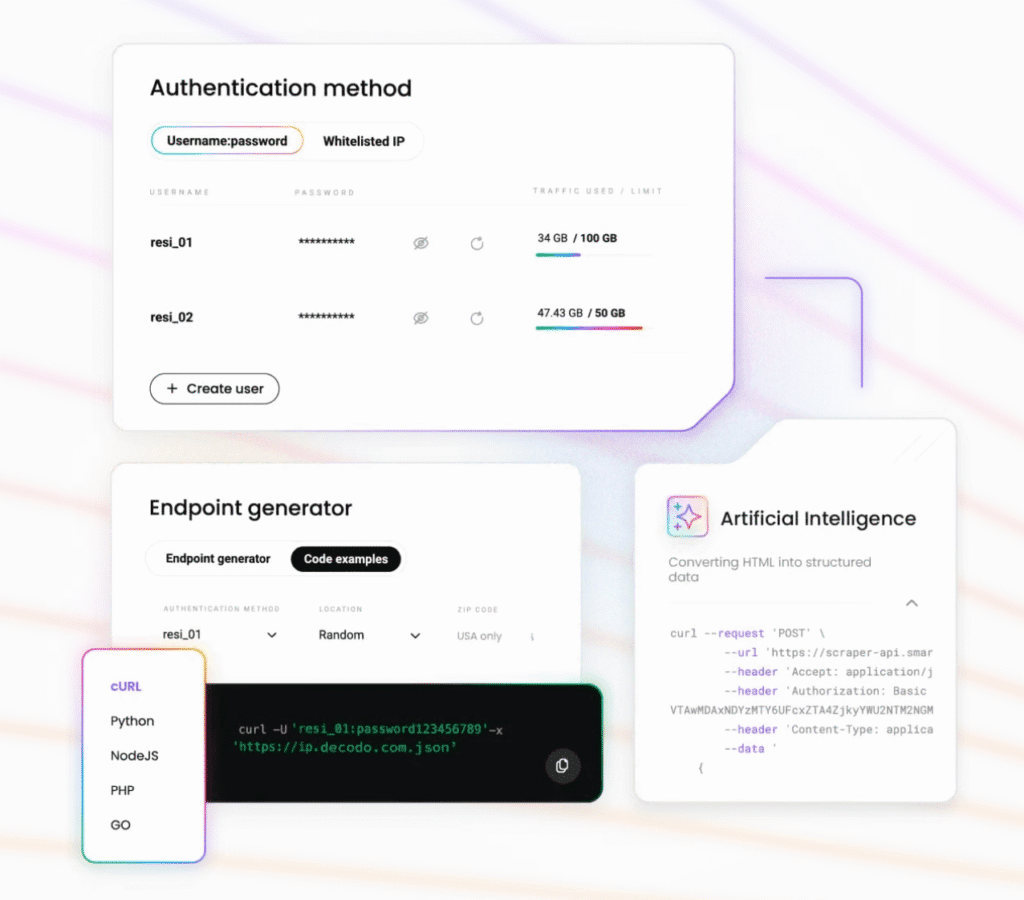
Decodo provides a large residential IP pool, fine-grained geo targeting, and managed scraping endpoints. It is ideal for teams that want both proxy control and ready-to-use scraping tools with minimal infrastructure overhead.
Quick Setup Examples
Here are a few quick examples to help you get started.
1. Generic HTTP Proxy Example
If you’re working with Python’s requests library, you can plus in your proxy details directly into a dictionary:
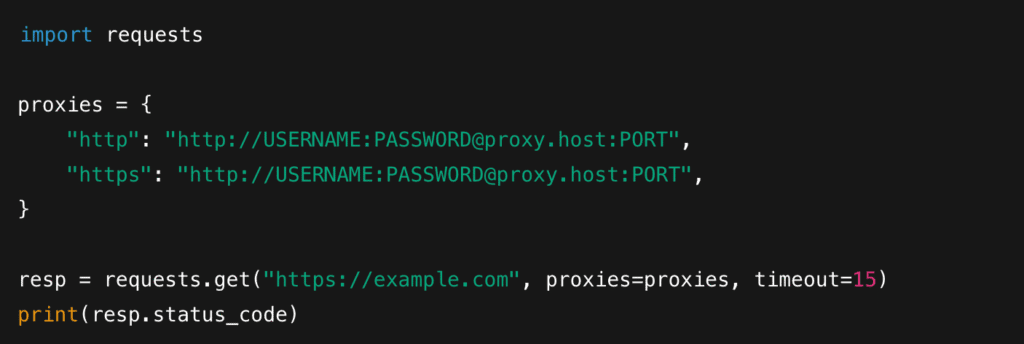
Just replace USERNAME , PASSWORD , proxy.host , and PORT with the details provided by your proxy provider. Your traffic now routes through a residential IP.
2. Playwright With a Proxy
If you’re using Plywright for browser automation or scraping, you can pass proxy credentials while launching the browser:
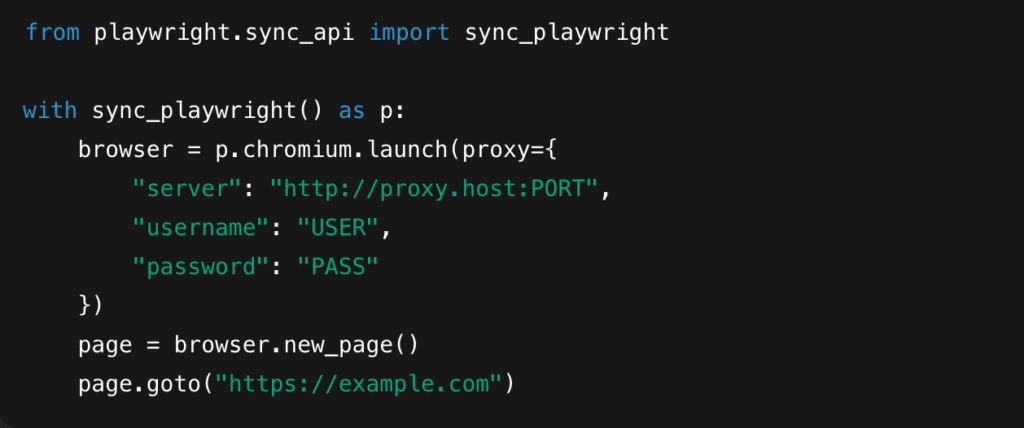
Playwright takes care of routing all browser traffic through your proxy settings. It is perfect for scraping dynamic, JavaScript-heavy websites.
3. Decodo Quick Start
If you’re using Decodo, the setup is even simpler:
1. Sign up on the Decodo dashboard.
2. Choose “Residential Proxies” and copy your endpoint + credentials.
3. Paste those credentials into your HTTP client, Playwright setup, or any scraping framework you use.
4. Optional: Use Decodo’ managed scraping endpoint if you want automatic rendering, rotation, and retries handled for you.
Note: All examples above are neutral templates. Always use the exact endpoint port and credentials provided by your vendor.
Best Practices for Using Residential Proxies
Follow these best practices to keep your setup efficient, ethical, and block-free.
1. Throttle & Randomize Your Requests
Add jittered delays, vary your request intervals, and mimic natural browsing behavior. This simple step goes a long way toward avoiding detection.
2. Use Backoff Logic or Errors
Use exponential backoff, slow down, retry, or switch IPs if needed. It protects your proxies and keeps your workflow unblocked.
3. Choose Sessions Strategically
- Sticky sessions: Best for account logins, carts, and tasks that require consistency.
- Per-Request Rotation: Ideal for scraping large datasets where anonymity is key.
4. Monitor Proxy Health
Keep an eye on:
- Success rate per IP
- Success rate per region
- Latency
- Repeated failures
5. Respect Websites & Legal Boundaries
- Avoid scraping personal or sensitive data.
- Follow robots.txt when required.
- Stay aligned with local laws and site terms.
6. Invest in Quality Proxies
High-quality providers pay off in stability, accuracy, and lower block rates.
Troubleshooting Common Problems
Here’s how to handle the most common issues you might run into:
1. Getting 403/429 Errors
These are signs that the website thinks you’re sending too many or suspicious requests. Try this:
- Reduce your request rate
- Randomize headers and timing
- Use higher-quality residential proxies
- Rotate IPs in a less predictable pattern
2. Slow Response Times
Residential IPs follow real-world ISP routes, so speed can vary. To improve performance:
- Use a closer geographic region
- Switch to a different ISP pool
- Enable caching where possible
- Avoid overloading the same IP with heavy requests
3. Inconsistent Results by Region
If SERPs, ads, or page layouts differ unexpectedly, it may be a geo-targeting mismatch.
- Double-check your geo settings
- Test with multiple locations
- Verify that your provider actually supports the selected region
4. IP Getting Flagged Repeatedly
A repeatedly blocked or flagged IP is usually a “burned” IP. When that happens:
- Retire the IP immediately
- Open a support ticket with your providers
- Ask if the IP was part of a shared pool with prior abuse
- Switch to a cleaner, more reputable pool
Residential proxies have quickly become one of the most powerful tools for anyone who needs clean data, accurate geo-targeting, or reliable access to websites that aggressively filter traffic.
Follow the best practices, use clean IP pools, stay compliant, and monitor your traffic. Do that, and residential proxies will give you consistent, high-quality results at scale.
Check out our other proxy-related guides:
- Best SOCKS5 Residential Proxies in 2025
- Top Proxy Service Providers in 2025
- Best Shared Proxies in 2025
- Best Private Proxies in 2025
- Best Rotating Proxies in 2025
- Top 11 Transparent Proxies in 2025
FAQs
Use high-quality residential IPs, slow down your request rate, randomize headers, and add jittered delays. If the site is still aggressive, you may need CAPTCHA-solving services or headless browser rendering. The goal is to look as human as possible.
Shared Bandwidth: Multiple users access the same pool, and you pay for the amount of data you consume (per GB), not the number of IPs. It is great for large-scale scraping where IP variety matters more than exclusivity.
Dedicated Bandwidth: You get exclusive access to specific residential IPs or a dedicated subnet. Best for account work, long-lived sessions, and environments where “clen” IP reputation really matters.
Per IP Pricing: Some providers charge based on the number of IPs you need rather than the data you consume. It is ideal for low-volume, high-precision tasks.
Scraping public product data is generally fine, but you must avoid personal information and follow local laws (GDPR, CFAA guidelines, etc.)
Using high-quality residential proxies helps reduce bans, but you should always scrape responsibly, throttle requests, and review the site’s policies. When in doubt, consult legal counsel, especially for enterprise use cases.
A typical scalable setup includes:
– A proxy pool manager
– Automatic rotation (per request or timed)
– Session tracking
– Error monitoring + backoff
– Geo selection per task
– Health scoring for each IP
Disclosure – This post contains some sponsored links and some affiliate links, and we may earn a commission when you click on the links at no additional cost to you.