Exporting Instagram data sounds simple until you actually try doing it at scale. Instagram lets you download your own account data. But what if you are a marketer needing engagement metrics on 50 influencers? Or a social media manager tracking 15 competitors every week? Or an agency building a client report from scratch?
This is actually a pain point. Manual copy-pasting would be too slow. Sure, you can consider scraping tools, but they would be either too expensive, unreliable, or simply require a technical setup that most marketers do not have time for.
At Smacient, we have built something different: the Instagram Data Extractor for Google Sheets, which lets you extract structured Instagram data from any public profile or hashtag directly into your spreadsheet with just a few clicks. You do not need to code, do complex setups, or manage API keys. Just paste Instagram URLs and get clean, structured rows of data.
In this guide, we will show you step-by-step instructions on how to export Instagram profile data using our tool. So, let us get started!
Why You Might Want to Export Instagram Profile Data
Instagram holds more public marketing data than most brands ever actually use. This is why exporting profile information is not just about convenience; it is about making that data work for you.
Here is where this becomes powerful:
- Influencer Research and Vetting: Want to evaluate dozens of creators for a campaign? Exporting Instagram data lets you compare follower counts, engagement rates, and post frequency side by side without visiting each profile manually.
- Competitor Monitoring: Track how rival brands are growing, how often they post, and how their audience responds, all without logging into Instagram every week.
- Client Reporting: Agencies need standardised formats for social performance data. Pulling this information into Google Sheets simplifies the process of building and updating client reports.
- Hashtag Research and Trend Analysis: Whether you are in content strategy, social media, or marketing, extracting hashtag data helps you identify which content formats, topics, and creators are winning in your niche right now.
Other Instagram Data Tools vs Smacient Instagram Data Extractor
| Feature | Other Instagram Data Tools | Smacient Instagram Data Extractor |
| Installation and Setup | Often requires API keys, browser extensions, or scripts | Seamless install via Google Workspace Marketplace |
| Data Accuracy | Mixed results; depends on scraping depth and workarounds | High accuracy via structured extraction fields |
| Speed | Varies; often slow or batch-based | Instant results are directly in your sheet |
| Bulk Capability | Limited or paid tiers only | Bulk URL processing for 100+ profiles at once |
| Integration | Requires export and reformatting | Native integration with Google Sheets |
| Formatting | Often messy JSON or poorly structured CSV | Structured, human-readable, sortable columns |
| Pricing | Usually, monthly subscriptions of $49 or more | One-time credit purchase, credits never expire |
| Privacy and Security | Questionable, some violate platform terms | Compliant with public profiles only; nothing invasive |
| Maintenance | Breaks when Instagram updates its structure | Actively maintained and updated with new features |
Export Instagram Profile Data the Smart Way: Using Smacient’s Add-On
If you are looking to move beyond one-off manual lookups and start working smarter, not harder, explore Smacient’s Instagram Data Extractor for Google Sheets. It is a Google Sheets add-on that does more than just fetch profile numbers. It pulls 35+ fields of structured Instagram data in real-time, straight into your spreadsheet.
What Sets It Apart
- Real-Time Extraction: Forget waiting for a data file to arrive by email. Our tool fetches the information as soon as you click Extract. You will see follower counts, engagement rates, post frequency, bio text, verified status, and business category all within seconds.
- 35+ Customisable Data Fields: Choose exactly what you need. If you are vetting influencers, select follower count and engagement rate. If you are running a competitor audit, add bio, posting frequency, and business category. No clutter, no noise.
- Bulk Profile Data Collection: Need profile metrics on more than one account? Just paste a column of Instagram URLs or hashtags and let the add-on extract all of them in a single click. The bulk extraction capability handles 100+ rows simultaneously.
- Cleaner, Easier to Read: No more messy exports or unexplained fields. Every profile comes through in a consistent, easy-to-read format. And the best part? You never leave Google Sheets.
How to Export Instagram Profile Data with Smacient
Exporting profile data does not have to be complicated. With Smacient’s Instagram Data Export, exporting Instagram data does not have to be complicated. With Smacient’s Instagram Data Extractor add-on for Google Sheets, the entire process is streamlined into a few simple steps. You just need a Gmail account to get started.
Prefer a visual walkthrough? Watch our complete step-by-step tutorial before diving into the steps below – How to Extract Instagram Data in Google Sheets – Complete Guide.
Here is How to Do It
Step 1: Install the Add-On

Head over to the Google Workspace Marketplace and install The Marketing Data Extractor by Smacient, or visit smacient.com/extract-instagram-data-google-sheets/directly to find the install link. The add-on is free to install and comes with 30 credits to get you started. No credit card is required.
Step 2: Open the Add-On in Google Sheets
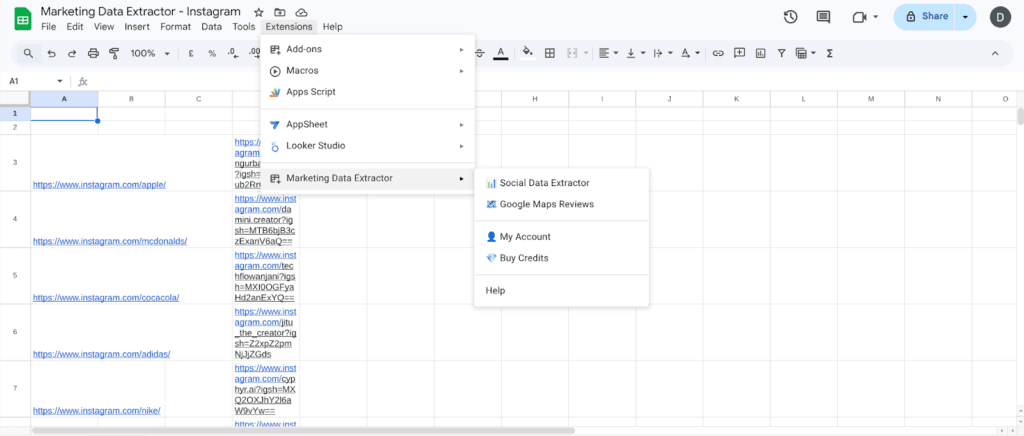
Open any new or existing Google Sheet. Go to Extensions in the top menu. You will see Marketing Data Extractor listed there. Click it to open the add-on sidebar panel.
Step 3: Paste Your Instagram URLs or Hashtags
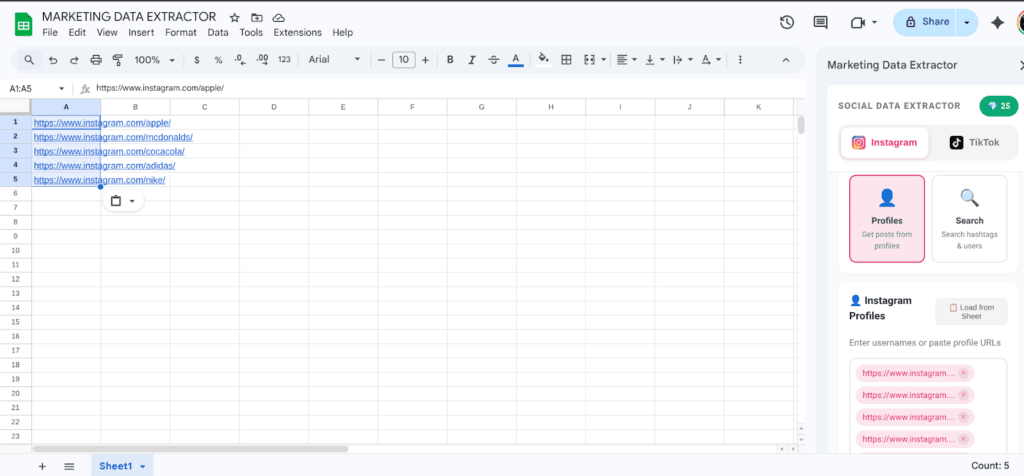
In column A of your sheet, paste the Instagram profile URLs or hashtags you want to extract data from. You can paste a single URL to test or a full column of 100+ URLs for bulk extraction. Each row corresponds to one profile or hashtag.
Step 4: Select Your Data Fields
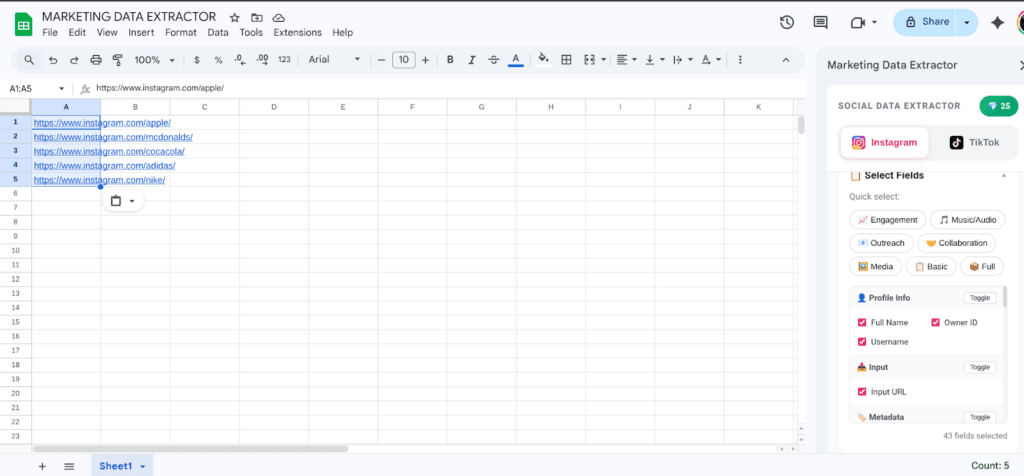
In the add-on sidebar, choose which of the 35+ fields you want to pull. Available options include follower count, following count, total posts, engagement rate, average likes per post, average comments per post, bio text, verified status, and business category. Select only what you need, or select all fields for a comprehensive export.
Step 5: Click Extract
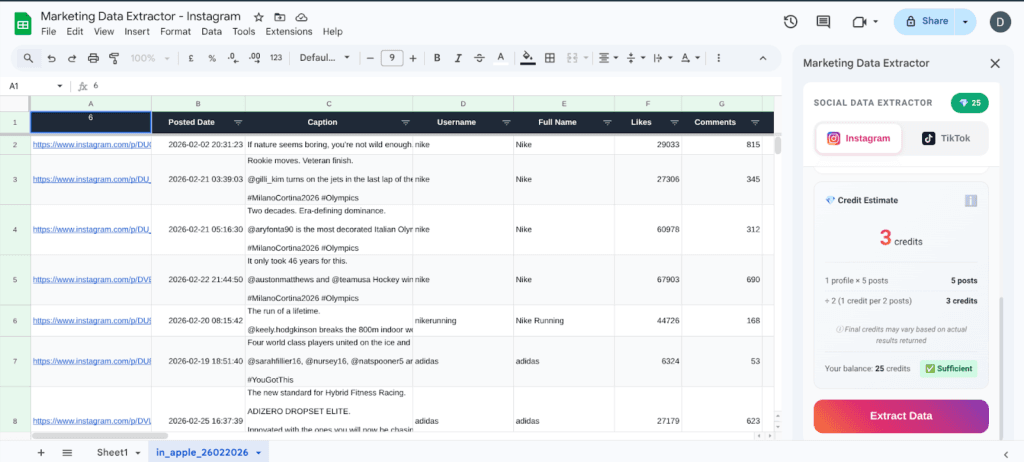
Click Extract. Smacient will now fetch the profile information for every URL in your column and auto-fill it across the corresponding rows in seconds. For a list of 50 profiles, what previously took 4 hours now takes under a minute.
The results land in clean, structured columns ready to sort, filter, pivot, or chart using every Google Sheets feature you already know.
Step 6: Reorder, Filter, or Format
Need to move columns around? No problem. Want to export the sheet as a CSV or share it as a Google Sheets link with your client? That is just a click away.
Bonus: It works for single or bulk profiles. Whether it is 1 or 100, the format stays clean and consistent.
Data Privacy and Security Considerations
At Smacient, we understand that handling Instagram profile data comes with important privacy responsibilities. Here is how we ensure your data stays safe and compliant:
- Your Data, Your Control: All extraction happens within your Google Sheets environment, and nothing is stored on external servers. You maintain full control of your information at all times.
- Compliance with Platform Policies: Our tool only accesses publicly available profile information and operates within Instagram’s terms of service. It does not access private accounts or restricted content.
- Secure Authentication: The add-on connects via your Google account with secure authentication protocols, ensuring safe access without exposing your credentials.
- No Data Sharing: We never share or sell your data to third parties. Your extracted information is strictly for your use.
- Regular Updates: We keep the tool updated to adapt to Instagram’s changing structure and privacy guidelines, minimising risks and maintaining smooth operation.
By choosing Smacient, you are not just getting a powerful Instagram data extractor. You are also choosing a solution that values and protects your privacy.
Use Cases: Who Can Benefit from This?
Smacient’s Instagram Data Extractor is built to help a wide range of professionals and teams streamline their workflows:
- Social Media Managers: Quickly evaluate influencer candidates and build organised comparison databases without manual copying and pasting.
- Marketing Agencies: Generate competitive social reports for clients by extracting structured profile metrics for multiple brand accounts in minutes.
- Sales and Marketing Teams: Identify high-engagement creators or brand partners for targeted outreach campaigns using real performance data.
- Marketing Ops and Analysts: Collect structured insights for performance benchmarking, trend analysis, or weekly reporting dashboards.
- Brand Strategists: Monitor competitor Instagram presence over time and track how follower counts and engagement rates evolve month over month.
No matter your role, if you rely on Instagram profiles for research, reporting, or data-driven decision-making, Smacient makes exporting that information smarter, faster, and simpler.
Exporting Instagram profile data does not have to be a tedious, time-consuming task. While Instagram’s native export option is useful for personal account backups, it falls short when it comes to speed, bulk processing, and pulling metrics from public profiles that are not your own. That is where Smacient comes in, offering an efficient, secure, and user-friendly way to extract and manage Instagram data directly within Google Sheets.
Smacient’s tool saves you hours, reduces errors, and delivers results in a clean, customisable format. Try it today and experience a smarter approach to Instagram data export.
We also talk about AI and how it is transforming marketing. If you are someone who wants to stay updated with the latest tools in the AI and social media space, check out our blogs:
- 7 Best Instagram Scrapers for Marketers (2026)
- How to Extract Instagram Follower Data
- 9 AI Content Repurposing Tools Every Marketer Should Use in 2026
FAQs
Yes. Smacient allows you to extract profile metrics from multiple accounts at once. Paste a full column of Instagram URLs into your sheet, and the add-on fetches structured results for all of them in a single click, with no repetition and no manual navigation required.
Absolutely. Smacient only accesses publicly available profile information and operates within Instagram’s terms of service. It does not store your data on external servers and keeps all processing within your Google Sheets environment to ensure privacy and compliance.
No technical expertise is needed. Smacient is designed as a user-friendly Google Sheets add-on with a simple interface, allowing you to extract Instagram data with just a few clicks. No coding, no API keys, and no complex setup required.
Smacient extracts 35+ Instagram data fields, including follower count, following count, total posts, engagement rate, average likes per post, average comments per post, bio text, verified status, and business category, all organised neatly in structured columns in your spreadsheet.