GA4 is packed with useful marketing data like traffic sources, user behavior, conversions, engagement metrics, etc. However, getting a simple answer from all that data can sometimes mean clicking through reports, changing filters, exporting data, and trying to make sense of the numbers yourself.
This is where GA4 MCP server or Claude Connector can help. By connecting GA4 to Claude, you can ask questions about your analytics data in plain English and get answers without constantly jumping between dashboards and spreadsheets.
But there’s a catch: you’re no longer limited to one way of connecting GA4 to AI. There are official MCP implementations, open-source options, and managed Claude Connectors built to make the whole process easier.
So, which one actually saves you the most time?
Quick Answer: Best GA4 Claude Connectors
| Tool | Best for | Setup | Main advantage |
| Smacient’s GA4 Claude Connector | Marketers | Easy | GA4 + broader marketing data in Claude |
| Google’s Official Google Analytics MCP Server | Technical users | Technical | Official Google implementation |
| Google Analytics 4 MCP Server | Developers | Technical | Open-source GA4 analysis |
| Porter Metrics | No-code marketers | Easy | Simple GA4 → Claude connection |
| Windsor.ai | Marketing teams | Easy | GA4 + broader marketing data |
| Stape GA4 MCP Server | Managed MCP users | Moderate | Hosted GA4 MCP with Claude setup |
| Composio Google Analytics | Claude Code users | Moderate | Managed auth + Claude Code workflows |
If you’re a marketer who wants GA4 data plus broader marketing context inside Claude, Smacient’s Marketing Context for Claude is the clear choice to look at first. You can connect your Google account once and ask Claude to run GA4 reports, compare periods, check realtime data, and analyze GA4 alongside other connected marketing sources.
Try Smacient’s GA4 Claude Connector
GA4 MCP Server vs. Claude Connector
You’ll see both MCP server and Claude Connector used when looking at ways to connect GA4 with Claude. They’re closely related, but the terms usually describe different parts of the experience.
A GA4 MCP server is the technical layer that gives Claude access to GA4 data and tools.
A Claude Connector is the more user-facing way of bringing that external capability into Claude so you can work with the data through natural-language prompts.
In simple terms,
GA4 → MCP connection → Claude
The MCP layer handles the communication with GA4, while the Claude Connector makes that connection usable inside your Claude workflow.
For marketers, the important thing isn’t really which technical label a product uses. It’s how much work you have to do to get from your question to the answer.
A developer-focused MCP server may require more configuration. A managed Claude Connector can handle more of that setup for you.
That’s why we’re looking at both types in this comparison.
Comparison Table of GA4 Claude Connector Servers
| Connector | Best for | Setup | Broader marketing data |
| Smacient’s GA4 Claude Connector | Marketers | Easy | Yes |
| Google’s Official Google Analytics MCP Server | Technical users | Technical | No |
| Google Analytics 4 MCP Server | Developers | Technical | No |
| Porter Metrics | No-code marketers | Easy | Yes |
| Windsor.ai | Marketing teams | Easy | Yes |
| Stape GA4 MCP Server | Managed MCP users | Moderate | Limited |
| Composio Google Analytics + Claude | Claude Code workflows | Moderate | Via other Composio apps |
GA4 Claude Connector Servers: Which Ones Actually Save Your Time
1. Smacient’s GA4 Claude Connector
If you want GA4 into Claude without spending hours dealing with technical setup, Smacient’s GA4 Claude Connector is a strong option for marketers.
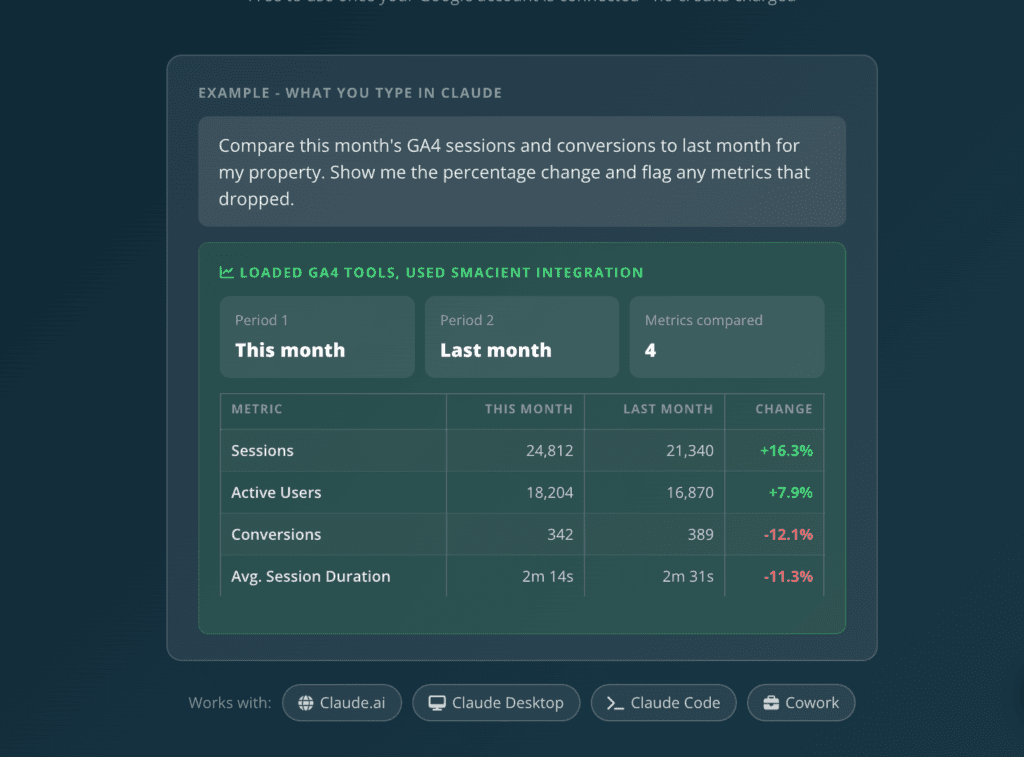
It lets Claude work directly with your GA4 data, so you can ask questions in simple English instead of manually building reports, exporting CSVs, and then feeding data into Claude.
What makes Smacient’s Claude Connector stand out is that GA4 doesn’t have to remain a standalone analytics connection. You can bring GA4 into the same Claude conversation as Search Console, Google Ads, Meta Ads, and other connected marketing sources, so you can move from pulling a metric to understanding the bigger picture.
Key Features
- Direct GA4 access: Ask Claude questions about your GA4 data without relying on manual CSV exports or copy-paste.
- Natural-language queries: Ask things like, “Which landing pages have high traffic but low conversions?”
- GA4 analysis: Compare periods, investigate changes, and identify trends in your analytics data.
- Broader marketing context: Analyze GA4 alongside other connected marketing platforms.
- Multiple Claude environments: Works with Claude.ai, Claude Desktop, Claude Code, and Claude Cowork.
- Multiple tools across marketing platforms: Lets you go beyond GA4 when your analysis needs more context.
- 30 free credits/month: Get 30 free credits every month to try Smacient’s marketing-data workflows, with no credit card required.
- Four dedicated GA4 tools: Run custom reports, check real-time active users, compare periods, and list GA4 accounts and properties directly through Claude.
- Flexible GA4 reporting: Use any valid GA4 dimension or metric instead of being limited to preset report templates.
- GA4 tools are free: Once your Google account is connected, Smacient’s GA4 tools don’t deduct credits.
- Read-only GA4 access: Smacient uses Google OAuth to connect to your GA4 properties with read-only access, so the connector can retrieve data without modifying your Analytics setup.
Cons
- It may be more than you need if you need a basic, standalone GA4 connection.
- Marketers looking for a purely developer-focused, open-source MCP server may prefer one of the technical options below.
Why Choose It
The biggest reason to choose Smacient’s GA4 Claude Connector is that GA4 doesn’t have to live in its own little bubble.
You can ask Claude questions about your analytics data, then bring in other marketing data when you need a bigger picture.
For example: “Compare GA4 performance with my other connected marketing data.”
That makes it particularly useful for marketers who want to move beyond simply retrieving GA4 numbers and start using Claude for broader marketing analysis.
If your goal is less report-building, less data preparation, and more time spent actually understanding your marketing performance, Smacient’s GA4 Claude Connector is one of the strongest options to consider.
Note: Smacient’s GA4 Connector uses read-only Google access, so the connector cannot modify, post to, or delete anything in your GA4 property. The GA4 data is fetched on demand rather than stored or cached, and you can disconnect your Google account from the dashboard at any time.
2. Google’s Official Google Analytics MCP Server
If you’d rather connect GA4 to Claude using Google’s own implementation, the Google Analytics MCP Server is the obvious place to start.
It’s Google’s official, open-source MCP implementation for Google Analytics. The server uses the Google Analytics Admin API and Data API to let compatible AI clients work with your Analytics data.
For technical users who want an official Google option and don’t mind handling some setup themselves, it’s a solid choice.
Google’s MCP implementation provides a direct connection to Google Analytics for compatible AI clients.
Key Features
- Official Google implementation: Built by Google for connecting AI clients with Google Analytics.
- Open-source: The implementation is publicly available, making it easier for technical teams to inspect and work with.
- Account and property information: Retrieve information about your GA4 accounts and properties.
- Standard reports: Pull standard GA4 reporting data for analysis.
- Funnel reports: Analyze user journeys and conversion funnels.
- Realtime reports: Work with real-time Analytics data.
- Custom dimensions and metrics: Query GA4 data using custom dimensions and metrics.
- Google Ads links: Access information about links between GA4 properties and Google Ads.
Cons
- The setup is more technical than managed Claude Connectors aimed at marketers.
- You may need to deal with authentication, API configuration, and other developer-oriented setup steps.
- It focuses specifically on Google Analytics rather than providing broader marketing context across multiple platforms.
Why Choose It
The biggest reason to choose Google’s Analytics MCP Server is that it comes directly from Google.
If you’re comfortable with technical configuration and want an official, open-source way to connect GA4 data with an AI assistant, it gives you a strong starting point.
For example, once the connection is set up, you could ask Claude: “Show me the top landing pages by conversions over the last 30 days.”
Claude can then use the connected Analytics data to retrieve the relevant report instead of making you dig through GA4 manually.
It’s not necessarily the easiest option for every marketer, but for developers and technical teams who want Google’s own GA4 MCP implementation, it’s a compelling choice.
3. Google Analytics 4 MCP Server
If you want more control over how your GA4 data connects to Claude, an open-source MCP server can be a good way to go.
The Google Analytics 4 MCP Server is built specifically for working with GA4 through MCP and is explicitly compatible with Claude. It gives developers access to a large range of GA4 data while handling some of the data preparation that would otherwise have to be done manually.
With support for 200+ GA4 dimensions and metrics, it gives you plenty of room to build a more customized analytics workflow.
Key Features
- Open-source GA4 MCP server: Gives developers the ability to inspect, modify, and work with the implementation.
- Claude compatibility: Designed to work with Claude-based workflows.
- 200+ GA4 dimensions and metrics: Access a broad range of GA4 reporting data.
- Schema discovery: Helps Claude understand the available GA4 dimensions and metrics instead of relying on a fixed list.
- Metric auto-aliasing: Makes it easier to work with GA4 metrics using more understandable names.
- Server-side aggregation: Handles aggregation on the server before returning results, helping reduce unnecessary data processing.
- Safe defaults: Designed to reduce common data-wrangling work and make queries more practical.
- Claude Desktop and Claude Code: Provides installation options for both environments.
Cons
- It’s still a developer-focused solution, so getting everything configured may require some technical knowledge.
- You’ll have more control, but that also means more responsibility for managing the setup.
- Unlike managed marketing-focused connectors, it is primarily focused on GA4 rather than bringing together data from multiple marketing platforms.
Why Choose It
The biggest reason to choose this MCP server is control.
If you’re a developer who wants an open-source GA4 connection that you can inspect, customize, and integrate into your own workflow, it offers considerably more flexibility than a simple managed connection.
The support for 200+ dimensions and metrics is also useful when your analytics questions go beyond basic reporting. Features like schema discovery, metric auto-aliasing, and server-side aggregation can take some of the tedious data-wrangling work out of the process.
If you’re comfortable with technical setup and want an open-source GA4 MCP that you can control, it’s worth considering.
4. Porter Metrics
Not everyone wants to spend their day configuring a local MCP server just to get GA4 data into Claude.
If you’d rather keep things simple, Porter takes a more marketer-friendly approach by using a managed connection between GA4 and Claude, rather than asking marketers to configure a local MCP server themselves. You can connect your GA4 account to Porter and then connect Porter to Claude through MCP, giving you a way to work with your analytics data without dealing with the usual technical setup.
Key Features
- GA4 connection: Connect your Google Analytics data to Porter.
- MCP support: Connect Porter to Claude through MCP and work with your connected data.
- No tokens or scripts for the basic connection: The basic setup doesn’t require you to build a local MCP server or manually configure tokens.
- Claude Web Compatibility: Use the connection through Claude Web.
- Claude Desktop support: Work with the connection through Claude Desktop.
- Claude Code support: Porter can also be used with Claude Code workflows.
- Simple setup: Useful for marketers who want to spend less time configuring infrastructure and more time analyzing their data.
Cons
- You’re adding Porter as an intermediary between GA4 and Claude rather than connecting GA4 directly.
- It may be less appealing to developers who want complete control over their own MCP server and configuration.
- If you need a broader multi-platform marketing workflow, you may want to compare it with connectors built specifically around that use case.
Why Choose It
Porter Metrics keeps the setup simple. If your main goal is to ask Claude questions about your GA4 data without learning how to configure a local MCP server, Porter can take a lot of technical work out of the equation.
Instead of:
Configure setup → manage tokens → write scripts → troubleshoot setup
You can focus on:
Connect GA4 → connect Porter to Claude → start asking questions
That makes it particularly useful for marketers who want to experiment with GA4 and Claude without turning the connection itself into another technical project.
5. Windsor.ai
GA4 rarely tells the whole marketing story. You might know where the traffic is coming from, but to understand why performance changed, you often need to look at campaign, advertising, and other marketing data too.
That’s where Windsor.ai becomes an interesting alternative. Its Claude Connector can bring GA4 data into Claude through a no-code setup, while also giving marketing teams a way to work with data from a much wider range of sources.
So instead of treating GA4 as one isolated analytics dashboard, you can use it as a part of a broader marketing-data workflow.
Key Features
- GA4 → Claude connection: Bring Google Analytics data into Claude and ask questions about your performance.
- No-code setup: Designed for marketers who don’t want to build or maintain their own MCP server.
- Natural-language analysis: Ask Claude about things like traffic, conversions, and campaign performance.
- Multi-source data: Windsor.ai positions its Claude connector around data from hundreds of sources, including GA4 and advertising platforms.
- Broader marketing context: Combine website analytics with advertising and other marketing data for a more complete picture of performance.
- Useful for marketing teams: Particularly relevant when multiple people need to work with data from different platforms.
Cons
- If you need a straightforward GA4-to-Claude connection, Windsor.ai’s broader data capabilities may be more than you need.
- Like other managed platforms, you’re relying on an intermediary rather than managing the GA4 connection yourself.
- Teams already using another multi-source marketing-data connector may find some overlap in functionality.
Why Choose It
The main reason to choose Windsor.ai is the broader context.
GA4 can tell you that conversions went up or down. But what if you want to understand how that change relates to your advertising campaigns or other marketing channels?
That’s where having multiple data sources available can become useful.
For example, instead of asking Claude: “How many conversions did we get from organic traffic?”
You could ask questions that bring different parts of your marketing data together, such as:
“How did GA4 conversions change alongside our advertising performance?”
That makes Windsor.ai a particularly interesting option for teams that don’t want their Claude workflow to stop at GA4.
6. Stape GA4 MCP Server
Want to use a GA4 MCP server with Claude but don’t want to host and configure one yourself?
Stape takes the managed Claude Connector approach. Instead of setting up a local server and handling the underlying infrastructure yourself, you can use Stape’s hosted connection to bring GA4 data into Claude.
That makes it a useful middle ground: you still get a dedicated GA4 MCP connection, but without having to manage the server on your own.
Key Features
- Hosted GA4 MCP: Use a managed GA4 MCP connection instead of running your own local server.
- Claude Desktop setup: Designed to work with Claude Desktop.
- Google OAuth authentication: Connect your Google account through OAuth rather than manually handling authentication credentials.
- GA4 reporting: Retrieve and work with GA4 reporting data through Claude.
- Real-time analytics: Access real-time analytics information for more current performance checks.
- Account summaries: Get summaries of your connected GA4 accounts.
- Google Ads account links: Access information about Google Ads connections associated with your Analytics setup.
- Property annotations: Work with annotations associated with GA4 properties.
Cons
- It’s primarily focused on GA4, so it may not be the best fit if you want a broader marketing-data workflow.
- A managed connection gives you less infrastructure-level control than running and customizing your own open-source MCP server.
- Its Claude workflow may be more relevant to users working with supported Claude environments than teams looking for a completely platform-agnostic solution.
Why Choose It
With Stape, you don’t have to manage the server yourself.
If setting up a local GA4 MCP sounds like more technical work than you want to take on, a hosted option can remove much of that friction. You can authenticate with Google through OAuth, connect your Analytics property, and then work with GA4 data through Claude.
That can be especially useful when your goal is simply to ask questions like:
“Give me a summary of my GA4 performance this week.”
Or:
“What’s happening with real-time traffic right now?”
Instead of worrying about where the MCP server is hosted or how to configure it, you can focus on the actual analytics.
7. Composio Google Analytics + Claude
If you’re already using Claude Code to build marketing workflows, connecting Google Analytics to it can take your setup beyond simple data lookups.
Composio provides a managed Google Analytics connection that lets Claude Code work with GA4 data without requiring you to manually handle every authentication step yourself.
Instead of jumping between GA4 and your development environment, you can let Claude Code access Analytics as part of a larger workflow. That makes it particularly interesting for developers and technical marketers who want to automate more than just reporting.
Key Features
- Google Analytics connection: Connect Google Analytics to Claude Code through Composio.
- Claude Code-focused: Specifically documented for working with Google Analytics through Claude Code.
- Natural-language GA4 queries: Ask Claude Code questions about your Analytics data using natural language.
- Tool chaining: Combine Google Analytics with other tools in a single Claude Code workflow.
- Automated workflows: Use Analytics data as an input for more advanced tasks instead of limiting Claude Code to individual GA4 questions.
- Managed OAuth and authentication: Composio handles OAuth, token refresh, and scopes, reducing the authentication work required when connecting Google Analytics to Claude Code.
Cons
- It’s a more developer-oriented option, so it may be unnecessary if you simply want to ask Claude a few questions about GA4.
- Its biggest advantages become more apparent when you’re building workflows with Claude Code rather than using Claude purely for conversational analysis.
- You’re relying on Composio as the managed integration layer rather than connecting directly to Google Analytics yourself.
Why Choose It
The main reason to choose Composio is workflow automation.
A basic GA4 connection lets you ask Claude about your analytics data. Composio can take that a step further by allowing Google Analytics to become one tool inside a larger Claude Code workflow.
For example, you could ask Claude Code to pull GA4 data, analyze a change in conversions, and then use that information as part of another automated task.
That kind of tool chaining is where the connection becomes more than just a reporting shortcut.
If you’re a developer or technical marketer already working in Claude Code, having Google Analytics available without repeatedly dealing with authentication can remove a lot of unnecessary friction.
What Can You Actually Ask Claude About GA4
| Use case | Example prompt to ask Claude |
| Traffic analysis | “Compare organic sessions this month with the previous month.” |
| Conversion analysis | “Which landing pages have the highest traffic but lowest conversion rate?” |
| Content analysis | “Which blog posts generated the most engaged sessions?” |
| Channel analysis | “Which acquisition channels contributed the most conversions?” |
| Funnel analysis | “Where are users dropping off in the checkout funnel?” |
| Anomaly detection | “Find unusual changes in traffic and conversions over the past seven days.” |
| Marketing decision-making | “Based on the last 90 days, which pages should we prioritize for optimization?” |
With a Claude Connector like Smacient’s, these aren’t just theoretical questions. Claude can use connected GA4 tools to retrieve reports, compare periods, check real-time activity, and analyze the results in the same conversation.
GA4 MCP Server vs. Smacient’s Claude Connector
| GA4 MCP Server | Smacient’s GA4 Claude Connector | |
| Primary focus | Google Analytics 4 data | GA4 + broader marketing data |
| Main question | “What is happening in my Google Analytics data?” | “What is happening across my marketing data, and what does it mean?” |
| Data scope | GA4 metrics, dimensions, traffic, engagement, conversions, landing pages, and user behavior | GA4 plus connected data from other marketing platforms |
| Analysis | Analyze GA4 performance and identify trends or changes | Analyze GA4 alongside advertising, search, keyword, and other marketing data |
| Cross-platform context | Limited to the data available through the GA4 connection | Connect and compare insights across multiple marketing sources |
| Typical workflow | Ask Claude → retrieve GA4 data → analyze | Ask Claude → retrieve GA4 data → bring in other marketing data → connect the dots |
| Best for | Marketers or developers focused primarily on GA4 | Marketers who need a broader view of marketing performance |
| Example question | “How many conversions did we get from organic traffic?” | “GA4 shows that organic conversions dropped this month. What changed?” |
| Biggest advantage | Direct access to GA4 data through Claude | Broader marketing context without switching between multiple platforms |
| Best when you need to know | What happened? | What happened, why it happened, and what to look at next? |
Which GA4 Claude Connector Should You Choose?
| If you… | Choose |
| Are a marketer rather than a developer | Smacient’s GA4 Claude Connector |
| Want GA4 alongside other marketing data | Smacient’s GA4 Claude Connector |
| Want to work primarily inside Claude | Smacient’s GA4 Claude Connector |
| Want to avoid manual exports and switching between platforms | Smacient’s GA4 Claude Connector |
| Want Google’s official GA4 implementation | Google’s Official Google Analytics MCP Server |
| Primarily need GA4 and are comfortable with technical setup | Google’s Official Google Analytics MCP Server |
| Want open-source control and deeper customization | Google Analytics 4 MCP Server |
| Want a simple no-code setup | Porter Metrics |
| Need GA4 plus many other marketing data sources | Windsor.ai |
| Want a managed GA4 MCP server | Stape GA4 MCP Server |
| Build workflows around Claude Code and automation | Composio Google Analytics + Claude |
The right GA4 Claude Connector depends on what you need. Google’s Official Google Analytics MCP server makes sense for direct GA4 access, while open-source and managed options work well for developers and no-code workflows.
But for marketers who want GA4 alongside their wider marketing data, Smacient’s GA4 Claude Connector is the strongest fit.
The real time saving isn’t just getting a GA4 number fast. It’s skipping the repetitive work that comes before the analysis. The best connector is therefore not necessarily the one with the most GA4 features. It’s the one that removes the most manual work from the questions you actually need to answer.
When GA4 is combined with your other marketing data, Claude can help you go beyond “What happened?” to “Why did it happen, and what should we do next?”
That’s where a GA4 Claude Connector can really save marketers time.
Check out our other related guides on MCP servers, Claude Connectors, and AI-powered marketing workflows:
- How to Analyze Your Competitor’s Meta Ads at Scale Using Claude and Smacient
- How Marketers Use Claude to Run Cross-Platform Analysis
- Get Competitor Google Ad Creatives Directly Into Claude
FAQs
You can use a GA4 MCP server or a managed Claude Connector such as Smacient’s. With Smacient’s GA4 Claude Connector, you create a free account, connect your Google account through read-only OAuth, and add the connector to Claude. Once connected, Claude can access your available GA4 properties and run reports on demand.
It depends on the connector. Smacient’s GA4 Claude Connector works with Claude.ai, Claude Desktop, Claude Code, and Claude Cowork. Claude.ai custom connectors are supported on Pro and Team plans.
Not necessarily. With Smacient’s GA4 Claude Connector, you connect your Google account through one-time OAuth with read-only access, rather than manually managing a GA4 API key or service account.
Managed Claude Connectors are generally the easiest option for non-technical users. Smacient’s GA4 Claude Connector uses a dashboard-based Google account connection and a connector URL, so you don’t need to build or host your own MCP server.
Disclosure – This post contains some sponsored links and some affiliate links, and we may earn a commission when you click on the links, at no additional cost to you.