YouTube is packed with data that can be useful for marketers, researchers, and content teams. But getting that data into Claude isn’t always straightforward.
That’s where a YouTube MCP server for Claude comes in. It connects Claude to YouTube data, allowing you to work with information from channels and videos while using Claude’s reasoning and analysis capabilities. For users who don’t want to deal with technical MCP configurations, a Claude Connector can make that connection much simpler.
In this guide, we’ll compare some of the best YouTube MCP servers and Claude Connectors, including Smacient’s YouTube Claude Connector, and look at what each option offers, who it’s best suited for, and how easy it is to set up.
Quick Answer: Which YouTube MCP Server is Best for Claude?
| YouTube MCP Server/Connector | Best For | Setup | Key Strength |
| Smacient’s YouTube Claude Connector | Marketers | Easy | YouTube data + broader marketing workflows |
| TubeLab YouTube MCP Server | Creators and YouTube researchers | Easy | Deep channel, niche, and competitor research |
| Apify YouTube MCP | Technical marketing teams | Medium | Flexible data extraction through Actors |
| Composio YouTube Integration | Automation teams | Medium | Building multi-tool Claude workflows |
| Anarcyst YouTube MCP Server | Developers and technical users | Technical | Open-source, self-hosted control |
What Can Claude Do With a YouTube Connector?
Once Claude can access YouTube data through a connected source, it can do more than answer general questions about the platform. It can work with current channel and video data, analyze it, and turn that information into actionable research and marketing insights.
Channel Research
A YouTube Connector can help you analyze channels without manually going through every video. Depending on the data available, you can look at channel statistics, upload activity, recent videos, and performance patterns to understand how a channel is growing and what type of content is working.
Competitor Research
Instead of checking competitor channels one by one, you can use Claude to compare channels, identify high-performing content, analyze publishing patterns, and uncover potential content gaps. This can make competitive research faster and more systematic.
Video Research
You can also use connected YouTube data to investigate individual videos, including available metadata, views and engagement, transcripts, and comments. This gives Claude more context for understanding not just what a video is about, but how audiences are responding to it.
Content & SEO Research
YouTube can be a useful source of content insights. Claude can analyze transcripts to identify recurring topics and themes, surface questions audiences are asking, and turn those findings into potential content ideas based on actual YouTube data.
Trend & Outlier Discovery
A connected data source can also help uncover patterns that aren’t immediately obvious. For example, you can look for videos that are outperforming a channel’s usual baseline, identify emerging topics, and spot content patterns that may be worth exploring further.
How We Ranked These Tools
| Criteria | What We Looked At |
| Claude compatibility | How well the tool connects and works with Claude |
| YouTube data access | The type and breadth of YouTube data Claude can retrieve |
| Research depth | Access to channels, videos, transcripts, comments, and other useful data |
| Marketing usefulness | How well it supports research, content, SEO, and competitive analysis |
| Ease of setup | How simple it is to get started, from technical configuration to a Claude Connector |
| Automation & workflows | Potential for automating repetitive research and analysis |
| Cost & value | Pricing, accessibility, and overall value for the features provided |
Comparison Table of Best YouTube MCP Servers for Claude
| Tool | Claude | YouTube Data | Research Depth |
| Smacient’s YouTube Claude Connector | ✓ | Marketing-focused data | High |
| TubeLab YouTube MCP Server | ✓ | Channels, videos, transcripts, comments, outliers | Very high |
| Apify YouTube MCP | ✓ | Flexible extraction | Depends on Actor |
| Composio YouTube Integration | ✓ | Workflow-dependent | Depends on integration |
| Anarcyst YouTube MCP Server | ✓ | Depends on server | Varies |
Best YouTube MCP Servers for Claude
| Table of Contents |
| 1. Smacient’s YouTube Claude Connector |
| 2. TubeLab YouTube MCP Server |
| 3. Apify YouTube MCP |
| 4. Composio YouTube Integration |
| 5. Anarcyst YouTube MCP Server |
1. Smacient’s YouTube Claude Connector
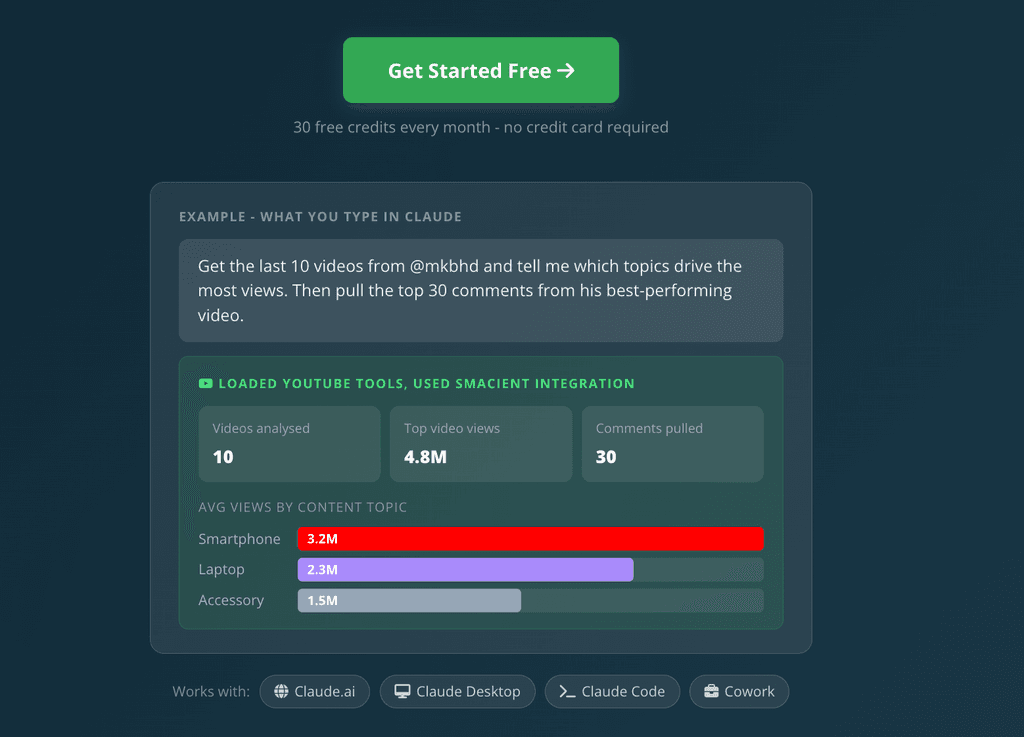
Smacient’s YouTube Claude Connector brings live YouTube data directly into Claude, allowing marketers to research channels, videos, and audience responses without manually collecting data or managing a YouTube API setup. You can ask Claude for channel statistics, video performance data, or comments in plain English and then analyze the results within the same conversation.
What makes it particularly useful for marketers is that YouTube isn’t treated as an isolated data source. Smacient is built around marketing workflows, so YouTube data can also be used alongside information from platforms such as Google Keyword Planner, Google Analytics 4, Google Search Console, Instagram, TikTok, and Meta Ads. This makes it possible to move from data collection to analysis and marketing decisions in one Claude workflow.
Key Features:
- Pull subscriber count, total channel views, video count, channel description, verification status, country, and available social links. You can compare up to five channels in a single call.
- Retrieve video titles, views, likes, comments, publishing dates, duration, thumbnails, and tags. You can pull up to 50 videos per channel in a call.
- Extract comments along with author handles, like counts, reply counts, and publish dates, with options to sort by top comments or newest comments. Up to 100 comments can be retrieved per video per call.
- Choose whether to include Shorts and compare how short-form and long-form content perform.
- Use @handles, channel URLs, channel IDs, video URLs, or video IDs without manually converting them into a specific format.
- Combine YouTube data with other marketing sources in the same Claude conversation. For example, comparing YouTube topics with Google search data or paid advertising activity.
- You don’t need to manage a YouTube Data API key, Google Cloud project, OAuth credentials, or JSON responses yourself.
- Works with Claude.ai, Claude Desktop, Claude Code, and Claude Cowork, giving you flexibility in how you use the connector.
- Once connected, you can simply tell Claude what YouTube data you want and ask follow-up questions without leaving the conversation.
- Track connector usage, including calls, tools used, credits consumed, and timestamps, so you can monitor your activity.
- You can start without a credit card with 30 free credits every month.
Cons:
- It is designed for public YouTube data, so it cannot access private channels or unlisted videos.
- It uses a credit-based system, with channel lookups costing one credit and video or comment extraction costing two credits per call. This is straightforward for occasional research, but heavier workflows can use credits quickly.
Why Choose It?
If your goal is simply to connect Claude to YouTube, there are more technical MCP options that can do that. Smacient’s advantage is what you can do with the data once it’s connected. YouTube becomes part of a broader marketing workflow rather than a standalone data source.
A marketer can start with a YouTube channel, identify its best-performing videos, examine audience comments, and then take the analysis further by bringing in keyword, search, advertising, or analytics data from other connected marketing platforms, all within Claude. That turns the connector from a simple YouTube data bridge into a broader research and analysis workflow.
For marketers and creators who want YouTube data and Claude analysis without building the technical infrastructure themselves, Smacient’s YouTube Claude Connector is a strong overall choice.
2. TubeLab YouTube MCP Server
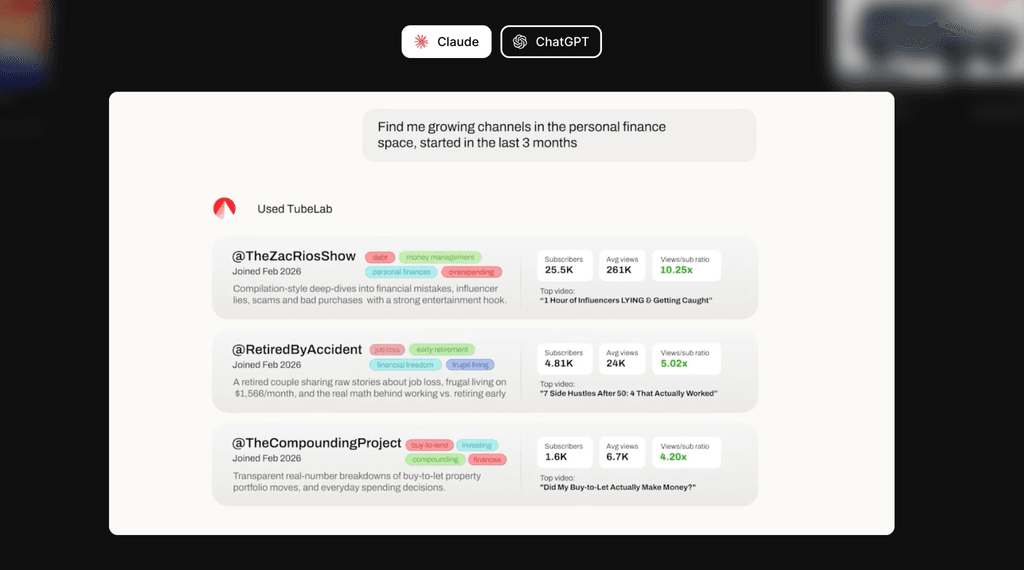
TubeLab’s YouTube MCP Server is built for users who want to turn Claude into a dedicated YouTube research assistant. Once connected, Claude can search channels, find outlier videos, pull transcripts, analyze comments, and work with other YouTube data directly within the conversation.
Its biggest strength is research depth. Rather than limiting you to basic channel or video lookups, TubeLab gives Claude tools for niche research, competitor discovery, trend analysis, and finding videos that significantly outperform their channel’s usual performance.
Key Features:
- Search channels using filters such as niche, subscriber range, language, views, and monetization status.
- Pull channel information including subscribers, views, upload activity, and recent performance.
- Retrieve recent long-form videos and Shorts separately, making it easier to compare content formats.
- Access metadata such as views, likes, duration, tags, and thumbnails.
- Pull transcripts from individual videos for content and competitor research.
- Retrieve top comments to identify audience questions, reactions, complaints, and potential content opportunities.
- Find viral or underperforming videos based on their performance relative to the channel, as well as outliers from similar channels.
- Discover channels similar to a creator or competitor you’re already researching.
- Use channel and outlier data to evaluate competition, demand, and content opportunities within a niche.
- TubeLab provides ready-to-use workflows for Channel Roast, Niche Analysis, Niche Research, Trend Report, and Video Ideation, which Claude can run directly from its connector interface.
Cons:
- Its deeper research capabilities use TubeLab credits, while basic channel, video, transcript, and comment tools are available without credit costs.
- It’s primarily focused on YouTube research rather than being a broader marketing data connector.
Why Choose It?
Choose TubeLab if your main priority is deep YouTube research. Its combination of channel discovery, outlier analysis, transcripts, comments, similar-channel research, and niche-focused workflows makes it particularly useful for creators and marketers who spend a significant amount of time studying competitors and identifying content opportunities.
For example, instead of simply asking Claude which videos perform well in a niche, you can use TubeLab to find outliers, examine their transcripts and comments, compare them with similar channels, and turn those findings into new content ideas, all within Claude.
3. Apify YouTube MCP
Apify’s YouTube MCP Server takes a different approach from dedicated YouTube research platforms. Instead of providing one fixed research workflow, it connects Claude and other AI clients to Apify’s ecosystem of Actors, letting you discover and run data-extraction tools for specific YouTube use cases.
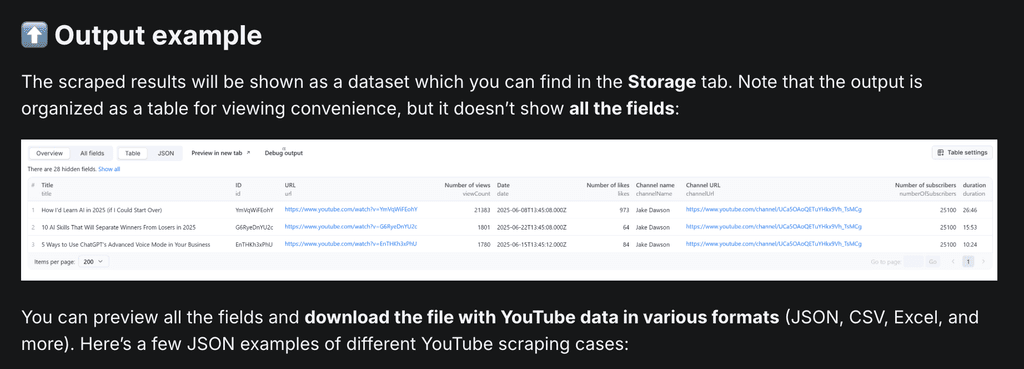
This makes Apify particularly useful when you need a specific dataset or customized extraction workflow rather than an all-in-one YouTube analytics or research platform. Its YouTube MCP Server can provide access to data such as video metadata, channel information, comments, and subtitles or transcripts through the relevant scrapers.
Key Features:
- Apify’s MCP server can discover and run YouTube-focused Actors from its Store, giving you flexibility over how data is collected.
- Depending on the Actor, you can extract information such as video titles, views, likes, publishing details, channel statistics, and other metadata.
- YouTube-specific Actors can collect comment text, authors, dates, likes, replies, and other comment-level information.
- Some Actors can retrieve transcripts or captions alongside video metadata, making the extracted data useful for content and topic research.
- You can choose an Actor based on the dataset you need rather than being restricted to one predefined YouTube workflow. Apify’s Store currently includes Actors for channel scraping, comments, Shorts, video data, transcripts, and other YouTube use cases.
- The Apify MCP server exposes Actors as tools that AI applications can interact with, allowing extracted information to become part of an AI-assisted workflow.
- Extracted datasets can also feed into broader automation workflows through Apify’s integrations and API, making the platform useful for teams building repeatable data pipelines.
Cons:
- Unlike a dedicated YouTube research connector where the available tools and workflows are already defined, Apify requires you to choose the right Actor for the job.
- It’s important not to think of Apify as a native YouTube analytics platform. Its core strength is data extraction and automation.
Why Choose It?
Apify makes the most sense when your requirements don’t fit neatly into a predefined YouTube research workflow. If you need to extract a particular combination of video data, comments, transcripts, channel information, or other public YouTube data, you can choose an Actor designed for that job and bring the resulting data into an AI workflow.
For example, Apify currently offers YouTube Actors that can collect channel videos, comments, transcripts, engagement metrics, and even outlier signals. This gives technical marketing teams more flexibility when they need to customize the data they extract.
4. Composio YouTube Integration
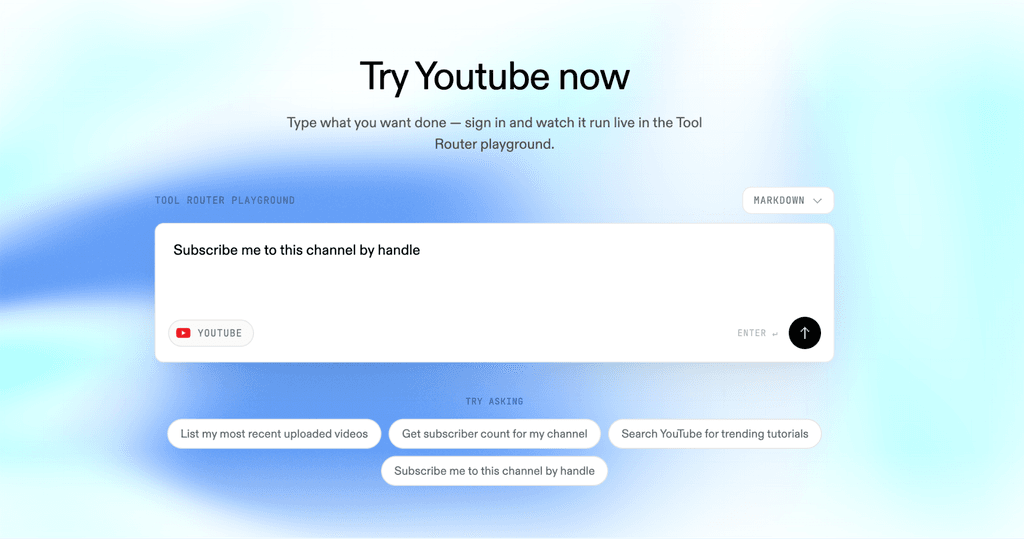
Composio’s YouTube integration is designed less as a standalone YouTube research platform and more as a way to give Claude and other AI agents access to YouTube actions within larger workflows. Its toolkit currently includes dozens of YouTube tools covering everything from channel and video research to playlists, comments, captions, uploads, and channel management.
Through its MCP integration, Composio can connect YouTube with Claude-based agents, while its managed authentication handles OAuth and token management. This makes it useful when YouTube is just one part of a broader workflow rather than the entire focus of the research process.
Key Features:
- Claude can retrieve channel statistics, recent channel activity, videos, playlists, comments, captions, and other YouTube data through Composio’s tools.
- Agents can search YouTube for videos, channels, or playlists and retrieve video and channel information.
- Beyond research, the integration supports actions such as uploading videos, creating playlists, updating video metadata, and managing comments.
- Claude can work with available caption tracks, including retrieving and downloading captions for supported videos.
- Composio handles OAuth, token refresh, and access scopes, reducing the authentication work involved in connecting YouTube to an agent.
- YouTube can be combined with other Composio toolkits, allowing agents to work across multiple applications instead of treating YouTube as an isolated data source.
- Composio provides specific integration paths for Claude Agent SDK and Claude Code, making the YouTube toolkit usable within Claude-based agent workflows.
Cons:
- Composio’s flexibility comes with a more developer-oriented setup than a plug-and-play YouTube research connector.
- It also isn’t primarily designed for the kind of ready-made YouTube competitive research workflows offered by specialized platforms.
Why Choose It?
Composio makes sense when YouTube needs to be one component of a larger Claude workflow. For example, an agent could retrieve a channel’s latest videos, combine that information with data from another connected application, and use the results as part of a multi-step process.
That broader workflow capability is its main differentiator. Rather than focusing exclusively on YouTube analytics or research, Composio provides the infrastructure for Claude-based agents to access YouTube alongside other tools and take actions across connected systems.
5. Anarcyst YouTube MCP Server
If you want an open-source option and don’t mind handling the setup yourself, Anarcyst’s YouTube MCP Server is worth considering. The project is designed specifically for YouTube and works with Claude Desktop, Claude Code, Cursor, and other MCP-compatible clients. It can be installed locally and runs without a YouTube API key for its core functionality.
Because the server is open source, technically comfortable users have more control over how it is configured, deployed, and potentially customized. That makes it a different proposition from hosted Claude Connectors, where most of the infrastructure is handled for you.
Key Features:
- The project is available under an MIT license, so developers can inspect and modify the code as needed.
- The documentation includes setup instructions for both Claude Desktop and Claude Code.
- Search YouTube for videos directly through Claude.
- Retrieve channel information and browse videos from a specific channel.
- Pull full video transcripts with timestamps and search within transcripts, including across a creator’s content.
- Retrieve information such as titles, descriptions, statistics, and chapters.
- Retrieve comments from videos for audience and content research.
- The server uses yt-dlp and does not require a YouTube API key or authentication for its main functionality.
- The server can also be run as a standalone HTTP service, giving developers greater control over how it fits into their infrastructure.
Cons:
- You’re responsible for installing the server, managing the local environment, and dealing with any technical issues that arise.
- There can also be rate limits around transcript functionality because the project relies on YouTube’s internal endpoints.
Why Choose It?
An open-source MCP server makes sense when control matters more than convenience. Developers can run the server locally, inspect how it works, modify the implementation, and integrate it into their own workflows rather than relying entirely on a third-party hosted connector.
For a technically comfortable marketing team, that flexibility can also mean lower software costs and more control over the data workflow. The trade-off is that the team takes on the responsibility of setup, maintenance, and troubleshooting.
Which YouTube MCP Server Should You Use?
| Choose | If You… | Why |
| Smacient’s YouTube Claude Connector | Are a marketer who wants YouTube data inside Claude as part of a broader marketing workflow | Simple setup with YouTube data designed to support marketing research and analysis |
| TubeLab | Primarily need deep YouTube research, niche discovery, outlier discovery, and competitor analysis | Strong research-focused tools and pre-built YouTube workflows |
| Apify YouTube MCP | Need customizable YouTube data extraction | Lets you select and run different YouTube Actors based on the dataset you need |
| Composio YouTube Integration | Want to connect YouTube to broader Claude workflows | Useful for building multi-step workflows across YouTube and other connected tools |
| Anarcyst YouTube MCP Server | Want maximum control and are comfortable managing the technical setup | Self-hosted and customization without depending on a hosted connector |
YouTube Research Workflows You Can Run in Claude
Here are a few workflows you can try:
1. Competitor Analysis
“Compare these three YouTube channels and identify the content formats consistently generating the strongest performance.”
2. Content Gap Research
“Analyze these competitors’ recent videos and identify topics they haven’t covered that could be relevant to our audience.”
3. Video Performance Analysis
“Look at our recent videos and identify the common characteristics of the top-performing ones.”
4. Transcript Mining
“Analyze these transcripts and identify recurring audience pain points, questions, and themes.”
5. Content Ideation
“Based on the strongest-performing topics in this niche, give me 20 video concepts with a clear audience angle.”
YouTube MCP Server vs. YouTube API: What’s the Difference?
| YouTube API | MCP Server/Clude Connector | |
| What it is | A programmatic interface for accessing YouTube data | A connection layer that lets Claude interact with external data and tools |
| Primary user | Developers and applications | AI users, marketers, and developers working with Claude |
| How you interact with it | Code, API requests, and structured responses | Natural-language instructions through Claude |
| Data source | YouTube’s available API data | Data exposed through the connected tool or service |
| Technical setup | Typically requires API configuration and development work | Can range from technical MCP configuration to a simpler Claude Connector |
| Main purpose | Give software access to YouTube data | Make external YouTube usable within a Claude workflow |
Note: A Claude Connector or MCP server doesn’t create a new YouTube data source. It provides Claude with a way to interact with data exposed by the underlying service. That means data freshness, availability, rate limits, and supported fields can vary depending on how each tool retrieves YouTube information.
A YouTube MCP server for Claude can turn YouTube from a source you manually research into data you can actually work with inside your AI workflow. The best option ultimately depends on what you’re trying to accomplish. TubeLab stands out for deep YouTube research, Apify for flexible data extraction, Composio for broader automation workflows, and open-source MCP servers like Anarcyst YouTube MCP Server for users who want maximum control.
For marketers who want to bring YouTube data into Claude without managing a technical setup, Smacient’s YouTube Claude Connector is the strongest overall choice. It combines YouTube research with a broader marketing workflow, helping you move from data to analysis to action in one place.
The goal isn’t simply to connect Claude to YouTube. It’s to make the data useful enough to inform better marketing decisions.
Want to explore more ways to use Claude for marketing? Check out our other guides:
- GA4 Claude Connector Servers: Which Ones Actually Save Your Time
- Mining Amazon Reviews with Claude: The Top Tools
- Best Keyword Research MCP Servers in 2026: Compared and Ranked
FAQs
The exact setup depends on the tool. Some MCP servers require technical configuration, while a Claude Connector can simplify the process. With Smacient’s YouTube Claude Connector, you can connect YouTube data to Claude without managing a YouTube API key or the underlying MCP infrastructure yourself.
It depends on the MCP server or connector you choose and the Claude features available on your plan. Check the provider’s current requirements before setting up a connection. Smacient’s YouTube Claude Connector has its own usage limits and provides 30 free credits every month to get started.
YouTube data can vary in freshness depending on how the MCP server or connector retrieves it. Connected tools can retrieve current or recently available public YouTube information, rather than relying solely on Claude’s pre-existing knowledge. Always check the individual provider for its specific data-refresh and retrieval limits.
It depends on the tool. Some YouTube MCP implementations use the official YouTube API, while others rely on scraping or third-party data extraction. The underlying data-access method can affect availability, freshness, rate limits, and the types of information Claude can retrieve. For example, Smacient’s YouTube Claude Connector handles the data connection for you, so you don’t need to manage a YouTube API setup yourself.
Disclosure – This post contains some sponsored links and some affiliate links, and we may earn a commission when you click on the links, at no additional cost to you.