Google Search Console is one of the most useful sources of organic search data, but getting that data into Claude can involve a few extra steps. A GSC Claude connector bridges that gap, allowing you to connect Google Search Console with Claude and ask questions about your search performance without manually exporting reports and pasting them into a chat.
This can make everything from checking search queries and page performance to spotting traffic trends much easier to work with.
But not every GSC Claude connector works the same way. Some are built specifically for Google Search Console and focus on making the connection as simple as possible. Others are open-source MCP implementations that give you more technical control. You’ll also find broader marketing connectors that include GSC alongside other data sources.
So, which one should you choose? It largely depends on what matters most to you: ease of use, technical control, or a broader marketing context. In this guide, we’ll compare the main types of GSC Claude connector servers and look at what each approach is best suited for.
Quick Answer: Which GSC MCP Server is Best for Claude?
| Rank | GSC MCP/Connector | Verdict |
| 1 | Smacient’s GSC Claude Connector | Best overall |
| 2 | GSC Wizard | Best for SEO-focused workflows |
| 3 | Two Minute Reports | Best for multi-source reporting |
| 4 | Markifact | Best for Search Console management |
| 5 | GrowthSpree GSC MCP | Best for straightforward setup |
| 6 | mcp-gsc by AminForou | Best open-source option |
What is a GSC Claude Connector?
Google Search Console (GSC) gives you valuable data about how your website performs in Google Search, while Claude can help you analyze that data and turn it into useful insights. A GSC Claude Connector brings the two together, so you can work with your Search Console data directly through Claude.
The technology behind many of these connections is the Model Context Protocol
(MCP). In simpler terms, MCP is a protocol that allows Claude to communicate with external tools and data sources. A Claude Connector gives Claude a direct way to access external data, while MCP is the technology that enables that connection.
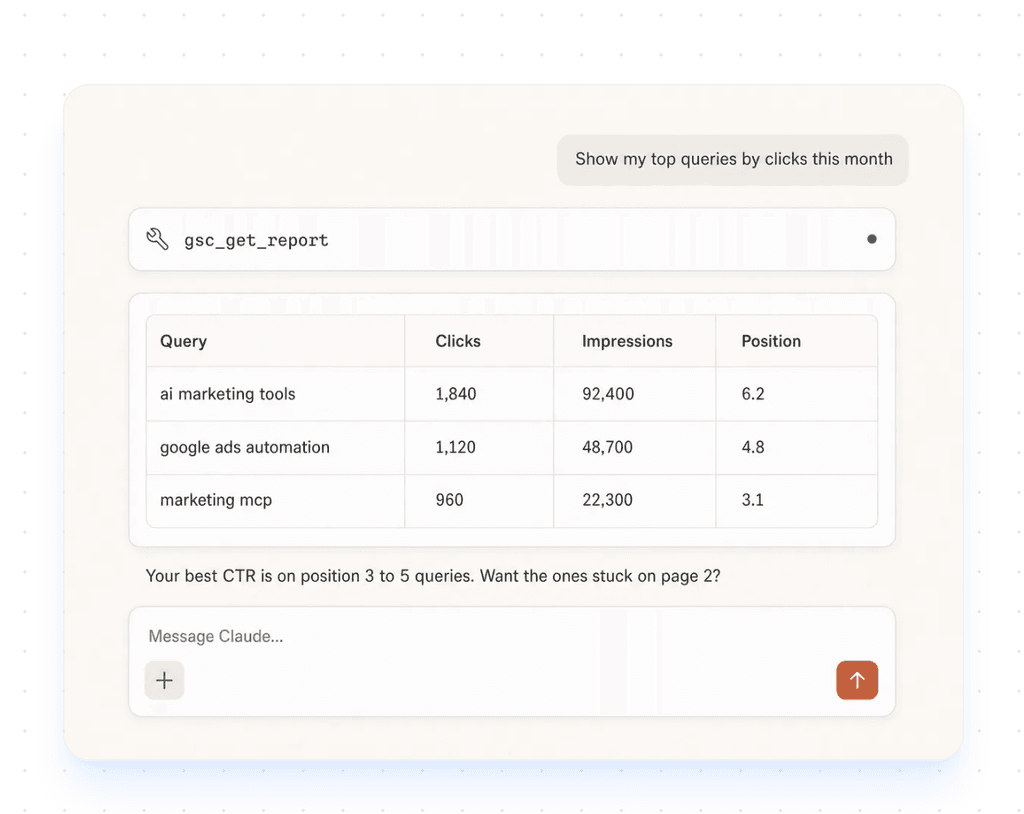
With a GSC Claude Connector, you can instead ask Claude to work with your Search Console data directly. For example, you could ask which queries generated the most clicks, which pages saw a drop in impressions, or how your average position changed over a specific period.
How We Ranked These GSC Claude Connectors
| Criteria | What We Looked At |
| GSC Coverage | How much Search Console data and functionality the connector can expose to Claude, including queries, pages, clicks, impressions, CTR, position, and other SEO data. |
| Claude Compatibility | How easily the connector works with Claude and whether it supports common Claude workflows or clients. |
| Setup Complexity | How much technical configuration is required, from simple account authentication to API credentials and local MCP setup. |
| Cross-Platform Context | Whether GSC data can be combined with other marketing sources such as GA4, Google Ads, keyword research, or social platforms. |
| Practical Usefulness | Whether the connector makes real SEO analysis easier and reduces the need for manual exports, spreadsheet work, and repetitive reporting. |
Comparison Table of GSC Claude Connector Servers
| Tool | Key Strength | Setup | Broader Marketing Context |
| Smacient’s GSC Claude Connector | GSC + broader marketing context in Claude | Very easy; one-click Claude Connector + Google OAuth | Yes; GA4, Keyword Planner, Google Ads, Meta Ads, YouTube, and more |
| GSC Wizard | Server-side SEO analysis and deeper GSC workflows | Easy hosted setup; MCP API key required | Some broader SEO integrations, but primarily GSC/SEO focused |
| GrowthSpree GSC MCP | Straightforward GSC-to-Claude workflow | Hosted/OAuth setup | Yes, with additional marketing integrations |
| Two Minute Reports | Combines GSC with a large marketing-data ecosystem | Hosted; account and authentication required | Yes; multiple analytics, advertising, ecommerce and social sources |
| mcp-gsc by AminForou | Open-source and locally controlled | Technical; local setup and Google API credentials | No; primarily focused on GSC |
| Markifact | GSC analysis + approval-gated management workflows | Hosted; Google OAuth + Claude Connector setup | Yes; GSC can be used alongside GA4, Google Ads, Trends, Sheets, Docs, and other tools |
GSC Claude Connector Servers
| Table of Contents |
| 1. Smacient’s GSC Claude Connector |
| 2. GSC Wizard |
| 3. GrowthSpree GSC MCP |
| 4. Two Minute Reports |
| 5. mcp-gsc by AminForou |
| 6. Markifact |
1. Smacient’s GSC Claude Connector
Smacient’s GSC Claude Connector is a broader marketing connector that brings Google Search Console data into Claude alongside other marketing platforms. Rather than treating GSC as a standalone data source, it gives marketers a way to work with search, advertising, analytics, social, and marketplace data within the same Claude workflow.
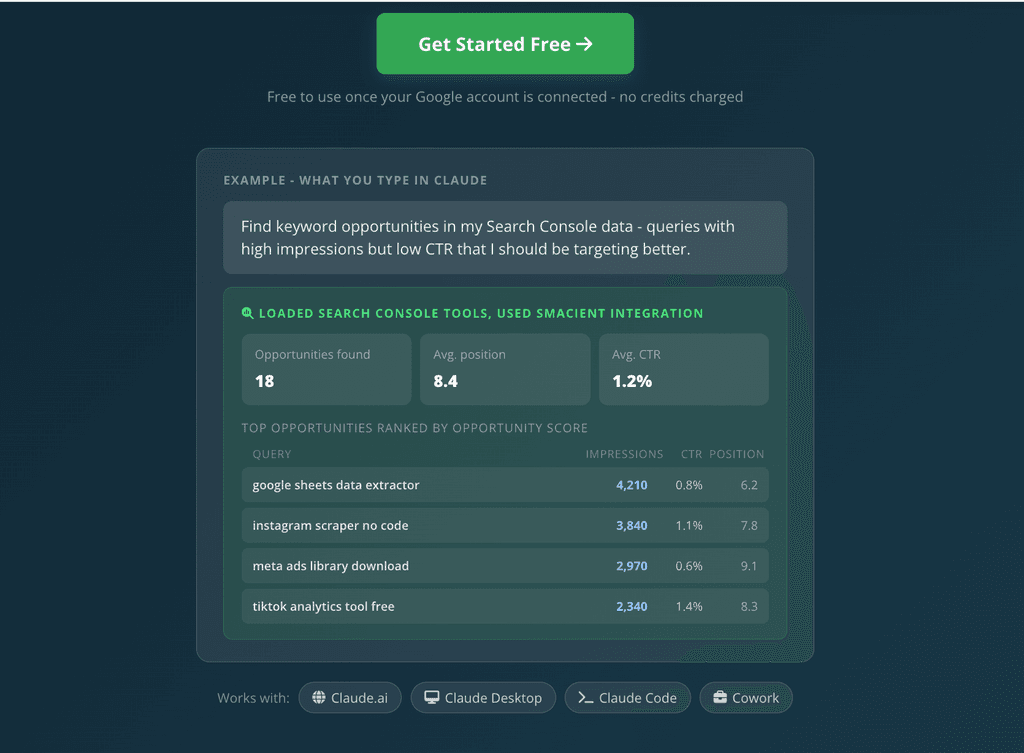
For GSC-specific work, Smacient can connect to verified Google Search Console analytics directly from Claude. This means you can investigate organic search performance through natural-language prompts instead of repeatedly exporting reports from GSC.
Smacient’s dedicated GSC functionality is built around these core tools:
- GSC List Sites: Lists connected and verified Search Console properties
- GSC Query Analytics: Queries Google Search Console analytics
- GSC Top Pages: Identifies top-performing pages
- GSC Find Opportunities: Surfaces potential optimization opportunities
The connector can work with metrics such as clicks, impressions, CTR, and average position, while also supporting query-level and page-level analysis, country and device breakdowns, and period comparisons.
Key Features:
- Query GSC data directly through Claude to investigate organic search performance without manually exporting reports.
- Explore the search queries generating impressions and clicks, and identify terms where performance could be improved.
- Look at how individual pages are performing in search and identify your strongest-performing content.
- Use GSC Top Pages to quickly find pages that are driving organic search visibility and traffic.
- GSC Find Opportunities can help surface high-impression, low-CTR opportunities that may be worth trying and optimizing.
- Analyze search performance across different countries and device types to understand where visibility and engagement are coming from.
- Smacient’s broader connector can also access data from: GA4, Google Keyword Planner, Google Ads, Meta Ads, YouTube, LinkedIn, Instagram, TikTok, Amazon, Google Ads Library, Meta Ads Library, Google Maps, and Google and App Store data.
- Search for “Smacient” in Claude’s Connector directory and connect it in one click.
- It is listed in Anthropic’s official Connector directory, so you don’t need to copy a URL or set up a local MCP server.
- The connection uses OAuth 2.0 and requests read-only access to your Google account.
- Smacient also offers 30 free credits every month with no credit card required.
- You can also track tool usage, credits used, platforms, and timestamps from the Smacient dashboard.
Example Claude Workflow
You could start with a GSC-specific prompt such as:
“Find high-impression, low-CTR queries in Search Console and tell me which pages I should optimize first.”
For a broader analysis, you could ask:
“Find pages with high organic impressions but poor engagement, then compare their GSC performance with GA4.”
Or use Search Console alongside keyword research:
“Find my biggest GSC keyword opportunities and cross-check them against Google Keyword Planner search volume.”
Cons:
- It may offer more functionality than you need if your only requirement is basic GSC access.
- Smacient uses a credit-based model for its broader set of tools, although Search Console, GA4, Google Ads, and Meta Ads tools connected to your own accounts are free. Credits never expire.
Why Choose It?
Smacient makes the most sense if you want more than a direct GSC-to-Claude connection.
For a marketer, the useful part isn’t just being able to retrieve clicks, impressions, CTR, or rankings. It’s being able to take those Search Console insights and put them into a broader marketing context. That’s where Smacient’s Claude Connector can fit into a larger marketing workflow.
If your goal is to ask Claude questions such as, “What is happening with my organic traffic?” and then connect that answer to analytics, keyword research, paid campaigns, or social performance, Smacient offers a more comprehensive approach than a GSC-only connector.
2. GSC Wizard
GSC Wizard’s MCP connects Google Search Console data directly to Claude, ChatGPT, and other MCP-compatible assistants. Once connected, you can ask questions about your site’s clicks, impressions, CTR, average position, queries, pages, countries, and devices without manually exporting Search Console reports.
What makes GSC Wizard particularly interesting is that it goes beyond simply retrieving Search Console data. Its MCP exposes many of the SEO analyses available within GSC Wizard itself, including ranking changes, content decay, keyword cannibalization, striking-distance opportunities, indexing analysis, and automated SEO reports.
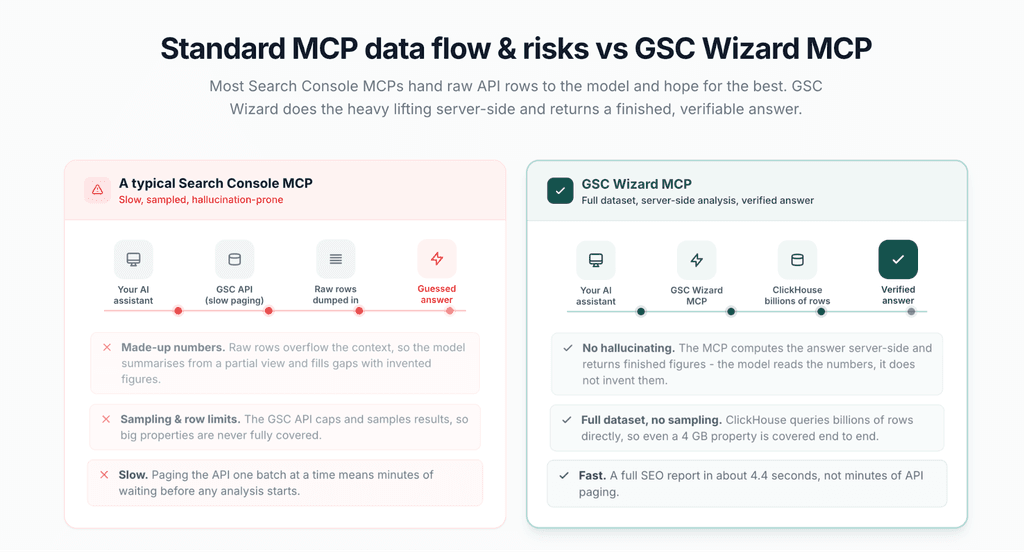
A key part of its architecture is server-side analysis. For properties stored in its data warehouse, GSC Wizard uses a ClickHouse backend to process large volumes of Search Console data before returning the results to the AI assistant. This is designed to avoid sending large raw datasets into the model’s context for the assistant to calculate itself.
Key Features:
- Query clicks, impressions, CTR, position, queries, pages, countries, and devices directly through your AI assistant.
- GSC Wizard processes supported Search Console datasets on its servers and returns analyzed results rather than requiring Claude to work through thousands of raw rows itself.
- You can investigate ranking changes, traffic drops, anomalies, and changes in search performance over time.
- The MCP includes tools for identifying cases where multiple pages compete for the same search queries.
- It can identify pages that are losing organic search performance, making it useful for ongoing content audits.
- GSC Wizard can identify queries and pages where additional optimization could potentially generate more clicks, including opportunity scoring and page-poaching analysis.
- The MCP supports URL Inspection and indexing-related workflows, including bulk URL inspection and indexing trackers.
- You can ask the assistant to generate a broader SEO report instead of manually pulling together individual Search Console metrics.
- GSC Wizard’s MCP can also work with GA4 data, including sessions, conversions, ecommerce revenue, and blended landing-page analysis. This makes it possible to extend some Search Console workflows beyond organic search visibility alone.
Cons:
- With a large collection of SEO-specific tools and workflows, it may be more than a marketer needs if the goal is to simply ask Claude basic questions about GSC performance.
- GSC Wizard states that its faster ClickHouse-backed querying is available to subscribers, while non-subscribers fall back to the Search Console API and may experience slower analysis.
Why Choose It?
GSC Wizard is a strong choice if Search Console analysis is the main reason you’re connecting an MCP to Claude.
Instead of stopping at questions such as “How many clicks did this page get?”, you can use the connector for deeper SEO workflows: “Which pages are losing traffic?”, “Where am I seeing keyword cannibalization?”, “Which queries are close to page one?”, or “What should I prioritize to recover organic traffic?”
Its server-side processing is another reason to consider it, particularly for larger Search Console properties. Rather than relying entirely on the AI model to process a large set of raw rows, GSC Wizard performs much of the data aggregation and analysis before returning the results.
3. GrowthSpree Google Search Console MCP
GrowthSpree’s Google Search Console MCP connects a Search Console property to Claude through the Model Context Protocol, allowing you to query search-performance data in natural language instead of manually filtering and exporting reports from the GSC interface.
Its main differentiator is the setup. GrowthSpree offers a hosted, no-code implementation that uses OAuth to connect your Search Console property, without requiring users to create a Google Cloud project, configure a service account, or manage a JSON key. GrowthSpree says the initial setup takes around five minutes.
The MCP is primarily designed for read and analysis workflows. You can use it to investigate search performance, identify SEO opportunities, compare periods, and generate reports from your Search Console data.

Key Features:
- Query clicks, impressions, CTR, and average position through Claude.
- Analyze performance by query, page, country, device, date, and search appearance.
- Find queries ranking around positions 8-20 with meaningful impressions but relatively few clicks, helping identify pages that may benefit from optimization.
- Identify pages with high impressions and low CTR, then use Claude to suggest potential title and meta-description improvements.
- Find queries where multiple URLs are competing for visibility and flag potential cannibalization issues.
- Compare performance across periods to identify pages that have lost clicks and investigate whether the change is related to rankings, impressions, or CTR.
- Claude can turn Search Console data into a performance overview, highlight unusual changes, and suggest prioritized next steps.
- The MCP can be used alongside Google Ads, Meta, GA4, and HubSpot, allowing marketers to bring Search Console data into broader marketing analysis.
- The implementation supports analyzing multiple Search Console properties.
Cons:
- The hosted GSC MCP is free on paid Claude plans, so it isn’t a completely free option for someone who doesn’t already have a paid Claude subscription.
- The hosted implementation focuses on reading and analyzing Search Console data. Users looking for broader write or indexing functionality may need another implementation.
Why Choose It:
GrowthSpree’s no-code hosted approach removes several configuration steps. Instead of setting up a Google Cloud project and service account, you can authorize your GSC property through OAuth, add the provided token to the Claude Desktop extension, and start querying your data.
It is also useful for marketers who want to move beyond simply retrieving metrics. Prompts around striking-distance keywords, CTR opportunities, cannibalization, page decay, and SEO reporting turn Search Console into something you can actively investigate through a conversational workflow.
The cross-channel capability is another advantage. If you’re already working with GrowthSpree’s other marketing MCPs, you can bring GSC into conversations that also involve Google Ads, Meta, GA4, or HubSpot.
4. Two Minute Reports Google Search Console MCP
Two Minute Reports offers a hosted MCP server that connects Google Search Console to Claude, ChatGPT, and other MCP-compatible AI clients. It lets you query Search Console data in natural language instead of manually navigating reports or exporting CSVs for analysis.
The connector covers standard Search Console metrics and dimensions, including clicks, impressions, CTR, average position, queries, pages, countries, and devices. It also supports search appearance data, index coverage, sitemap information, and Core Web Vitals.
Search Console is one of more than 20 data sources available through its connector, so marketers can potentially combine organic search insights with data from Google Analytics, Google Ads, Meta, TikTok, LinkedIn, Shopify, Amazon, and other platforms.
Key Features:
- Query clicks, impressions, CTR, and average position by query and page directly through Claude.
- Identify top queries, ranking changes, high-impression/low-CTR terms, and queries where rankings are improving or declining.
- Find pages driving the most clicks, pages with high impressions but low CTR, and pages ranking in opportunity ranges such as positions 8-15.
- Compare organic performance across countries and devices, including mobile and desktop.
- Examine how different search appearance types, such as web, image, and video results, contribute to clicks.
- The connector can also access indexing coverage status, sitemap submission information, and Core Web Vitals data.
- Manage and query data from multiple Search Console properties through the same conversation.
- It can combine Search Console data with Google Analytics, Google Ads, and other marketing sources.
- Instead of building queries or navigating multiple dashboards, you have access to a natural-language workflow.
Cons:
- If you need a lightweight connection, its wider ecosystem may provide more functionality than you actually need.
- It is less specialized than an SEO-first MCP, as its strength is connecting multiple marketing sources.
Why Choose It?
The cross-channel approach is the main reason to consider Two Minute Reports. Its MCP is designed to bring multiple marketing sources into the same AI workflow, rather than treating Search Console as an isolated dataset.
The hosted setup also means marketers don’t need to build and maintain their own GSC MCP infrastructure. Two Minute Reports handles the connection layer, while Claude or another compatible AI client becomes the interface for querying the data.
5. mcp-gsc by AminForou
mcp-gsc is an open-source Model Context Protocol server that connects Google Search Console with AI assistants. It is designed specifically for SEO workflows, allowing users to query Search Console data and investigate performance through natural-language conversations.
Unlike hosted GSC connectors, mcp-gsc runs locally by default. Users provide their own Google API credentials and configure the MCP server within their preferred AI client. The project is released under the MIT license, making the source code available for inspection and modification.
The project currently provides around 20 tools covering Search Console analytics, property management, URL inspection, indexing checks, and sitemap management.
Key Features:
- Query clicks, impressions, CTR, and average position, and analyze search performance across different periods.
- Analyze Search Console data by country, device, query, and page using the “get_advanced_search_analytics” tool.
- Compare two date ranges to identify changes in search performance rather than looking at a single reporting period in isolation.
- Page and query analysis: Investigate which queries are driving traffic to individual pages and identify performance patterns at a more granular level.
- List available GSC properties and retrieve verification and ownership information.
- Check individual URLs for crawl and indexing information, with support for inspecting multiple URLs at once.
- View sitemap status, check errors and warnings, and submit or delete sitemaps. Destructive operations are disabled by default.
- The project can provide data that AI assistants use to create charts and visual representations of Search Console performance.
- The MIT-licensed project can be installed and run locally, giving technically comfortable users more control over their setup and data flow.
Cons:
- The standard setup runs the MCP server locally, so it is not as straightforward as a hosted connector where authentication and infrastructure are handled for you.
- Users are responsible for their own credentials, local configuration, and updates. The project’s changelog also shows that MCP SDK changes can occasionally affect fresh installations.
Why Choose It?
mcp-gsc is a good choice if you want an open-source GSC connector that you can run and control yourself.
Once configured, it gives Claude access to a substantial set of Search Console workflows, from basic performance analysis to URL inspection, indexing checks, period comparisons, and sitemap management.
The open-source model is particularly useful for developers and technical SEOs who want to inspect the implementation, customize the setup, or run the server within their environment.
The trade-off is convenience. If you simply want to connect GSC to Claude and start asking questions, a hosted connector requires considerably less configuration. mcp-gsc is more attractive when control, transparency, and customization matter more than a one-click setup.
6. Markifact Google Search Console MCP
Markifact offers a managed Google Search Console MCP that connects GSC to Claude and other MCP-compatible AI clients. It goes beyond basic Search Console reporting, allowing users to query search performance, inspect URLs for indexing information, review submitted sitemaps, and perform supported sitemap actions through an AI conversation.
The connector can retrieve clicks, impressions, CTR, and average position by query, page, country, or device, with filters and data ranges described in natural language. It also includes tools for URL inspection and sitemap management.
One of its more notable differences is that Markifact supports write actions for Search Console, rather than limiting the connection to read-only reporting. Sitemap submissions, reprocessing requests, and removals are approval-gated, so the action is shown for review before it runs.
Key Features:
- Query clicks, impressions, CTR, and average position across queries, pages, countries, and devices using natural-language prompts.
- Markifact can expose the available report fields and dimensions before a query is run, helping the AI construct requests using fields Search Console actually supports.
- Find queries ranking around positions 8-15 with meaningful impression volume and identify page-one opportunities.
- Inspect individual URLs or batches of up to 100 URLs for indexing verdicts, crawl information, canonical selection, mobile usability, and rich-result findings.
- Review submitted sitemaps, processing status, errors, warnings, and indexed counts. Supported actions also include submitting, reprocessing, and removing sitemaps.
- Write actions don’t run automatically. Markifact shows the specific operation for approval before submitting or removing a sitemap.
- Users don’t need to create API credentials, service accounts, or run a local server. The documented setup uses Google OAuth and a hosted MCP endpoint.
Cons:
- Users who want a lightweight, GSC-only MCP may not need Markifact’s larger marketing integration ecosystem.
- Your GSC connection is managed through Markifact rather than directly through a locally hosted MCP server.
Why Choose It?
Markifact makes the most sense if you want to do more than report on Search Console data.
Its approval-based approach is particularly useful for teams that want AI to help with Search Console management without allowing changes to happen silently. Read operations can run normally, while supported write operations require the user to review and approve the exact action first.
The broader ecosystem is another reason to consider it. Markifact can put GSC alongside analytics, advertising, social, workspace, and other marketing data sources, making it possible to move from an SEO question to a wider marketing analysis without switching between separate tools.
Which GSC Claude Connector Should You Choose?
| If you are… | Choose |
| A marketer who wants GSC alongside your wider marketing data in Claude | Smacient’s GSC Claude Connector |
| An SEO professional who wants deeper, server-side GSC analysis | GSC Wizard |
| A marketer looking for a straightforward, hosted GSC connection | GrowthSpree GSC MCP |
| A marketing team that needs GSC alongside multiple reporting and marketing sources | Two Minute Reports GSC MCP |
| A developer or technical SEO who wants an open-source, locally controlled solution | mcp-gsc by AminForou |
| An SEO team that wants GSC analysis plus URL inspection and sitemap management | Markifact GSC MCP |
Connecting Google Search Console to Claude can make SEO analysis much easier, especially when you want to explore performance without constantly moving data between tools. And when GSC data can be considered alongside analytics, keyword research, advertising, and other marketing data, those insights become more useful.
For marketers looking for that broader workflow, Smacient’s GSC Claude Connector brings GSC and other marketing data into Claude, so you can spend less time moving data around and more time understanding what it means.
Want to explore more ways to use Claude for marketing? Check out our other guides:
- Best MCP for Meta Ads in 2026: Official vs Third-Party Servers Compared and Ranked
- Best MCP for Google Ads in 2026: Official vs Third-Party Servers Compared and Ranked
- GA4 Claude Connector Servers: Which Ones Actually Save Your Time
FAQs
For a simple setup, Smacient’s Claude Connector is a good option. Search for “Smacient” in Claude’s Connector directory, connect your Google account for GSC, and start querying Search Console data without setting up a local MCP server.
Not necessarily. Some open-source GSC MCP servers require Google Cloud configuration and API credentials, while hosted connectors such as Smacient’s GSC Claude Connector handle the connection through Google account authentication, making setup easier for non-technical users.
No. Python is generally only needed for developer-focused or locally hosted MCP implementations. With a hosted option like Smacient’s GSC Claude Connector, you don’t need to install Python or configure a local server.
A connector can give Claude direct access to your Google Search Console data without requiring manual exports, but GSC itself has reporting delays. So it’s better to think of these connectors as providing direct access to Search Console data, rather than guaranteeing real-time data.
Disclosure – This post contains some sponsored links and some affiliate links, and we may earn a commission when you click on the links, at no additional cost to you.