AI is changing the way marketers work, and Google Ads is no exception. Instead of spending hours switching between Google Ads, spreadsheets, and reporting dashboards, marketers can now connect AI assistants directly to their advertising data.
That’s where Google Ads MCP servers and Claude Connectors come in. They create a bridge between AI assistants and Google Ads, allowing marketers to retrieve campaign data, analyse performance, generate reports, and uncover insights using natural-language prompts.
There are now several ways to connect AI with Google Ads. Official solutions offer direct access to Google’s ecosystem, while third-party tools can make setup easier and add broader workflow capabilities. Smacient’s Google Ads Claude Connector, for example, lets marketers bring live Google Ads data directly into Claude for reporting and analysis without manually exporting data.
In this guide, we’ll compare the leading Google Ads MCP solutions, look at their features, strengths, limitations, and ideal use cases, and help you choose the option that best fits your workflow.
Quick Answer: Best Google Ads MCP Servers
Here’s a quick overview of the leading options available.
| MCP | Best for | Why |
| Smacient’s Google Ads Claude Connector | Marketing teams and agencies | Built for bringing live Google Ads data into Claude for reporting and analysis |
| Google Ads MCP (Official) | Enterprises and technical teams | Direct integration with Google’s ecosystem |
| Composio Google Ads MCP | Multi-app workflows | Broad integration support across multiple tools |
| Zapier Google Ads MCP | Workflow automation | Simple automation across Google Ads and other applications |
| Open-source Google Ads MCP projects | Developers | Maximum flexibility and customization |
How We Ranked These Google Ads MCP Servers
To make things easier, we evaluated every Google Ads MCP server using the same set of criteria.
Google Ads API Compatibility
A strong integration should allow AI assistants to access campaign data, generate reports, analyse search terms, and retrieve performance metrics without unnecessary complexity.
Authentication Support
We examined the authentication methods each solution supports, along with permission controls and account-level access requirements.
Documentation Quality
Documentation should be easy to understand. We reviewed setup guides, tutorials, examples, troubleshooting resources, and overall ease of use.
Setup Difficulty
Some MCP servers can be installed in a matter of minutes, while others require extensive configuration and development knowledge. We considered how much technical expertise was needed to get each solution up and running.
Maintenance Frequency
Tools that aren’t regularly updated can quickly become outdated. So, we looked at release histories, community activity, bug fixes, and overall project maintenance.
AI Client Support
Since many marketers rely on Claude, we examined how well each solution works with Claude and other popular AI clients.
Security and Reliability
Marketing teams often work with sensitive campaign data, budgets, customer information, and performance reports, so strong security standards were an important consideration throughout our evaluation process.
What is Google Ads MCP?
At its core, MCP stands for Model Context Protocol, an open standard that allows artificial intelligence systems to communicate with external tools, applications, and data sources in a secure and structured way.
Instead of manually downloading reports, copying data into spreadsheets, and creating charts, marketers can simply ask their AI assistant to perform these tasks for them.
What Does the Google Ads API Do?
To understand Google Ads MCP servers, you’ll need to understand the Google Ads API.
The Google Ads API allows developers and applications to interact directly with Google Ads account. It provides access to campaign data, keyword information, audience insights, budgets, conversions, performance metrics, and much more.
In simple terms, the API is what makes automation possible.
Without the API, your AI assistant wouldn’t have a way to retrieve information from your account. The API provides the connection, while the MCP server creates an easy way for the AI model to understand and use that information.
How Do Claude Connectors Work with Google Ads?
Claude is designed to understand natural-language questions and generate analysis, but it cannot automatically access your Google Ads account on its own.
A Claude Connector gives Claude a way to communicate with external data sources and tools. With a Google Ads connector connected, Claude can retrieve relevant account data and use it to answer questions about campaign performance, search terms, spending, conversions, and other metrics.
Smacient’s Google Ads Claude Connector uses MCP to connect Claude with marketing data sources, including your Google Ads account. This means marketers can ask questions in plain English and have Claude analyse their actual advertising data rather than relying on generic Google Ads advice.
Official Google Ads MCP vs Third-Party Solutions
Here’s a quick comparison.
| Feature | Official Google Ads MCP | Third-Party Solutions |
| Primary Advantage | Native ecosystem support | Greater flexibility and automation |
| Integrations | Limited to supported services | Access to multiple platforms and tools |
| Security | Strong first-party security controls | Depends on the provider |
| Customization | More limited | More extensive |
| Setup Process | Can require additional configurations | Often easier to deploy |
| Maintenance | Managed by the provider | Depends on community or vendor support |
| Best Suited For | Enterprises and large teams | Agencies, growth teams, and independent marketers |
Comparison Table of Best MCP for Google Ads: Official vs Third-Party Servers Compared and Ranked
| Tool | Google Ads Support | Authentication | Pricing |
| Smacient’s Google Ads Claude Connector | Account overview, campaign performance, search terms, video campaigns, Performance Max, and custom GAQL analysis | Google OAuth, read-only | Free |
| Google Ads MCP (Official) | Native Google Ads API integration | Google authentication and credentials | ree; Google Ads API credentials and access requirements apply |
| Composio Google Ads MCP | Campaign and account workflows | Managed authentication | Varies by plan |
| Zapier Google Ads MCP | Google Ads automation and multi-app workflows | OAuth | Task-based MCP usage |
| Open-source Google Ads MCP Projects | Custom Google Ads integrations | Self-managed | Typically free; hosting may cost extra |
Best MCP for Google Ads: Official vs Third-Party Servers Compared and Ranked
| Table of Contents |
| 1. Smacient’s Google Ads Claude Connector |
| 2. Google Ads MCP (Official) |
| 3. Composio Google Ads MCP |
| 4. Zapier Google Ads MCP |
| 5. Open-source Google Ads MCP Projects |
1. Smacient’s Google Ads Claude Connector
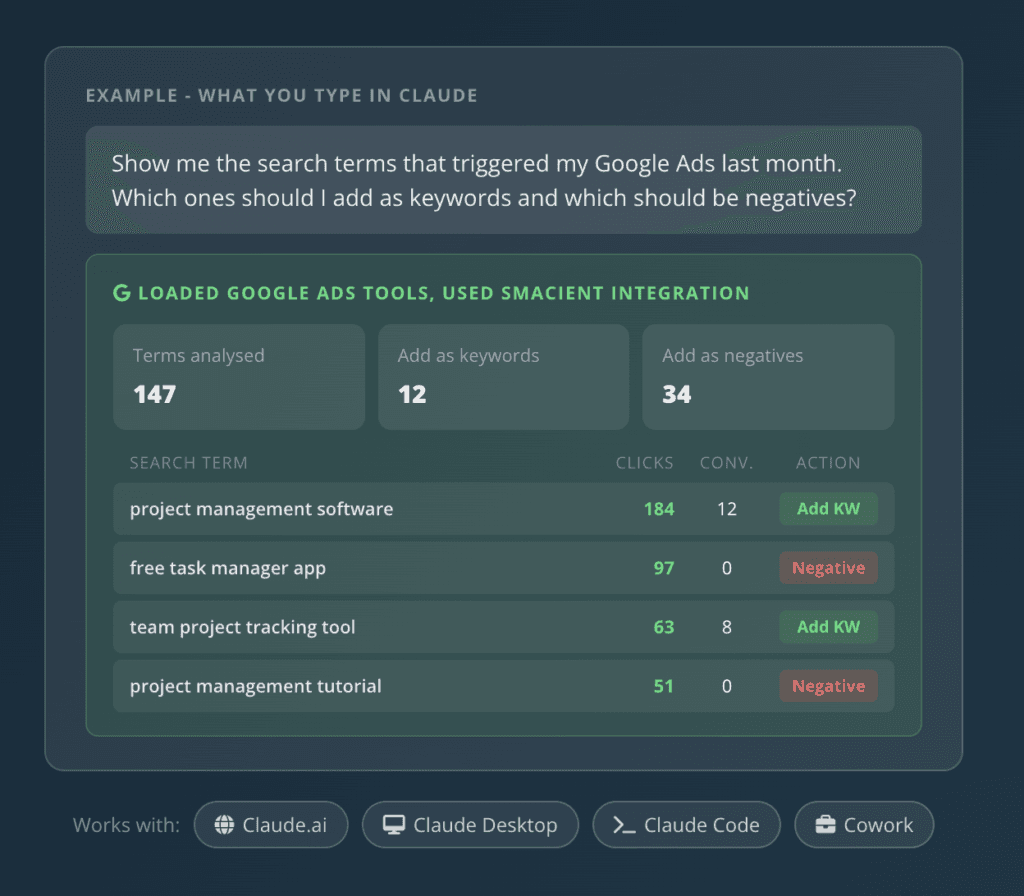
Smacient’s Google Ads Claude Connector brings live Google Ads data directly into Claude, giving marketers a simpler way to analyse campaigns, search terms, spending, conversions, and account performance through natural-language prompts. Users get 30 free credits every month to start with, with no credit card required.
Instead of exporting reports from Google Ads and manually feeding them into an AI tool, marketers can connect their account and ask Claude questions about their actual advertising data.
The Google Ads tools are read-only, so Smacient’s Google Ads Claude Connector does not request permission to create, modify, or delete campaigns, ads, budgets, or account settings. The Google Ads tools are also free to use, making the connector a practical option for marketers who primarily need reporting, analysis, and insights.
Features
- Pull current Google Ads account information into Claude without manually exporting reports or copying data between platforms.
- Analyse spend, clicks, impressions, conversions, ROAS, average CPC, and cost per conversion across a selected date range.
- Compare campaigns using spend, clicks, impressions, conversions, ROAS, and cost per conversion to identify strong and weak performers.
- Review the search queries triggering ads, identify high-performing terms, and flag wasted-spend terms that may be candidates for negative keywords.
- Analyse YouTube and video campaign metrics such as views, view rate, cost per view, and completion rates.
- Review Performance Max spend, conversions, and ROAS to identify campaigns that may need further attention.
- Run custom Google Ads Query Language (GAQL) queries for deeper analysis when standard reports don’t cover a specific requirement.
- Connect and analyse multiple Google Ads accounts through a Manager Account, making the connector useful for agencies managing several clients.
- Analyse Google Ads data without giving the connector permission to create, modify, or delete campaigns, ads, budgets, or account settings.
- Ask questions about advertising data in plain English and let Claude turn the results into summaries, comparisons, and actionable insights.
Cons
- Access to the relevant Google Ads account is still required before Claude can retrieve account-specific data.
- The connector is read-only, so teams looking for an AI tool that can directly create, edit, or delete campaigns and budgets will need a different solution.
- Claude is required for the core workflow, so marketers looking for a standalone Google Ads management interface may prefer a traditional advertising platform.
Why Choose It
For marketers who primarily need live Google Ads reporting and analysis inside Claude, Smacient’s Google Ads Claude Connector offers a simpler, read-only alternative to building or managing a more technical MCP setup.
It is particularly useful for agencies, PPC specialists, and marketing teams that regularly work with campaign reports, search terms, spending, and performance data. Because the Google Ads tools are read-only, teams can use Claude for analysis and reporting without giving it permission to modify their campaigns or budgets.
For example, you can ask Claude:
“Which campaigns generated the most conversions at the lowest cost?”
“Show me the search terms that generated wasted spend.”
“Compare my Performance Max campaigns by ROAS.”
“Give me a summary of my Google Ads performance for the last 30 days.”
Claude can then retrieve the relevant data through Smacient’s Google Ads Claude Connector and analyse it in the same conversation.
2. Google Ads MCP (Official)
If security, stability, and first-party support are your top priorities, the official Google Ads MCP server is one of the strongest options available. Developed and maintained by Google’s own team, this server enables AI assistants to communicate directly with the Google Ads API through the Model Context Protocol (MCP).
Unlike many third-party solutions, the official implementation focuses on reliability, security, and long-term support. It is designed primarily for developers, technical teams, and organizations that require greater control over their infrastructure.
Key Features
- Direct integration with the Google Ads API that allows AI assistants to access campaign information without relying on third-party services.
- Native authentication support that enables users to connect securely through OAuth credentials, application default credentials, and Google Cloud services.
- Campaign search capabilities that help marketers retrieve account information, campaign details, and advertising metrics directly from their AI assistant.
- Customer account discovery features that simplify the process of accessing and analyzing multiple advertising accounts from a single interface.
- Resource discovery features that provide access to metrics, segments, release notes, and metadata available through the Google Ads API.
- Flexible deployment options that support local environments as well as cloud-based infrastructure such as Google Cloud Run.
Cons
- The initial setup is considerably more technical than many third-party alternatives.
- Users must configure developer tokens, authentication credentials, environment variables, and API permissions before they can begin using the server.
- Teams without development resources may find the implementation process challenging.
- The official server focuses primarily on Google services, which means it offers fewer integrations than many competing platforms.
Why Choose It
The official Google Ads MCP server is particularly suited to teams that prioritize direct access to Google’s ecosystem, technical control, and first-party documentation. Because the project is maintained directly by Google, users can be confident that the server will continue to evolve alongside the Google Ads ecosystem.
For enterprises and developers who don’t mind a more technical setup process, the official implementation offers one of the most dependable Google Ads MCP solutions available today.
3. Composio Google Ads MCP
Composio takes a very different approach from most Google Ads MCP solutions. Instead of focusing solely on Google Ads, the platform is designed to connect AI assistants with hundreds of different applications through a single interface. This makes it particularly useful for marketers who rely on multiple tools to manage campaigns, analytics, customer relationships, and reporting workflows.
With built-in authentication management and support for popular AI clients, Composio makes it easier for teams to create powerful workflows without building everything from scratch.
Key Features
- Managed authentication capabilities that handle OAuth credentials, token refresh cycles, and permission management automatically.
- Support for Claude and other AI frameworks, allowing teams to connect Google Ads tools to different AI workflows.
- Campaign and ad-group management tools that let AI agents create, update, or remove campaigns and ad groups, as well as retrieve campaign information and run GAQL queries.
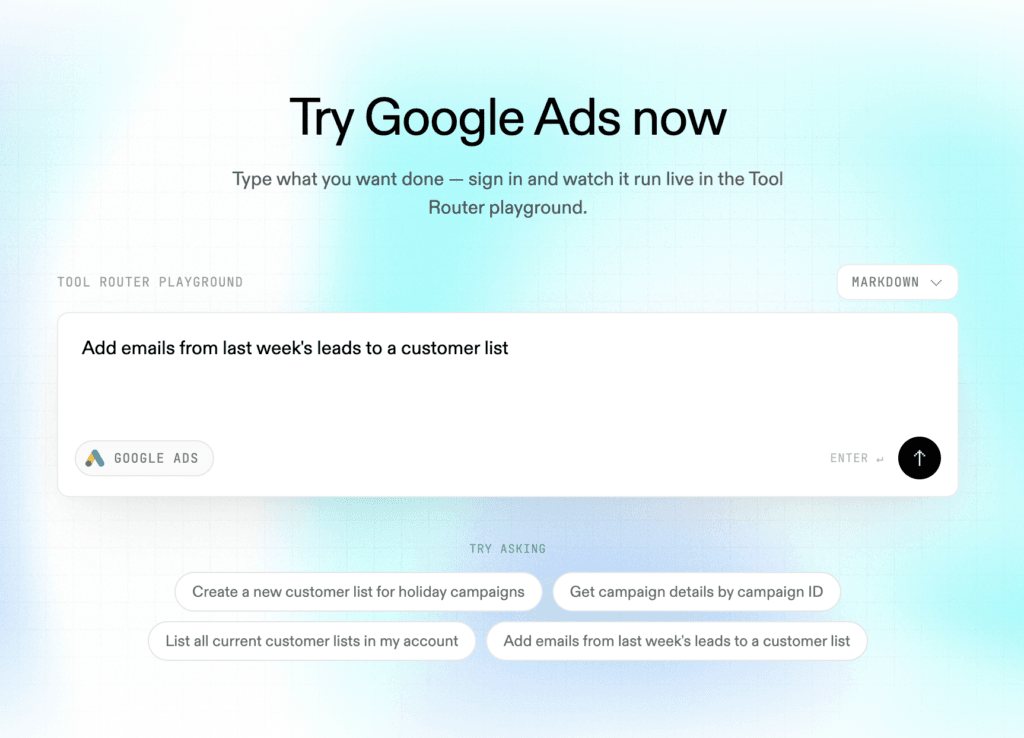
- Customer list tools that let users create, retrieve, and add or remove contacts from Google Ads customer lists.
- Multi-tool workflow support that enables marketers to combine Google Ads data with information from platforms such as HubSpot, Slack, GitHub, and Notion.
- Structured, LLM-friendly tool schemas designed to support more reliable tool execution.
Cons
- Some advanced features require a stronger understanding of APIs, authentication processes, and workflow automation.
- Costs can increase as the number of integrations and workflows grows.
- Businesses with very specific requirements may still need additional customization.
Why Choose It
If your team uses more than just Google Ads, Composio is certainly worth considering. Its biggest advantage is flexibility. Instead of maintaining separate integrations for every platform, marketers can manage multiple tools from a centralized environment.
For businesses building large-scale AI workflows, Composio offers one of the most comprehensive Google Ads MCP solutions available today.
4. Zapier Google Ads MCP
If your team already relies on automation tools, the Zapier Google Ads MCP server is another option worth considering. It connects Google Ads actions to AI tools through Zapier’s MCP server, allowing marketers to automate advertising workflows and connect Google Ads with Zapier’s broader app ecosystem.
One of Zapier’s biggest advantages is its no-code approach. Instead of building custom integrations, marketers can simply connect their preferred AI assistant and begin automating repetitive tasks within minutes.
Key Features
- Google Ads actions that allow AI assistants to create reports, manage campaign status, work with customer lists, and send offline conversions through natural-language workflows.
- No-code automation capabilities that allow users to build workflows without writing complex scripts or maintaining their own infrastructure.
- Scoped access that lets users choose which Zapier Actions their AI assistant can perform within Google Ads workflows.
- Reporting capabilities that let users create reports based on specified Google Ads campaign and ad data.
- Customer list management features that allow users to create customer lists and add or remove contacts from them.
- Access to Zapier’s broader app ecosystem, allowing Google Ads workflows to connect with other business applications.
Cons
- Workflow costs can increase as the number of automated tasks grows.
- Some advanced configurations may still require technical knowledge.
- Organizations that need complete control over their infrastructure may prefer self-hosted alternatives.
Why Choose It
Zapier’s greatest strength is its simplicity. Instead of spending days configuring APIs, maintaining servers, and building custom integrations, marketers can focus on creating workflows that deliver results.
For teams looking for flexibility, speed, and access to a large ecosystem of tools, the Zapier Google Ads MCP server is one of the most accessible options available today.
5. Open-source Google Ads MCP Projects
Open-source Google Ads MCP servers are a strong choice for developers who want complete control over the way their AI workflows operate. Instead of relying on a commercial platform, users can customize the server, add new features, modify existing functionality, and build workflows that are tailored to their specific requirements.
As the MCP ecosystem continues to grow, more community-driven projects are appearing on GitHub. Some are maintained by independent developers, while others are supported by larger organizations.
Key Features
- Complete control over infrastructure, allowing teams to customize workflows according to their own requirements.
- Flexible deployment options that support local environments, cloud infrastructure, and self-hosted implementations.
- Direct access to the Google Ads API, enabling developers to create custom integrations and automation pipelines.
- Active community support that encourages collaboration, experimentation, and continuous improvement.
- Greater transparency into authentication mechanisms, permissions, and underlying code architecture.
- The ability to extend functionality and create entirely new tools as business requirements evolve.
Cons
- This kind of setup often requires considerably more technical knowledge than using a managed platform.
- Teams are responsible for maintenance, updates, bug fixes, and ongoing security management.
- Documentation quality can vary significantly from one project to another.
Why Choose It
If flexibility is your top priority, open-source projects are difficult to beat. They allow you to build exactly the workflow you need rather than adapting your processes to fit the limitations of a particular platform.
For developers who enjoy experimenting with new technologies and creating highly customized solutions, open-source Google Ads MCP servers offer virtually unlimited possibilities.
Decision Framework
| Choose This If… | Recommended Solution |
| You are completely new to MCP | Smacient’s Google Ads Claude Connector or the official Google Ads MCP server |
| You manage multiple clients | Smacient’s Google Ads Claude Connector |
| You need access to numerous integrations | Composio Google Ads MCP |
| You want to automate repetitive workflows | Zapier Google Ads MCP |
| You need maximum flexibility and customization | Open-source Google Ads MCP projects |
| You prioritize first-party support and direct Google integration | Official Google Ads MCP server |
| You want the simplest setup experience | Smacient’s Google Ads Claude Connector |
| You have an in-house development team | Open-source Google Ads MCP projects |
How to Connect Google Ads to Claude With an MCP or Claude Connector
The exact setup depends on the solution you choose, but the general process involves connecting your Google Ads account, authorising access, connecting the Claude Connector, and testing your first prompt. Here’s a step-by-step breakdown of the process.
1. Enable the Google Ads API
Before you can connect an AI assistant to your ad account, you’ll need access to the Google Ads API. This usually involves creating a Google Cloud Project, enabling the API, and generating the required credentials.
2. Configure your authentication credentials
Most Google Ads MCP servers rely on OAuth authentication to establish secure connections between your Google Ads account and your AI assistant. During this stage, you’ll grant the permissions required to access campaign data.
3. Connect your preferred MCP server
Once authentication is complete, you can connect your chosen solution. Whether you’re using Smacient’s Google Ads Claude Connector, Composio, Zapier, the official Google implementation, or an open-source project, the basic process remains similar.
4. Grant the necessary permissions
Different MCP servers require different permission levels depending on the features you want to use. Carefully review all access settings before proceeding, especially if you’re managing multiple client accounts.
5. Test your first prompt
After the connection is established, it’s time to put everything to work. You can start with simple prompts such as:
- “Show me my best-performing campaigns from the last 30 days.”
- “Identify keywords with the highest cost per conversion.”
- “Summarize changes in click-through rates across all campaigns.”
- “Suggest ways to improve my advertising budget.”
Connecting Smacient’s Google Ads Claude Connector
With Smacient’s Google Ads Claude Connector, the setup is designed to let marketers connect Google Ads to Claude without building their own API integration.
- Create a Smacient account: Sign up and access your Smacient dashboard.
- Add the connector to Claude: In Claude.ai, go to Settings → Connectors → Add custom connector and add Smacient’s connector.
- Connect Google Ads: From the Smacient dashboard, select Google Ads and complete Google’s OAuth flow.
- Choose your account: If you manage multiple accounts through an MCC, Smacient can detect the relevant account relationships.
- Start analysing: Ask Claude to list your Google Ads accounts or retrieve campaign performance to confirm the connection is working.
For Other Google Ads MCP Servers
Other implementations may require Google Cloud projects, developer tokens, OAuth credentials, environment variables, or additional configuration. Always follow the setup instructions provided by the specific provider.
Common Use Cases
Google Ads Claude Connectors can help marketers reduce manual reporting and get faster answers from their advertising data. Some common use cases include:
- Campaign performance reporting: Analyse spend, clicks, conversions, ROAS, and other campaign metrics without manually exporting reports.
- Search-term analysis: Identify high-performing queries, wasted spend, and potential negative-keyword opportunities.
- Budget analysis: See where advertising spend is going and identify campaigns that may need closer attention.
- Performance Max analysis: Compare PMax campaigns by spend, conversions, and ROAS.
- Video campaign reporting: Analyse views, view rates, cost per view, and video completion rates.
- Account summaries: Ask Claude to turn large amounts of Google Ads data into concise performance summaries.
Google Ads MCP servers and Claude Connectors make it easier for marketers to bring advertising data into AI-powered workflows and turn large amounts of campaign data into useful insights.
The right option depends on what you need. The official Google Ads MCP is a strong fit for teams that prioritize first-party support and technical control. Composio and Zapier are useful when broader integrations and automation are important, while open-source projects offer greater flexibility for developers.
For marketers and agencies that primarily want to analyse live Google Ads data inside Claude, Smacient’s Google Ads Claude Connector offers a simpler, read-only approach to campaign reporting, search-term analysis, Performance Max reporting, video campaign analysis, and more.
Ultimately, the best Google Ads MCP isn’t necessarily the one with the longest feature list. It’s the one that fits the way your team actually works.
Explore more AI-powered marketing workflows here:
- The End-to-End Model Context Protocol (MCP) Guide for Marketers
- How to Use Claude for Automated Weekly Marketing Reports
- How to Get Live Google Ads Data Into Claude in a Few Minutes
- Google Keyword Planner MCP: Pull Live Keyword Data Into Claude Without Leaving the Chat
- How to Analyze Your Competitor’s Meta Ads at Scale Using Claude and Smacient
FAQs
Not necessarily. A standard Google Ads account is enough for most use cases. Agencies managing multiple accounts can use an MCC, and Smacient’s Google Ads Claude Connector supports Google Ads Manager Accounts for analysing multiple client accounts.
Google does not charge a separate fee for Google Ads API usage, although access is subject to Google’s eligibility, developer-token, and usage requirements. Smacient’s Google Ads tools are also free to use, so marketers can connect their account to Claude for reporting and analysis without paying for the connector itself.
The exact requirements depend on the solution you use. Smacient’s Google Ads Claude Connector uses Google OAuth and requests read-only access to Google Ads data. It does not request permission to create, modify, or delete campaigns, ads, budgets, or account settings.
Yes. Multiple-account support is particularly useful for agencies and teams managing several clients. With Smacient’s Google Ads Claude Connector, Google Ads Manager Accounts can be used to access multiple client accounts through Claude.
Disclosure – This post contains some sponsored links and some affiliate links, and we may earn a commission when you click on the links, at no additional cost to you.