AI is quickly becoming part of everyday advertising. But with all this automation comes a very understandable question: Could connecting an AI tool get your Google Ads account suspended?
The concern has grown as marketers hear about accounts being restricted after AI-assisted automation, creating confusion between simply using AI and using unauthorized or risky automation. So, what actually causes a Google ad suspension? Is connecting an AI tool enough to trigger one, or does the risk depend on how that tool accesses and operates your account?
Quick Answer
| Question | Short answer |
| Can connecting AI to Google Ads get you suspended? | Not simply because it uses AI. |
| Is using the Google Ads API allowed? | Yes, as long as you follow Google’s API policies and account requirements. |
| Is browser automation riskier? | It can be. Browser-based automation comes with different compliance and detection risks than using the official API. |
| Can AI-generated ads cause suspension? | Potentially. If the resulting ads violate Google Ads policies, they can lead to enforcement. |
| Is official API access completely risk-free? | No. Policy violations, billing issues, misuse, or other account problems can still result in enforcement. |
| What should marketers check before connecting an AI tool? | Its API, authentication, permissions, automation behavior, and compliance with Google Ads policies. |
How We Evaluated the Risk
| Factor | What we checked |
| Access method | API, browser automation, scraping, or unofficial endpoints |
| Authentication | OAuth, developer credentials, or shared passwords |
| Permissions | Read-only, campaign changes, budgets, or full access |
| Automation | Human approval, batch actions, or autonomous changes |
| Policy compliance | Ads, billing, verification, and prohibited practices |
| Transparency | API usage, permissions, security, and approval controls |
The Core Distinction: AI vs How AI Connects to Ads
AI itself isn’t automatically the problem. Marketers can use AI to analyze data, generate ad copy, and assist with campaign management. What matters is how the AI connects to and operates the ad account.
Lower-risk model: AI → official API → authorized action
Higher-risk model: AI → browser automation/scraping/unofficial access → automated action
In other words, the concern isn’t simply “Are you using AI?” but “How is the AI accessing and changing your account?” This distinction is especially important when evaluating AI connectors and MCP-based tools that let platforms such as Claude interact with Google Ads.
What About MCP Servers?
If you’re using AI tools for marketing, you may have come across MCP servers. But does using an MCP make a Google Ads integration riskier? Not necessarily.
An MCP server doesn’t determine whether an integration is compliant. It can act as a layer between an AI client such as Claude and an advertising platform. What matters is how the connection works, how it authenticates, what permissions it uses, and what the tool can actually do.
For example, an MCP-based connection with proper authentication has a very different risk profile from one that relies on browser automation or unofficial access methods.
That’s why marketers shouldn’t just ask, “Is this an MCP?” Instead, ask “How does this connector connect to Google Ads, what permissions does it need, and what can it actually do?”
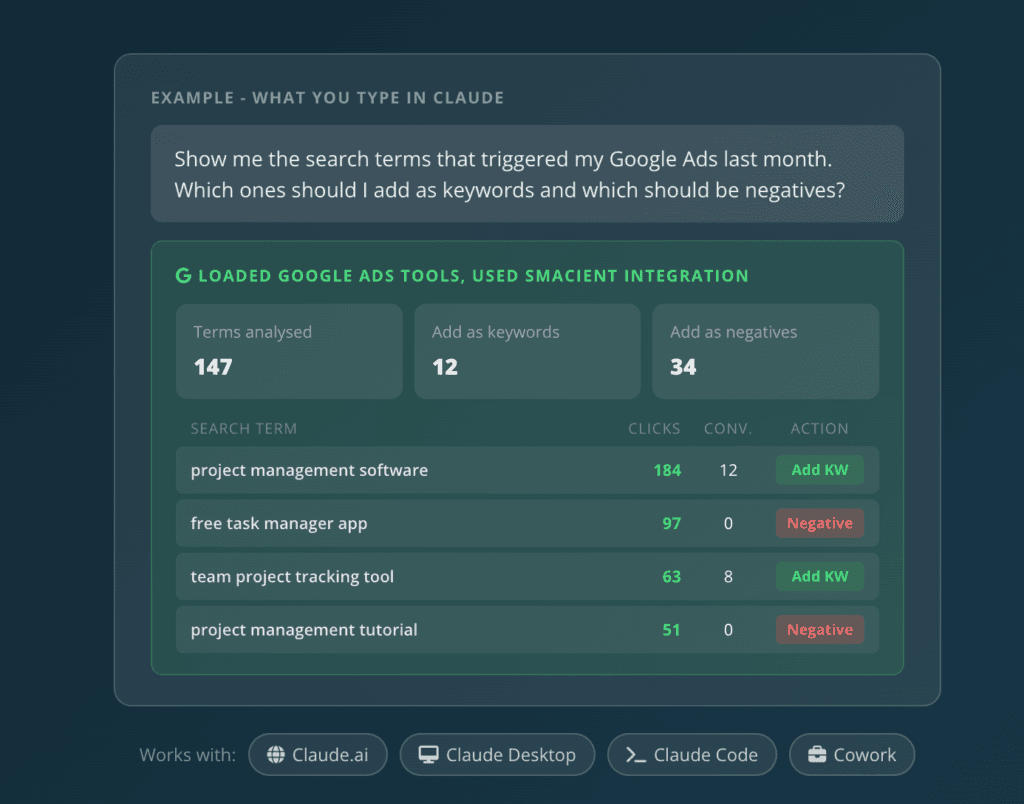
For marketers who want to work with Google Ads through Claude, Smacient’s Google Ads Claude Connector provides an MCP-based connection that lets Claude access and analyze supported Google Ads data, including campaign performance, search terms, keyword metrics, spend, and conversion data. Smacient uses OAuth 2.0 for authentication, and its documentation states that connected Google Ads accounts use read-only access for reporting and analysis.
Users also get 30 free credits every month, with no credit card required.
Explore Smacient’s Google Ads Claude Connector
Myth vs Reality: Can AI Get Your Google Ads Account Suspended?
Myth 1: “Google suspends accounts for using AI.”
Reality: Not simply because you’re using AI. Google doesn’t have a blanket ban on AI tools. What matters is whether the account, ads, or actions performed through the tool violate Google Ads policies or its Terms and Conditions.
For example, using AI to analyze campaign data or suggest optimizations is very different from using an automated tool to carry out prohibited actions. Billing problems, serious policy violations, verification issues, or attempts to circumvent Google’s systems can still lead to suspension, regardless of whether AI was involved.
Myth 2: “Connecting Claude or ChatGPT to Google Ads is automatically unsafe.”
Reality: Connecting an AI tool to Google Ads isn’t automatically risky. The bigger question is how that connection is made and what access it gives the tool.
Using an established API connection, proper authorization, and standard OAuth authentication provides a more structured way to connect tools. On the other hand, unofficial integrations or browser automation can introduce additional compliance and security concerns, especially when a tool is making changes without clear authorization.
This applies whether you’re using a standalone AI tool, an AI connector for Claude, or an MCP-based integration. Before connecting one, look beyond the AI itself. Check how it authenticates, what permissions it requests, and how it interacts with your Google Ads account.
For example, when evaluating a Google Ads Claude Connector such as Smacient’s Google Ads Claude Connector, check the same factors before granting access.
Myth 3: “If a tool uses the Google Ads API, my account can never be suspended.”
Reality: Using the official Google Ads API can reduce certain integration-related risks, but it doesn’t make your account immune from suspension.
Your account can still face enforcement for issues such as policy violations, billing problems, advertiser verification failures, or attempts to circumvent Google’s systems. These issues have nothing to do with whether AI or an API is involved.
Think of the API as a safer way to connect to your account, not a free pass from Google Ads policies.
Myth 4: “AI-generated ad copy is against Google Ads policy.”
Reality: Google Ads doesn’t judge an ad simply by whether it was written by a person or generated with AI. What matters is whether the final ad and its destination comply with Google’s policies.
AI-generated copy can still create problems if it contains misleading claims, prohibited content, misrepresentation, or points users to problematic destinations. Using AI also doesn’t give advertisers a way around existing policies.
So, AI can help write your ads, but you’re still responsible for reviewing what it produces before it goes live.
Myth 5: “Read-only AI tools are always safe.”
Reality: Read-only access is generally lower risk because the tool can analyze your account without directly changing campaigns, budgets, or ads. But it doesn’t make the Google Ads account completely safe from suspension.
For example, if you’re using a Claude Connector primarily for campaign analysis and reporting, read-only access can be useful when you don’t need the tool to make changes directly. The right permission level depends on the specific capabilities and workflow you need from the connector.
Regardless of access level, separate issues such as policy violations, billing problems, or verification issues can still affect the account.
Myth 6: “Giving an AI agent write access means Google will flag the account.”
Reality: Write access doesn’t automatically mean Google will flag or suspend an account. It simply gives the AI agent more ability to make changes, which can increase the impact of mistakes.
What matters is how that access is used. Before giving an agent write permissions, consider what it can change, how frequently it makes changes, which API it uses, whether actions require human approval, and whether it stays within applicable API limits.
In short, write access increases responsibility, not automatically the suspension risk.
If you’re considering a Claude Connector with write capabilities, apply the same checks: understand exactly what actions it can perform, what permissions it needs, and whether you can keep approval controls in place.
Myth 7: “Browser automation is basically the same as using the Google Ads API.”
Reality: They may achieve similar outcomes, but they work in very different ways. The Google Ads API is designed specifically for programmatic access, with established authentication, authorization, and API policies.
Browser automation, on the other hand, simulates actions a person would normally take through the Google Ads interface. That can create different compliance, reliability, and account-safety considerations, particularly when actions are performed at scale or without human oversight.
So, if an AI tool needs to interact with Google Ads, an official API-based connection is generally the more structured approach than automating the browser.
This is also why, when evaluating a Claude Connector or MCP server, marketers should look at the underlying connection rather than simply the AI client being used.
Myth 8: “The AI tool is responsible for keeping my account compliant.”
Reality: The advertiser is still responsible for what happens in their Google Ads account, even when AI or a third-party tool is involved.
AI recommendations should be reviewed before important changes are made, and Google Ads policies still apply regardless of which tool you use. For high-impact actions such as changing budgets, launching campaigns, or modifying targeting, human oversight can help catch mistakes before they affect the account.
And if a vendor mentions its tool is “compliant,” don’t treat that as a guarantee. Using a compliant tool doesn’t remove your responsibility to follow Google Ads policies.
What Actually Causes Google Ads Suspensions?
Here are a few possible reasons for Google Ads suspension:
Policy Violations
These can include prohibited content, misleading or deceptive practices, unacceptable business practices, and attempts to circumvent Google’s systems.
Billing and Payment Issues
Problems such as suspicious payment activity, unpaid balances, chargebacks, or promotional code abuse can also lead to account restrictions or suspension.
Advertiser Verification Problems
Providing false or fraudulent information or failing advertiser verification can put an account at risk.
Circumventing Previous Enforcement
Trying to get around an existing suspension can create another serious problem. This includes creating new accounts to bypass restrictions or otherwise attempting to circumvent previous enforcement.
What Makes an AI Ads Integration Safer?
Use the Official API
Use Google’s official API where possible. It provides a structured way for tools to access and manage Google Ads accounts.
Use Proper OAuth/Authorization
Avoid tools that ask you to hand over your password or rely on questionable credential-sharing methods. Use established authentication and authorization methods instead.
Limit Permissions
Give an AI tool only the access it actually needs. If it only needs to analyze campaign data, there’s little reason to give it full write access. When evaluating a Claude Connector, check whether its permissions match the tasks you actually want it to perform.
Keep Humans in the Loop
Human review is especially useful for high-impact actions such as:
- Budget changes
- Campaign launches
- Major targeting changes
- Account-wide edits
Respect API Limits
AI agents shouldn’t repeatedly call the API or create unnecessary operations. Staying within applicable API limits helps keep automated activity controlled.
Audit AI Actions
Keep logs or a review history so you can see what changes, when it changed, and why. This makes it easier to catch mistakes and troubleshoot unexpected activity. If a connector supports activity or change tracking, use those controls to review what happened and identify unexpected changes.
Review AI-Generated Ads
AI-generated copy still needs to follow Google Ads policies. Review ads, claims, and landing pages before publishing rather than assuming AI-generated content is automatically compliant.
Official API vs. Browser Automation vs. Unofficial Integrations
When evaluating a Google Ads Claude Connector or MCP server, use these same criteria to understand how it actually interacts with your account.
| Connection method | How it works | Risk profile | Best suited for |
| Official Google Ads API | Structured programmatic access | Lower integration risk when compliant | Professional automation |
| Browser automation | AI interacts with the Ads interface | Higher compliance and reliability concerns | Generally avoid for account automation |
| Unofficial/internal endpoints | Uses unsupported access methods | Higher risk | Not recommended |
| Human-assisted AI workflow | AI recommends, human approves | More controlled | Marketers wanting oversight |
Google Ads vs. Meta Ads: Is the Risk the Same?
| Area | Google Ads | Meta Ads |
| Official API | Google Ads API | Meta Marketing API |
| AI integrations | Supported through APIs and tools | Supported through APIs and AI connectors |
| Main concern | Policy compliance and integration practices | Authorization, automation, and platform enforcement |
| Browser automation | Higher-risk approach | Higher-risk approach |
| Human oversight | Recommended | Recommended |
How to Check an AI Tool Before Connecting Your Google Ads Account
A practical checklist:
- Does it use the official Google Ads API?
- Does it explain its authentication method?
- Does it require your Google password?
- What permissions does it require?
- Can you restrict write access?
- Does it have approval workflows?
- Does it respect API limits?
- Can you see an activity/change log?
- Does the vendor clearly explain its compliance approach?
- Does it allow you to disconnect/revoke access easily?
Not sure what connection a tool uses? Check its documentation for the API, authentication method, permissions, and supported actions before granting access. If the provider doesn’t clearly explain how the connection works, ask before connecting your account.
These are the same factors you should consider when evaluating a Google Ads Claude Connector such as Smacient’s.
Smacient’s Google Ads Claude Connector
What to Do If Your Google Ads Account Gets Suspended After Connecting AI
Note: Don’t automatically assume the AI tool caused it.
Step 1: Check the Suspension Notice
Identify the specific policy or account issue mentioned by Google.
Step 2: Review Recent Changes
Check whether:
- Ads were created or edited
- Budget changes
- Billing information changed
- Landing pages changed
- Multiple accounts were affected
Step 3: Disconnect or Restrict the Tool if Necessary
If the integration is unclear or suspicious, revoke its access while you investigate the issue.
Step 4: Fix the Underlying Issue
Address the actual reason for the suspension rather than simply creating another account to bypass the restriction.
Step 5: Appeal Through Google
If you believe the suspension was made in error, Google provides an appeal process for advertisers to request a review.
Decision Framework: Should You Connect AI to Your Google Ads Account?
| AI connection makes sense if… | Be cautious if… | Avoid if… |
| Uses the official Google Ads API | Asks for your Google password | Circumvents Google’s enforcement systems |
| Permissions are clearly explained | Uses browser automation | Relies on deceptive or unauthorized access |
| Write access can be controlled | Vendor won’t explain its connection method | Asks you to bypass account restrictions |
| Has an approval/review workflow | Promises “undetectable” automation | Can’t explain how it accesses your account |
| Helps with reporting or campaign analysis | Makes large numbers of changes without controls | — |
| Has monitoring and audit controls | — | — |
If you’re evaluating a Google Ads Claude Connector, use this framework before connecting your account. Look for clear authentication, defined permissions, controlled automation, and transparent documentation rather than choosing a tool simply because it uses AI or MCP.
Smacient’s Google Ads Claude Connector can be evaluated against these same criteria, giving marketers a way to assess the integration based on how it connects and what it allows Claude to do.
Connecting AI to Google Ads doesn’t have to be a reason to panic. AI itself isn’t what gets an account suspended; the way it accesses and operates the account matters far more.
Use established APIs, limit permissions, keep humans involved in important changes, and make sure every AI-generated ad and automated action follows Google Ads policies. With the right safeguards in place, AI can make campaign management faster and more efficient without turning account automation into an unnecessary risk.
If you’re looking to work with Google Ads through Claude, you can also explore Smacient’s Google Ads Claude Connector and evaluate its connection, permissions, and supported workflows against the criteria covered in this guide.
Want to explore more ways to use AI for advertising and marketing? Check out these Smacient guides:
- How to Get Live Google Ads Data Into Claude in a Few Minutes
- Connect Facebook Ads to Claude Desktop with an MCP Server: A Complete Guide
- Top AI Tools for Facebook Ads
FAQs
Smacient’s Google Ads Claude Connector lets marketers access and analyze supported Google Ads data through Claude, including campaign performance, search terms, keyword metrics, spend, and conversion data. The exact capabilities depend on the connector’s supported tools and permissions.
Neither is automatically safer. The main consideration is how the AI connects to Google Ads, what permissions it received, and what actions it can perform.
MCP is a protocol for connecting AI applications with external tools and services. Whether an MCP-based Google Ads integration is appropriate depends on how it connects to the platform, what permissions it uses, and whether its activity follows applicable policies.
Check the MCP provider’s documentation for its API and authentication method. If it isn’t clearly stated, ask the provider before granting access.
Disclosure – This post contains some sponsored links and some affiliate links, and we may earn a commission when you click on the links, at no additional cost to you.